21 个开发者工具,助你提升日常开发效率 ⚡🎁
虽然有成千上万种开发者工具和软件包,但普遍存在的问题是,其中大多数都达不到标准。
因此,我将介绍 21 个真正有用的工具,它们可以改善你作为开发人员的日常生活。
其中一些是工具,一些是项目,还有一些可能包含软件包。
让我们开始吧。

1. Taipy - 将数据和 AI 算法应用于生产级 Web 应用程序。

通常情况下,当我需要 Python 接口时,我会使用 Streamlit。但是,它的效率不高,而且存在很多性能问题。
另一方面,Taipy(开源)是一个完美的 Python 库,可以轻松进行端到端的应用程序开发,它具有假设分析、智能管道执行、内置调度和部署工具等功能。
需要明确的是,Taipy 用于为基于 Python 的应用程序创建 GUI 界面,并改进数据流管理。
关键在于性能,而 Taipy 正是实现这一目标的完美选择。
虽然 Streamlit 是一个流行的工具,但正如我之前所说,它的性能可能会大幅下降,尤其是在处理大型数据集时,这使得它不适用于生产级别的使用。
另一方面,Taipy 在不牺牲性能的前提下,提供了简单易用的体验。

Taipy 拥有丰富的集成选项,可轻松连接到主流数据平台。

请使用以下命令开始操作。
pip install taipy
您可以阅读文档。

另一个有用的功能是,Taipy 团队提供了一个名为Taipy Studio 的VSCode 扩展,以加速 Taipy 应用程序的构建。
如果你想通过阅读博客来了解代码库结构,可以阅读HuggingFace 撰写的《使用 Taipy 在 Python 中为 LLM 创建 Web 界面》 。
尝试新技术通常比较困难,但 Taipy 提供了10 多个演示教程,包含代码和完整的文档,方便你跟着做。我将详细介绍其中的一些项目!

Taipy 在 GitHub 上已接近 11k 个 star,并且即将v3.1.1发布。
2.有丝分裂- 一次编写组件,到处运行。

如果您不想在多个框架中维护一致的设计系统,或者不想通过编译原生框架代码来避免 Web 组件的陷阱,那么这款产品正适合您!
Mitosis 是一款可以将 JSX 组件转换为 Angular、React、Qwik、Vue、Svelte、Solid 和 React Native 等框架的全功能组件的工具。
只需用 JSX 编写一次 UI 组件,即可将其部署到任何平台,无需为每个框架重写代码。
这个概念非常独特,它使用了一个受 Solid 启发的 JSX 静态子集。它可以将 JSX 解析成简单的 JSON 结构,然后轻松构建针对各种框架和实现的序列化器。您可以阅读更多关于其工作原理的信息。
要从头开始创建一个新的有丝分裂项目,请运行以下命令。
npm create @builder.io/mitosis@latest

它简单易用,功能强大。许多组织级开源项目维护着不同框架的代码库,因此 Mitosis 对它们来说非常有用。


最令人惊叹的是,它还可以与 Figma 集成,使你的设计系统与代码系统保持同步。哇!

他们在 GitHub 上拥有 12k 个 star,并且使用 TypeScript 构建。
3.响应式- 修改后的网页浏览器,可实现速度提升 5 倍的响应式网页开发。

Responsively 是一个使用 Electron 构建的修改版浏览器,有助于响应式网页开发。
我知道Chrome开发工具非常好用,但你会惊讶于Responsively的易用性。
乍一看,任何人都会认为它是一款普通的应用程序,但它有一些非常独特的功能:
✅ 一次查看所有设备。

✅ 您在一台设备上执行的任何点击、滚动或导航操作都将实时复制到所有设备上。

✅ 它允许您将自己喜欢的设备组合保存为预览套件,以便在测试时快速切换上下文。

✅ 它内置了大量设备配置文件,开箱即用。您还可以添加自己的自定义设备。

你肯定在想这里会缺少哪些常见的功能,但事实并非如此。
⚡ 您将获得所有基本的浏览器功能,例如 Cookie 管理、本地存储、会话存储和书签。您还可以像在任何浏览器中一样使用开发者工具。
⚡ 您还可以通过点击设备工具栏中的相机图标来截取单个设备的屏幕截图,也可以快速截取视口屏幕截图。
Cmd/Ctrl + I⚡ 统一检查器允许您通过按下激活按钮并悬停在任何元素上来同时检查所有设备上的元素,从而查看其详细信息。

您可以下载桌面应用程序。

他们还为 Chrome、Edge 和 Firefox浏览器提供了扩展程序,方便用户轻松地将浏览器中的链接发送到应用程序并立即预览。
我强烈建议你至少试用一下,因为它也支持热重载。这或许能让你的工作流程更加流畅。
Responsively 在 GitHub 上拥有 22.3k 个 star,并且是用 JavaScript 构建的。
4. Documenso - 以最简单的方式签署电子文档。

如果你是自由职业者,需要签署协议,这是一款完美的工具。它解决了开发者们的一大难题,让他们可以专注于真正重要的事情,而不是浪费时间在签署协议上。
从技术上讲,这在今天很容易做到,但这也意味着每次签名都会引入一个新的参与方。
该项目的技术栈包括 TypeScript、Next.js、Prisma、Tailwind CSS、shadcn/ui、NextAuth.js、react-email、tRPC、@documenso/pdf-sign、React-PDF、PDF-Lib、Stripe 和 Vercel。


免费套餐每月允许签署 10 份文件,这已经足够了。
您可以阅读这篇文章了解如何设置项目。
您可以阅读文档。
我知道这不是一个很普遍的应用场景,但你仍然可以从代码库中学习,这始终是一个优势。
我已经仔细测试过了,效果非常好。简而言之,它的工作原理如下:
✅ 您上传文件并开始填写信息。

✅ 请填写所有相关方的电子邮件地址。
✅ 您只需在文档中插入所需的电子邮件、姓名或签名文本框即可。
✅ 当任何一方签署后,您将收到一封电子邮件;一旦所有成员都签署完毕,即可下载该文件。

文件将包含签名,并附有一页电子信息。非常独特!

他们在 GitHub 上拥有 7.1k 个星标,并且使用 TypeScript 构建。
5. Jam - 一键式错误报告。

几个月前我发现了Jam,之后就经常用它了。
Jam 是一款免费的 Chrome 扩展程序(非开源),可用于高效地报告错误。
提交 bug 报告是一个漫长的过程,而且你最终可能会遗漏解决问题所需的关键数据。这就是为什么开发者更喜欢使用 Jam 的原因。
观看此视频,了解 Jam 的工作原理!
如您所见,它最大的优点在于能够捕获控制台和网络日志信息,方便其他开发人员进行查看。
你还将获得人工智能调试器、后端跟踪、重现步骤和浏览器信息。你还需要什么呢?

我使用 Jam 已经很久了,它还会提供一个仪表盘,显示你迄今为止创建的所有 Jam 作品。它高效且非常好用。

它还可以与许多常用工具配合使用,因此您完全不必改变您的环境。

不要使用传统方法,您可以直接对 Jam 进行评论,改进整个流程,从而轻松解决问题。
6.我可以使用吗? - 检查前端 Web 技术的支持情况。

Can I use是一个提供最新浏览器支持表的网站,用于统计桌面和移动网络浏览器对前端网络技术的支持情况。
坦白说,很多开发者甚至都不知道这一点。
例如,输入“本地存储”来查看我可以在哪里使用它,将会给出相应的统计信息和参考资料。


您还可以直接比较不同浏览器在各种数据类型上的表现。

这里有很多数据筛选选项,你可以自己去探索,我很喜欢这个整体理念。
如果你想为数据做出贡献,请查看他们的开源存储库。
它在 GitHub 上拥有 5.6k 个星标,并被 GitHub 上的 180 万开发者使用。
7. AppFlowy - Notion 的开源替代品。

AppFlowy 是一个由人工智能驱动的安全工作空间,其理念是让您在不失去数据控制权的情况下取得更大的成就。
我之前已经介绍过 Obsidian 了,所以这里就略过不提了。
管理任务非常重要,而 AppFlowy 是实现这一目标的有力选择。

您可以将数据整理并可视化为表格、看板和日历。他们还提供移动应用程序,这也很实用。
他们支持使用 Supabase 自托管 AppFlowy。这对于使用 Supabase 作为基础架构的用户来说非常理想。
您还应该查看此内容,了解有关数据存储、Markdown、快捷方式、主题、人工智能和插件的更多信息。
AppFlowy 在 GitHub 上拥有超过 52.3k 个星标。
8.模仿- 生成确定性的虚假值。

这并非一款工具,而是一个高效的软件包,每位开发人员都可以在工作流程中使用它。
Snaplet(一家初创公司)最近倒闭了,但 Supabase 的联合创始人 Paul Copplestone 联系了 Peter,询问 Snaplet 是否对开源感兴趣。
将你开发的产品开源是确保你的产品比你的公司寿命更长的最佳方式。
他们发布了三款工具,其中之一是 Copycat,另一款是 Seed。我已经讨论过这两款工具。
Copycat 可以帮助你生成虚假数据。它类似于 faker.js,但它是确定性的。
它以无状态的方式工作,这意味着对于相同的输入,无论环境、进程、调用顺序或任何其他外部因素如何,都会返回相同的值。

例如:
import { copycat } from '@snaplet/copycat'

copycat.email('foo')
// => 'Raleigh.McGlynn56687@wholewick.info'

copycat.email('bar')
// => 'Amir_Kris69246@raw-lout.name'

copycat.email('foo')
// => 'Raleigh.McGlynn56687@wholewick.info'
您可以阅读文档,其中包括 API 参考和替代方法。
Copycat 在 GitHub 上拥有 648 个 star,并且使用 TypeScript 构建。
9. Litlyx - 一行代码即可实现人工智能分析。

我不太信任 Google Analytics,因为它不是开源的,所以我一直在寻找其他替代方案。这个方案是面向开发者的。
Litlyx 是一款单行代码分析解决方案,可与所有 JavaScript/TypeScript 框架集成。
litlyx 为开发者提供了一个简单的分析解决方案,它使用 GPT 的封装器,用户可以查询使用 litlyx 收集的数据。
例如,你可以直接问How many visits did I have 7 days ago?,等等How many visits I had last week?。how many custom events were triggered with this name or name of the event
我相信他们将来计划用它来生成图表和报告。
它可追踪 10 多个关键绩效指标 (KPI),并支持您为应用创建任意数量的自定义事件。此外,它还提供人工智能驱动的仪表盘,方便您直观地了解数据,自动生成报告并直接发送到您的邮箱,以及无缝下载 CSV 文件以便您处理数据。
你可以使用 npm 或 CDN 安装它。库的总大小不到 4kb,这是一个优点。
它支持如下所示的 15 个以上框架。


相信我,使用好的分析系统对你的项目来说绝对是最佳选择!
Litlyx 在 GitHub 上有 342 个 star,并且是使用 Vue + TypeScript 构建的。
10. Requestly - 功能强大的浏览器 HTTP 拦截器。

我们都遇到过这种情况:后端 API 还没准备好,所以前端开发人员只能手动硬编码响应。
Requestly 是一个开源前端开发平台,它可以帮助开发者更快地测试和调试应用程序,而无需多次部署。它可以帮助您:
✅ 在后端 API 尚未准备就绪时构建功能。
✅ 无需部署周期即可在生产环境中测试代码变更。
✅ 测试、验证、模拟 API 响应等等。

🎯 如何安装 Requestly?
您可以下载桌面应用程序,也可以在您喜欢的浏览器(包括 Chrome、Safari 和 Brave)中找到它。


正如我之前讨论的在代码库中硬编码响应的做法,在设置好 Requestly 之后,您不再需要这样做。在后端和前端相互理解的基础上,可以制定 API 契约,然后在 Requestly 控制面板上为所需的 API 端点进行定义。
它以服务器端响应的方式提供响应,以避免对代码库或其他复杂配置进行任何更改。
你还可以做很多其他事情,例如:
→ 通过将 HTTP 请求(API 调用/文件)从一个环境重定向到另一个环境,直接在测试/生产站点上测试脚本或 API。

→ 修改外部网页的标头或注入自定义脚本/样式。
→ 通过对操作名称和查询数据应用额外的目标来拦截、修改和模拟 GraphQL 查询。
它对质量保证软件工程师或前端团队来说非常有用。
让我们来看看它的一些精彩功能:
✅ 您可以创建工作区来共享规则、模拟和会话。更高效的协作有助于快速解决问题!

✅ 您可以录制会话,并且在您从控制面板测试规则时,系统会自动进行录制。

✅ 您可以在控制面板中启用/禁用规则。

✅ 您可以模拟任何服务器。阅读更多示例应用程序和用例。


您可以阅读文档。
他们在 GitHub 上获得了 2.2k 个星标。
11.编程音乐- 在编程时播放音乐以激发灵感。

你们大多数人都会否认音乐的重要性。我知道真相有时很难接受,但音乐确实可以提高你的编程水平😅
That is why, a lot of developers absolutely adore this site.
Music for programming presents a series of mixes intended for listening while programming to focus the brain and inspire the mind.
I love the feature of playing random music, it's sweet and focus oriented in my opinion.

Let me know in the comments if this can improve your coding skills :)
The only drawback is that it's not open source.
12. Obsidian - writing app for your style.

Obsidian is a private and flexible writing app that adapts to the way you think.


You can also see the list of plugins that can help you shape Obsidian to fit your way of thinking. I've checked the insane amount of options present there!

You can even collaborate and easily track changes between revisions, with one year of version history for every note.

You can publish those (I've never tried) and control the look and feel of your site with themes, custom domains, password protection, and more. It's a paid feature but you can read all about publishing with Obsidian.
You can read the detailed docs and check the live website. You can also build a custom plugin using this guide and use React or Svelte for that.
Download Obsidian based on the platform you're using.
They offer a free forever tier plan and don't charge based on features or usage. You only pay if you use Obsidian commercially.
One of the great alternatives that you can try is Capacities. It might even be better than Obsidian in some ways. I will cover it in one of my future articles.
The main repository has 9k stars on GitHub with 1600+ contributors. Another awesome project by the open source community.
13. Vanna - Chat with your SQL database.

Vanna is an MIT-licensed open-source Python RAG (Retrieval-Augmented Generation) framework for SQL generation.
Basically, it's a Python package that uses retrieval augmentation to help you generate accurate SQL queries for your database using LLMs.
It's perfect for developers like me who are not very fond of SQL queries!

Vanna works in two easy steps - train a RAG model on your data, and then ask questions that will return SQL queries that can be set up to run on your database automatically.

You don't need to know how this whole stuff works to use it.
You just have to train a model, which stores some metadata, and then use it to ask questions.
Get started with the following command.
pip install vanna
To make things a little easier, they have built user interfaces that you can use as a starting point for your own custom interface. Find all the interfaces including Jupyter Notebook and Flask.

You can read the docs and you can try this Colab notebook in case you want to see how it works after training.

Watch this demo for a complete walkthrough!
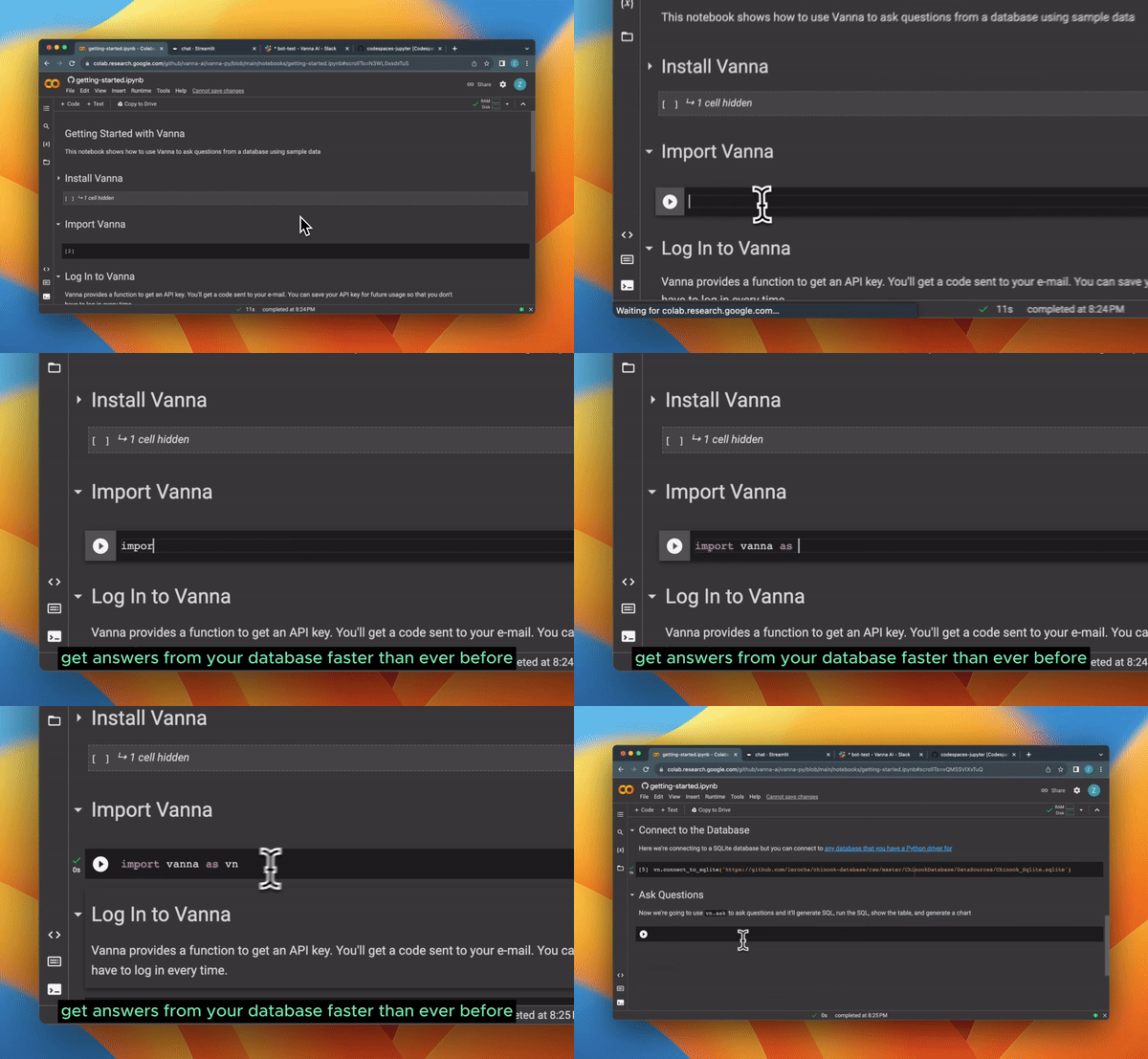
They have 10.5k+ stars on GitHub and are built using Python.
14. Seed - seed your database based on schema.

This is not a tool but a package that can be useful for your workflow.
Seed generates realistic synthetic data based on a database schema. It automatically determines the values in your database so you don't have to define each value.
You can get started by using this command.
npx @snaplet/seed init
For instance, if you want to generate 3 comments for one of your posts you simply point it at your schema and let it handle the rest:

It consists of the following parts:
a. Seed Client: Auto-generated and type-safe data client for Node.js & TypeScript.
b. Seed CLI: A CLI to generate and keep the data client in sync with your database 🛠️
c. Seed AI: Our custom model identifying the shape of your data 🤖

You can read the docs. Seed is compatible with PostgreSQL, SQLite and MySQL.
Watch this quick demo about Seed and how it works.
Seed was recently open sourced after Snaplet got shut down and has 298 stars on GitHub.
15. Hyperswitch - payments switch written in Rust.

Hyperswitch is a community-led, open payments switch to enable access to the best payment infrastructure for every digital business.
It provides APIs to access payment ecosystems across 130+ countries and you can even use it to reduce processing fees with smart routing.

You can manage 200+ payment methods and 50+ payment processors by using a simple CRUD way. Plus, it's trusted by a lot of companies.

You can read the api reference docs and the quickstart guide.

It's open source with 11.3k stars on GitHub.
16. Chat2DB - AI-driven data management platform.

Chat2DB is an AI-first data management, development and analysis tool.
Its core is AIGC (Artificial Intelligence Generation Code), which can convert natural language into SQL, SQL into natural language, and automatically generate reports, taking efficiency to another level.
Even operations that do not understand SQL can use it to quickly query business data and generate reports.
For instance, when you are doing database development, it will help you generate SQL directly in natural language, SQL optimization suggestions, analyze SQL performance, analyze SQL execution plan, and can also help you quickly generate SQL test data, system code, etc. Too much jargon but it's very powerful :)
They have excellent support for multi-data sources and can easily integrate up to 17 different database types including PostgreSQL, MySQL, MongoDB, and Redis.

You can download or try it in the browser.
Let's see some of the exciting features:
✅ Intelligent reports.

✅ Data Exploration.

✅ SQL Development.


You can read the quickstart guide on the official docs.
They have 14.7k stars on GitHub and are on the release v3.2.
17. Micro Agent - AI agent that writes (actually useful) code for you.

AI-assisted coding tools like GitHub Copilot and ChatGPT don't produce very reliable code. They often don't work correctly right out of the box, you find bugs, edge cases or even references to non-existent APIs.
This can lead to a frustrating loop of trying the generated code, finding issues, going back to the AI for fixes and repeating.
The time spent debugging can negate the time saved by using AI tools in the first place. But devs still use it!
Micro Agent claims to deliver the benefits of AI-assisted coding while mitigating the problems of unreliable code generation.
Give it a prompt and it'll generate a test and then iterate on code until all test cases pass.

You can install it using this command.
npm install -g @builder.io/micro-agent

# Next, set your OpenAI API key when prompted or manually using this.
micro-agent config set OPENAI_KEY=<your token>

# Then you can run to start a new coding task
micro-agent
Micro Agent will prompt you to describe the function you want, generate tests, and start writing code in your preferred language to make the tests pass. Once all the tests are green, you'll have a fully functional, test-backed function ready to use.
Let's explore some of the most mind blowing use cases:
⚡ 30-second demo of Micro Agent generating tests and code for a TypeScript function that groups anagrams together from an array of strings.

⚡ Using Micro Agent to generate a simple HTML to AST parser (it was achieved on two iterations).

⚡ Unit test matching.

⚡ Visual matching (experimental).

⚡ Integration with Figma.
Micro Agent can also integrate with Visual Copilot to connect directly with Figma to ensure the highest fidelity possible design to code!
Visual Copilot connects directly to Figma to assist with pixel-perfect conversion, exact design token mapping, and precise usage of your components in the generated output.
Then, Micro Agent can take the output of Visual Copilot and make final adjustments to the code to ensure it passes TSC, lint, tests, and fully matches your design including final tweaks. Amazing right :)

You can read the docs and the official blog where the team discussed everything about the micro agent.
It's open source with 2.5k stars on GitHub.
18. Miro AI - AI visual workspace.

Miro is the AI-powered visual workspace that brings teams together to collaborate and make faster decisions. Its intelligent canvas with interactive tools makes it easy for anyone to get work done, from journey mapping to diagramming and more. It's just too awesome!
Watch a quick demo to understand most of the stuff.
The concept of intelligent canvas is definitely new to me.
You can let AI use your brainstorms and ideas to create product briefs and summaries to move work forward — no complicated prompts needed. All you need to do is provide content from your canvas and let Miro AI handle the rest.

Watch the video to understand about that canvas!
There are intelligent templates, integrations and also an academy where you can learn all sorts of stuff about Miro. See all the courses and verified blogs at Miro Academy, and you can earn cool badges.

They have 70M users so I guess I was the only one who didn't know about it earlier. By the way, there is a free tier plan available but it's limited to a single workspace with 3 editable boards.
It's not open source but it will absolutely blow your mind.
19. Codium AI - Quality-first AI code generation to help busy devs write, test and review code.

CodiumAI is a developer tool that uses AI to generate meaningful tests for code. It analyzes your code, docstring, and comments, and then suggests tests as you code. You don’t have to spend hours!
Watch the complete demo of Codium AI in under 1 minute!
You can download it from VSCode Marketplace and JetBrains extension.
You definitely have heard about a PR agent that assists you in reviewing PRs, that with other tools and Codiumate are products by the same company.

You can also see the difference between CodiumAI vs ChatGPT for generating unit-tests.

I recommend checking out docs to find comprehensive guides and details to harness the full potential of CodiumAI.
They offer a lot more, so check their website for the detailed features along with all of the things that you can do!
CodiumAI is completely open source with all of its tools.
20. Opire - reward platform for developers.

Opire has a clear principle that states anyone can make a living from open source.
It's a platform for solving and creating bounties in open source.
As a developer, you can solve real problems which can be shown in your portfolio to build credibility.
As a project admin, this might be the most underrated way to grow your open source project.

Some of the very useful use cases can be:
⚡ Collaborate on open source projects and earn money for your contributions.
⚡ Include paid technical tests as part of the selection process in your company by adding rewards. This can help you evaluate your candidates' skills while valuing their time, which sends a very strong message.
⚡ Support maintainers of open source projects by contributing financially. They don't get enough recognition for the work they do!
🎯 How to create and solve those bounties?
您可以安装管理与 Opire API 通信的机器人,确保通过命令执行的操作能够反映在 Opire 控制面板中。
您可以使用如下命令:
→ /reward [amount]:设立奖励。
→ /try:尝试解决这个问题。
→ /claim #[issue_number]:领取奖励。
→ /tip [amount] @[user]:向上述用户支付美元小费。
如果您不想安装机器人,也可以直接在控制面板中创建这些奖励。我附上了一张截图。

您可以阅读文档。
大家都知道Algora,所以我只是想帮助Opire这个新平台在这个领域站稳脚跟。但最主要的原因是开发者可以获得100%的收益。
Opire 是开源的,有文档和网站。
21. Mantine Hooks - 用于状态和 UI 管理的 React Hooks。

你曾多少次因为要从零开始编写钩子函数而遇到困难?
嗯,多亏了曼汀鱼钩,我以后再也不会这么做了。
编写更多代码效率不高,因为以后还需要维护,所以最好使用这些生产级钩子来简化你的工作,而且每个钩子都有相当多的选项。
这可能是每个人都能用得上的最实用项目,无需从头开始编写代码。
相信我,能获得 60 多个 hooks 意义重大,因为他们提供了一种简单的方法,让你可以看到每个 hooks 的演示,并附有易于理解的文档。
使用以下 npm 命令开始。
npm install @mantine/hooks
这就是如何将其用作useScrollIntoView捕蟹钩的一部分。
import { useScrollIntoView } from '@mantine/hooks';
import { Button, Text, Group, Box } from '@mantine/core';

function Demo() {
  const { scrollIntoView, targetRef } = useScrollIntoView<HTMLDivElement>({
    offset: 60,
  });

  return (
    <Group justify="center">
      <Button
        onClick={() =>
          scrollIntoView({
            alignment: 'center',
          })
        }
      >
        Scroll to target
      </Button>
      <Box
        style={{
          width: '100%',
          height: '50vh',
          backgroundColor: 'var(--mantine-color-blue-light)',
        }}
      />
      <Text ref={targetRef}>Hello there</Text>
    </Group>
  );
}
他们几乎包含了从本地存储到分页、滚动视图、交叉分析,甚至还有一些非常酷的实用工具,比如吸管和文本选择。这简直太有用了!

您可以阅读文档。
他们在 GitHub 上获得了超过 25.9k 个星标,但这不仅仅是因为他们的 hooks,因为他们是一个 React 组件库。
为了更清楚地说明这一点,该软件包每周下载量超过 50 万次,v7这证明了其可靠性。
我知道这里并非所有工具、项目或软件包都对您有用,但您可以尝试将它们融入您的工作流程中。
大家都在使用相同的工具和项目,所以我尽量介绍一些独特的内容。希望对你有所帮助。
祝您今天过得愉快!下次再见。
如果您正在寻找一个友好的作家和开发者社区,欢迎加入我们:dub.sh/opensouls。
| 如果你喜欢这篇文章, 请在社交媒体上关注我哦 :) |
   |
|---|
关注 Taipy,获取更多类似内容。
文章来源:https://dev.to/taipy/21-developer-tools-to-improve-your-daily-life-as-developer-4m4e