25 个可以用 Python 和 AI 构建的项目
今天,我们将介绍 25 个可以使用 Python 和 AI 模型构建的业余项目。
大多数项目都会使用生产级别的代码,因此你可以学到很多东西。
我们开始做吧!
Taipy - 将数据和人工智能算法融入到可用于生产的 Web 应用程序中。

大多数初始项目都将使用 Taipy,所以让我们讨论一下该概念的用例。
Taipy 是一个开源的 Python 库,用于轻松进行端到端的应用程序开发,具有假设分析、智能管道执行、内置调度和部署工具等功能。
需要明确的是,Taipy 用于为基于 Python 的应用程序创建 GUI 界面并改进数据流管理。
关键在于性能,而 Taipy 正是实现这一目标的完美选择。
Streamlit 虽然是一款流行的工具,但在处理大型数据集时性能会显著下降,因此不适用于生产环境。
而 Taipy 则在保持性能的同时,提供了简洁易用的体验。试用 Taipy,您将亲身感受其友好的用户界面和高效的数据处理能力。

Taipy 拥有丰富的集成选项,可轻松连接到主流数据平台。

请使用以下命令开始操作。
pip install taipy
他们还利用分布式计算提高了性能,但最棒的是 Taipy 及其所有依赖项现在都与 Python 3.12 完全兼容,因此您可以在使用 Taipy 进行项目开发时使用最新的工具和库。
您可以阅读文档。

另一个有用的功能是,Taipy 团队提供了一个名为Taipy Studio 的VSCode 扩展,以加速 Taipy 应用程序的构建。

如果你想通过阅读博客来了解代码库结构,可以阅读HuggingFace 撰写的《使用 Taipy 在 Python 中为 LLM 创建 Web 界面》 。
尝试新技术通常比较困难,但 Taipy 提供了 10 多个演示教程,包含代码和完整的文档,方便你跟着做。我将详细介绍其中的一些项目!

这些应用案例非常棒,一定要去看看。
Taipy 在 GitHub 上拥有 8.5k+ 颗星,并且已经发布,v3.1所以他们一直在不断改进。
1.实时污染仪表盘
本用例展示了使用传感器测量工厂周围空气质量,以证明 Taipy 能够将流数据集成到仪表板中。
数据由另一台服务器生成,并通过 WebSocket 发送到 Taipy 应用程序。Taipy
随后处理数据并将其显示在仪表盘上。
仪表盘会随着新数据的接收而实时更新。

如果你想学习如何可视化流式数据,请查看多线程文档。
它讨论了如何创建发送脚本和接收脚本,包括套接字参数等等。
它涉及到前端和后端的概念。
查看在线演示。
2.欺诈检测
Taipy 的一款应用程序,用于分析信用卡交易以检测欺诈行为。

它会显示信用卡交易列表。
用户可以选择一个日期范围来预测欺诈行为。
然后,该应用会使用 XGB 模型将潜在的欺诈交易标记为红色或黄色。
用户可以选择一笔交易来查看模型预测的解释,以及该客户的其他交易。

用户还可以选择模型的阈值。阈值是指模型输出的某个值,高于该值的交易将被判定为欺诈交易。用户可以根据显示的混淆矩阵,并参考假阳性和假阴性交易的数量来选择模型。

查看在线演示。
3.新冠疫情仪表盘
该平台使用2020年的新冠疫情数据集。
页面展示了关于新冠疫情的不同图表和信息。此外,还有一个预测页面,用于预测死亡人数。
该应用程序包含以下四个部分:
✅ 国家。
- 各国新冠肺炎疫情统计数据。
- 轻松切换累积数据视图和密度数据视图。
- 用于动态数据探索的交互式条形图。
- 饼图显示病例分布(确诊病例、治愈病例、死亡病例)。

✅ 地图。
通过动态可缩放的彩色编码地图直观地展现 COVID-19 的影响。

✅ 预测。
通过创建不同预测日期和不同国家的场景,生成 COVID-19 预测。
这将分别使用 ARIMA 模型和线性回归模型生成 2 个不同的预测结果(橙色的 prediction_x 和绿色的 prediction_y)。
通过给新场景命名、指定预测日期、选择国家/地区,然后单击“提交”按钮来启动新场景。
您可以在“结果”部分的“场景”选项卡中访问它。

✅ 世界。
全球新冠疫情统计数据以折线图和饼图的形式汇总。通过切换“ ”Absolute和“ ”,可以查看各国新冠疫情影响的比较情况Relative。

总而言之,对于你的业余项目和构建非常酷炫的项目来说,这是一款非常有用的应用程序 :)
您可以查看在线演示。
4.创建LLM聊天机器人
此演示展示了 Taipy 如何使最终用户能够利用 LLM 进行推理。在这里,我们使用 GPT-3 创建了一个聊天机器人,并在交互式聊天界面中显示对话。

下面给出的主要函数以字符串提示(即用户消息)作为输入,并返回 LLM 的响应字符串。
def request(state: State, prompt: str) -> str:
    """
    Send a prompt to the GPT-3 API and return the response.

    Args:
        - state: The current state.
        - prompt: The prompt to send to the API.

    Returns:
        The response from the API.
    """
    response = state.client.chat.completions.create(
        messages=[
            {
                "role": "user",
                "content": f"{prompt}",
            }
        ],
        model="gpt-3.5-turbo",
    )
    return response.choices[0].message.content
您可以阅读完整的文档,了解如何构建这个LLM聊天机器人。
最棒的是,您可以根据自己的使用情况轻松修改代码,以使用任何其他 API 或模型。
您可以查看在线演示。
5.实时人脸识别
该演示将人脸识别无缝集成到我们的平台中,借助 OpenCV 库,使用您的网络摄像头提供实时人脸检测体验。

使用起来非常简单:
a. 打开应用程序时,你会看到自己的摄像头画面。你的脸周围会有一个红色方框,里面显示着别人的名字。
Captureb. 通过点击按钮并多次说出你的名字来训练模型识别你。
c. 现在点击Re-train按钮。你的名字应该会显示出来。模型现在识别出你了。
查看在线演示。
请务必在浏览器中启用相机设置,这是首要条件!
人脸检测和人脸识别的代码位于此处src/demo/faces.py。完整的目录结构请参见readme文件。
6.股票可视化
在金融市场领域,数据为王。对于投资者和金融分析师而言,能够快速便捷地可视化历史股票数据并进行预测至关重要。
这是一个股票数据仪表盘,带有交互式可视化元素,可以可视化历史股票数据并对股票未来 1 至 5 年的走势进行预测。

本演示程序使用 Facebook 的Taipy 和Prophet 库构建,需要 Python 3.8 或更高版本才能运行。
使用方法如下:
a. 选择您要预测的股票代码。b
. 打开历史数据面板。c
. 选择预测周期(1 至 5 年)。d
. 点击按钮PREDICT。e
. 在预测数据面板中查看您的预测结果。f
. 使用不同的股票代码重复尝试,以比较结果。
More info点击底部的按钮,即可在表格中查看预测范围。
您可以在src 目录下找到负责该功能的主要源代码。
这个完全交互式的 Web 应用程序只需不到 120 行 Python 代码即可创建。
查看在线演示。
7.情感分析。
情感分析就像一个机器人,能从人们的言语中解读他们的感受。
它会分析诸如“高兴”、“悲伤”或“愤怒”之类的词语,判断人们的情绪是好是坏。然后,它会告诉我们大多数人在说话时是快乐还是悲伤。
因此,它能帮助我们通过观察人们的言语来了解他们对电影或游戏等事物的感受!
简而言之,它是自然语言处理 (NLP) 中的一种技术,用于确定文本中传达的情感基调。它可以帮助企业和个人更好地理解书面内容中表达的情感和语气。
最终生成的是一个两页的应用程序,它使用情感分析模型来分析输入和全文。
第一页分析用户输入,第二页允许用户选择要上传的文件(文本)。系统将分析该文本并显示其背后的情感倾向。
✅ 第 1 页:行 - 分析用户输入
我们的情感分析应用程序的首页名为“行”,旨在即时分析用户输入。无论是简短的句子还是较长的段落,只需在输入框中输入或粘贴文本,Taipy 即可快速评估文本所表达的情感。

✅ 文本 - 上传和分析文本文件
第二页名为“文本”,允许用户上传整个文本文件(.txt)进行全面的情感分析。
用户可以从设备中选择一个文本文件,应用程序将提供对整个文档所表达的情感的分析。
此功能适用于处理较长的文本,例如文章、报告或大量的客户反馈。

您可以查看在线演示。
8.漂移检测- 检测糖尿病数据集中的漂移。

数据漂移是一个主要在机器学习中使用的概念,指的是推理数据的分布偏离训练数据的分布。
各种因素,例如底层数据源的变化、数据收集过程的变化或数据存储过程的变化,都可能导致数据漂移。
这通常会导致一种称为训练服务偏差的性能问题,即用于推理的模型不适用于推理数据的分布,并且无法泛化。
存在一些统计检验方法可以用来检测数据集中的漂移现象。这些检验方法计算两个序列来自同一分布的概率。如果该概率低于某个阈值,我们就认为存在漂移。
如何使用该应用程序?
✅ 选择对比数据集。
这里,我们选择 data_big,这是一个与参考数据集类似的数据集,但其中包含血压值更高的行。从血压分布图中我们可以看到,对比数据集(红色)的分布相对于参考数据集(绿色)向右偏移。

✅ 点击此处运行场景。

✅ 在页面底部查看结果。
此处,我们看到血压列的柯尔莫哥洛夫检验的p值小于0.05,这意味着两组血压数据来自同一分布的概率小于5%。我们可以拒绝两组数据来自同一分布的假设,并得出结论:血压列存在漂移。

您可以按照下面附带的在线演示中的步骤操作,并在 GitHub 上查看源代码。
它利用数据管道来比较数据集并检测漂移。

查看在线演示。
9. Walletwise

WalletWise就像我们财务上的得力助手,帮助我们追踪收入和支出。它使用Gemini进行交易,使用Taipy分析支出情况。
其中一些优点包括:
✅ 用户可以输入收入、支出以及所属行业作为标题。这样,他们就能了解并分析自己在各个行业的收入和支出情况。
✅ 分析用户的收入和支出,以数学方式展示,并显示 7 个做出更好、更明智的财务决策的技巧。
✅ 实现了可视化功能,您可以查看您赚钱的不同类别以及您花钱的不同类别。
这是一个非常优秀的用例,而且在创意方面也非常好。
10.泰皮象棋

我最喜欢这个应用,因为我热爱国际象棋!哈哈!
这是一个基于20000局棋谱的国际象棋可视化工具。您可以查看所有对局、开局、对手、最常用的开局以及最成功的开局。
您可以查看数据的热力图和图表。


你可以看看Korie的演示。我非常喜欢:)
这清楚地表明,我们使用 Taipy 的方式没有任何限制。
11.奥运奖牌

这是一个 Taipy 仪表板,显示了从现代奥林匹克运动会开始到 2024 年初颁发的奥运奖牌信息(即不包括 2024 年巴黎奥运会)。
✅ 控制面板有两个标签页:
- 标签页显示了所有奥运奖牌的汇总数据。
- 第二个标签页重点关注奥委会(国家,以及难民委员会等特别委员会)赢得的奖牌。
它还包含多种类型的图表,例如柱状图、旭日图、折线图、等值线图和网格图。
此外,仪表盘会根据所选年份和区域类型动态更新数据。
您可以在这里观看演示!
这里涉及很多概念,而且 Eric 实现的用例非常出色!
12. GPT Researcher - 基于 GPT 的在线研究自主代理。

GPT Researcher 是领先的自主代理,能够处理从准确收集信息源到整理研究结果的一切事务。
值得一提的是,它还列出了研究结果的来源,这提高了可信度。我非常喜欢这个理念 :)
其中一些野生特征包括:
✅ 可以生成篇幅较长、内容详尽的研究报告(超过 2000 字)。
✅ 每次研究汇总超过 20 个网络资源,以形成客观、事实性的结论。
✅ 包含易于使用的网页界面(HTML/CSS/JS)。
✅ 抓取支持 JavaScript 的网络资源。
✅ 跟踪并记录访问和使用的网络资源及其上下文。
✅ 将研究报告导出为 PDF、Word 等格式。

请使用以下命令开始操作。
pip install gpt-researcher
以下是它的使用方法。
from gpt_researcher import GPTResearcher

query = "why is Nvidia stock going up?"
researcher = GPTResearcher(query=query, report_type="research_report")
# Conduct research on the given query
await researcher.conduct_research()
# Write the report
report = await researcher.write_report()
请阅读下方附件中的安装说明和快速入门指南。
如果您想了解架构的具体细节,这些智能体同时利用 gpt3.5-turbo 和 gpt-4-turbo(128K 上下文)来完成研究任务。我们仅在必要时才使用其中一个模型以优化成本。平均而言,完成一项研究任务大约需要 3 分钟,成本约为 0.1 美元。

您可以阅读官方博客了解GPT Researcher 的工作原理。
您可以阅读常见问题解答,了解更多关于准确性等方面的信息。
点击这里观看演示!

它在 GitHub 上拥有 8.7k 个星标,并且还在不断改进。
13.私有 GPT - 无需联网即可询问有关您文档的问题。

PrivateGPT 是一个可用于生产的 AI 项目,它利用大型语言模型 (LLM) 的强大功能,即使在没有互联网连接的情况下,也能让您询问有关文档的问题。
100% 私密,意味着任何时候都不会有数据离开您的执行环境。
API 分为两个逻辑模块:
a. 高级 API,它抽象了 RAG(检索增强生成)管道实现的所有复杂性:
- 文档摄取:内部管理文档解析、拆分、元数据提取、嵌入生成和存储。
- 利用从已摄取文档中获取的上下文进行聊天和完成:抽象化上下文检索、提示工程和响应生成。
b. 底层 API,允许高级用户实现其复杂的流程:
- 嵌入生成:基于一段文本。
- 上下文块检索:给定一个查询,从已摄取的文档中返回最相关的文本块。
您可以阅读安装指南来开始安装。
PrivateGPT 正在发展成为生成式 AI 模型和原语的入口,包括补全、文档摄取、RAG 管道和其他底层构建模块。
他们在 GitHub 上拥有 51k+ 颗星,并且发展迅速。
14. facefusion - 新一代换脸和美化器。

这是新一代换脸和美颜工具。它用途广泛,而且操作简便。
他们还提供了一个研讨会版块,您可以在这里学习如何创建 UI 组件和定义框架处理器。
例如,这是创建 UI 组件的方法。
// create a new file

facefusion/uis/components/example.py

// Implement the essential methods of the UI component

from typing import Optional
import gradio

from facefusion.uis.typing import Update

EXAMPLE_IMAGE : Optional[gradio.Image] = None


def render() -> None:
    global EXAMPLE_IMAGE

    EXAMPLE_IMAGE = gradio.Image()


def listen() -> None:
    EXAMPLE_IMAGE.change(update, inputs = EXAMPLE_IMAGE, outputs = EXAMPLE_IMAGE)


def update() -> Update:
    return gradio.update()
你只需要添加这个组件即可。
from facefusion.uis.components import example

安装过程可能有点复杂,所以我建议您根据您正在使用的具体环境阅读安装指南。
您可以使用此命令查看基准测试结果。
python run.py --ui-layouts benchmark

他们在 GitHub 上拥有 14000 多个 star,并且正在v2.5发布版本。
15. H2O LLMStudio - 用于微调 LLM 的无代码 GUI。

H2O LLM Studio 是一个开源的、无代码的 LLM 图形用户界面 (GUI),旨在微调最先进的大型语言模型。
微调预训练语言模型需要编码专业知识和对模型及其超参数的广泛了解,但是,H2O LLM Studio 使 NLP 从业者能够轻松地微调他们的 LLM,无需编码,并且在自定义方面具有更大的灵活性。
H2O LLM Studio 还允许您与经过微调的模型进行聊天,并立即获得有关模型性能的反馈。
自然语言处理从业者和数据科学家尤其会发现,它能帮助他们轻松高效地创建和微调大型语言模型。您可以阅读有关其详细性能统计数据和云架构的信息。
如果你是新手,我建议你看看这个!
您可以阅读有关核心功能的内容,例如:
✅ 无需编写代码即可进行微调
✅ 高度可定制
✅ 即时提供模型性能反馈
您可以使用以下命令启动 H2O LLM Studio。
make llmstudio
如果您不了解这些概念,他们还提供了一份清晰的概念指南,包括生成式人工智能、LoRa、量化、LLM 骨干网等等。
您可以阅读文档。
你可以用它轻松制作出符合标准的副业项目。
他们在 GitHub 上获得了 3.6k 个星标,并且已经v1.5发布了。
16. Mac 上的语音助手- 您的语音控制 Mac 助手。

你的语音控制 Mac 助手。GPT Automator 让你可以用语音在 Mac 上执行各种任务。例如,打开应用程序、查找餐厅和合成信息。太棒了!:D
它是在伦敦黑客马拉松期间开发的。
它由两部分组成:
a. 语音命令:它使用本地运行的 Whisper(Buzz 的一个分支)生成命令。
b. Command to Action: You give the command to a LangChain agent equipped with custom tools we wrote. These tools include controlling the operating system of the computer using AppleScript and controlling the active browser using JavaScript. Finally, like any good AI, we have the agent speak out the final result using AppleScript saying "{Result}" (try typing "Hello World!" into your Mac terminal if you haven’t used it before”).
A custom tool we made to have the LLM control the computer using AppleScript. The prompt is the docstring:
@tool
def computer_applescript_action(apple_script):
    """
    Use this when you want to execute a command on the computer. The command should be in AppleScript.

    Here are some examples of good AppleScript commands:

    Command: Create a new page in Notion
    AppleScript: tell application "Notion"
        activate
        delay 0.5
        tell application "System Events" to keystroke "n" using {{command down}}
    end tell

    ...

    Write the AppleScript for the Command:
    Command:
    """
    p = subprocess.Popen(['osascript', '-'], stdin=subprocess.PIPE, stdout=subprocess.PIPE, stderr=subprocess.PIPE)

    stdout, stderr = p.communicate(applescript.encode('utf-8'))

    if p.returncode != 0:
        raise Exception(stderr)

    decoded_text = stdout.decode("utf-8")

    return decoded_text
If you are wondering how it works, GPT Automator converts your audio input to text using OpenAI's Whisper. Then, it uses a LangChain Agent to choose a set of actions, including generating AppleScript (for desktop automation) and JavaScript (for browser automation) commands from your prompt using OpenAI's GPT-3 ("text-davinci-003") and then executing the resulting script.
Just remember, this is not for production use. This project executes code generated from natural language and may be susceptible to prompt injection and similar attacks. This work was made as a proof-of-concept.
You can read the installation guide.
Let's look at some of the prompts and what it will do:
✅ Find the result of a calculation.
Prompt: "What is 2 + 2?"
It will write AppleScript to open up a calculator and type in 5 * 5.
✅ Find restaurants nearby.
Prompt: "Find restaurants near me"
It will open up Chrome, google search for a restaurant nearby, parse the page and then return the top results. Sometimes it’s cheeky, and instead will open up the Google Maps result and say “The best restaurants are the ones at the top of the page on Google Maps”. Other times it opens the top link on Google - and gets stuck on the Google accessibility page…
Here’s what’s printed to the terminal as it runs:
Command: Find a great restaurant near Manchester.

> Entering new AgentExecutor chain...
 I need to search for a restaurant near Manchester.
Action: chrome_open_url
Action Input: https://www.google.com/search?q=restaurant+near+Manchester
Observation:

Thought: I need to read the page
Action: chrome_read_the_page
Action Input:
Observation: Accessibility links
Skip to the main content
... # Shortned for brevity
Dishoom Manchester
4.7
(3.3K) · £££ · Indian
32 Bridge St · Near John Rylands Library
Closes soon ⋅ 11 pm
Stylish eatery for modern Indian fare
San Carlo
4.2
(2.8K) · £££ · Italian
42 King St W · Near John Rylands Library
Closes soon ⋅ 11 pm
Posh, sceney Italian restaurant
Turtle Bay Manchester Northern Quarter
4.7

Thought: I now know the final answer
Final Answer: The 15 best restaurants in Manchester include El Gato Negro, Albert's Schloss, The Refuge, Hawksmoor, On The Hush, Dishoom, Banyan, Zouk Tea Room & Grill, Edison Bar, MyLahore Manchester, Turtle Bay Manchester Northern Quarter, San Carlo, The Black Friar, Mana, and Tast Cuina Catalana.
I cannot guarantee that those restaurants are worth it, visit at your own risk. haha!
✅ If you ask GPT Automator to wipe your computer it will.
Yes, it will wipe your computer if you ask!
My inner self screaming to do it :)
You can see the full demo here!
17. RepoChat - Chatbot assistant enabling GitHub repository interaction.

Repochat is an interactive chatbot project designed to engage in conversations about GitHub repositories using a Large Language Model (LLM).
It allows users to have meaningful discussions, ask questions, and retrieve relevant information from a GitHub repository. This README provides step-by-step instructions for setting up and using Repochat on your local machine.
They have made two branches with distinct functionalities which is kind of new to me.
✅ The main branch of Repochat is designed to run entirely on your local machine. This version of Repochat doesn't rely on external API calls and offers greater control over your data and processing. If you're looking for a self-contained solution, the main branch is the way to go.
✅ The cloud branch of Repochat primarily relies on API calls to external services for model inference and storage. It's well-suited for those who prefer a cloud-based solution and don't want to set up a local environment.
You can read the installation instructions.
Repochat allows you to engage in conversations with the chatbot. You can ask questions or provide input, and the chatbot will retrieve relevant documents from the vector database.
It then sends your input, along with the retrieved documents, to the Language Model for generating responses.
By default, I've set the model to codellama-7b-instruct, but you can change it based on your computer's speed, and you can even try the 13b quantized model for responses.
The chatbot retains memory during the conversation to provide contextually relevant responses.
You can check the live website where you can check using the API key.
You can watch this demo!

I found one more alternative if you want to check it out.
Repochat has 200+ stars and deployed on Streamlit.
18. myGPTReader - read and chat with AI bots.

myGPTReader is a bot on Slack that can read and summarize any webpage, documents including ebooks, or even videos from YouTube. It can communicate with you through voice.
Some of the worthy features are:
✅ Use myGPTReader to quickly read and understand any web content through conversations, even videos (currently only YouTube videos with subtitles are supported).

✅ Use myGPTReader to quickly read the content of any file, supporting eBooks, PDF, DOCX, TXT, and Markdown.

✅ Practice your foreign language by speaking with your voice to myGPTReader, which can be your personal tutor and supports Chinese, English, German, and Japanese.

✅ A large number of prompt templates are built in, use them for better conversations with chatGPT.

✅ Every day myGPTReader sends out the latest hot news and automatically generates a summary, so you can quickly learn what's hot today.
You can visit the official website.
You can join the Slack channel on the repo that has more than 5000+ members to experience all these features for free.
They have 4.4k stars on GitHub and are built using Python like other projects in this list.
19. Marker - Convert PDF to markdown quickly with high accuracy.

Marker converts PDF, EPUB, and MOBI to markdown. It's 10x faster than nougat, more accurate on most documents, and has low hallucination risk.
We all know how helpful this can be especially in terms of doing it for a research paper.
✅ Support for a range of PDF documents (optimized for books and scientific papers).
✅ Removes headers/footers/other artifacts.
✅ Converts most equations to latex.
✅ Formats code blocks and tables.
✅ Support for multiple languages (although most testing is done in English). See settings.py for a language list, or to add your own.
✅ Works on GPU, CPU, or MPS.
They have also clearly documented the examples along with the results of Marker and Nougat.

Read the speed and accuracy benchmarks and instructions on how to run your own benchmarks.
For instance, check this PDF: Think Python and the markdown file of Marker vs Nougat.
Read the installation instructions.
They have also documented how to use it properly:
They have 8k+ stars on GitHub and I don't think it's maintained anymore.
20. Instrukt - Integrated AI in the terminal.

Instrukt is a terminal-based AI-integrated environment. It offers a platform where users can:
- Create and instruct modular AI agents.
- Generate document indexes for question-answering.
- Create and attach tools to any agent.
Instruct them in natural language and, for safety, run them inside secure containers (currently implemented with Docker) to perform tasks in their dedicated, sandboxed space.
Built using Langchain, Textual, and Chroma.
Get started with the following command.
pip install instrukt[all]
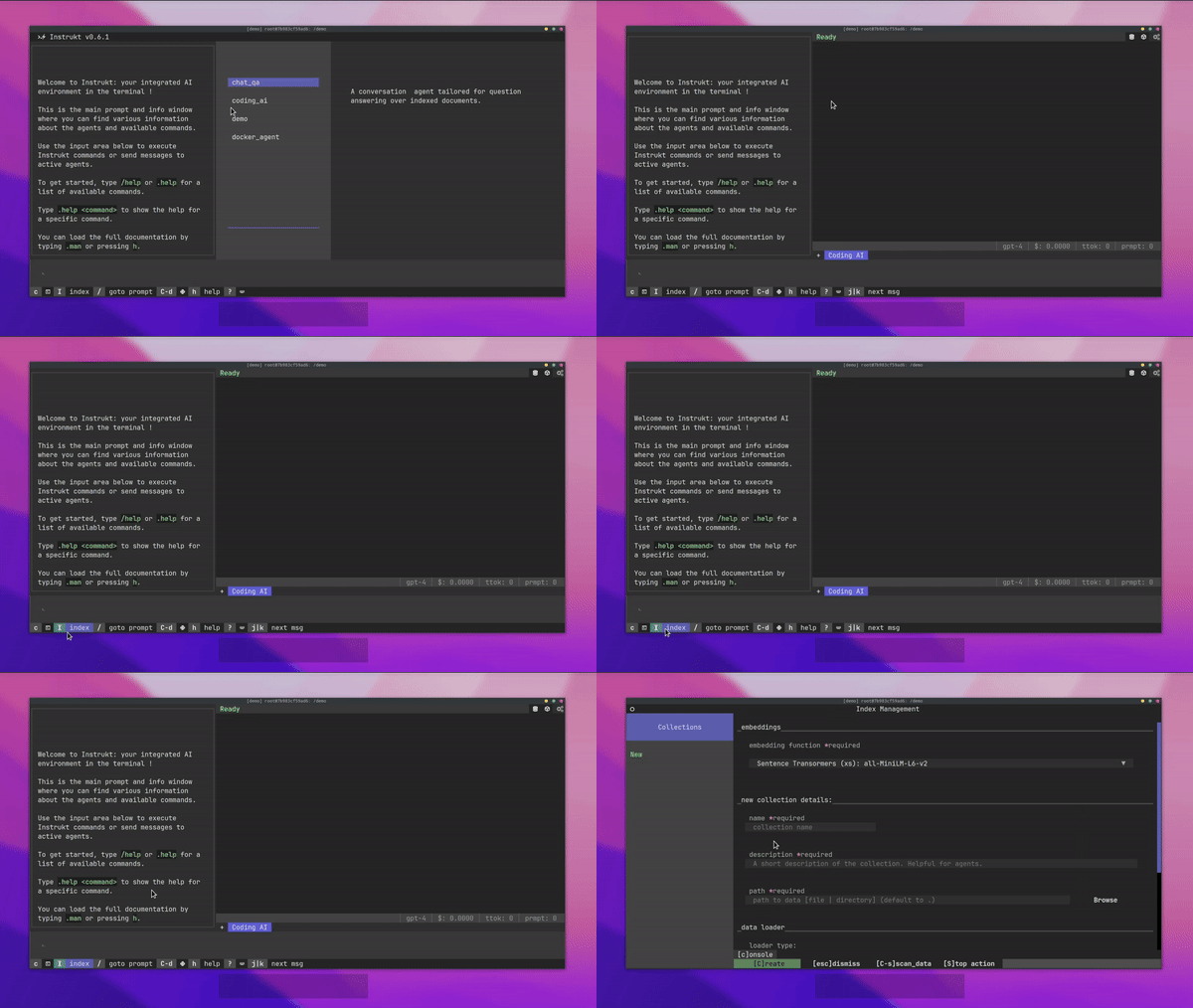
There are a lot of exciting features such as:
- A terminal-based interface for power keyboard users to instruct AI agents without ever leaving the keyboard.
- Index your data and let agents retrieve it for question-answering. You can create and organize your indexes with an easy UI.
- Index creation will auto-detect programming languages and optimize the splitting/chunking strategy accordingly.
- Run agents inside secure docker containers for safety and privacy.
- Integrated REPL-Prompt for quick interaction with agents, and a fast feedback loop for development and testing.
- You can automate repetitive tasks with custom commands. It also has a built-in prompt/chat history.
You can read about all the features.
You can read the installation guide.
You can also debug and introspect agents using an in-built IPython console which is a neat little feature.

Instrukt is licensed with an AGPL license meaning that it can be used by anyone for whatever purpose.
It is safe to say that Instrukt is a Terminal AI Commander at your fingertips.
It is a new project so they have around 200+ stars on GitHub but the use case is very good.
21. Microagents - Agents Capable of Self-Editing Their Prompts.

It's an experimental framework for dynamically creating self-improving agents in response to tasks.
Microagents represent a new approach to creating self-improving agents. Small, microservice-sized (hence, microagents) agents are dynamically generated in response to tasks assigned by the user to the assistant, assessed for their functionality, and, upon successful validation, stored for future reuse.
This enables learning across chat sessions, enabling the system to independently deduce methods for task execution.
This is built using Python, OpenAI's GPT-4 Turbo and Text-Embedding-Ada-002.
You can read the installation instructions. They have mentioned that you should have an OpenAI account with access to gpt-4-turbo and text-embedding-ada-002.
Let's see an example of fetching a Weather Forecast Agent.
You are an adept weather informant. Fetch the weather forecast by accessing public API data using this Python code snippet:

``python
import requests
import json

def fetch_weather_forecast(location, date):
    response = requests.get(f"https://api.met.no/weatherapi/locationforecast/2.0/compact?lat={location[0]}&lon={location[1]}")
    weather_data = response.json()
    for day_data in weather_data['properties']['timeseries']:
        if date in day_data['time']:
            print(day_data['data']['instant']['details'])
            break
``
# Example usage: fetch_weather_forecast((47.3769, 8.5417), '2024-01-22T12:00:00Z')
Note: Replace the (47.3769, 8.5417) with the actual latitude and longitude of the location and the date string accordingly.
If you're wondering how agents are created, then this architectural diagram explains it.

You can see the working demo.
They have around 700 stars on GitHub and are worth checking out.
22. Resume Matcher - a free tool to improve your resume.

Resume Matcher is an open source, free tool to improve your resume. To tailor your resume to a job description. Find the matching keywords, improve the readability, and gain deep insights into your resume.
How does it work?
The Resume Matcher reads your resume and job descriptions using Python, just like an ATS.
It suggests changes to make your resume ATS-friendly by:
✅ Parsing: It breaks down your resume and job description using Python.
✅ Keyword Extraction: The tool finds important keywords from the job description, like skills and qualifications.
✅ Key Terms Extraction: It identifies the main themes in the job description to understand its context.
✅ Vector Similarity: Using FastEmbedd, it compares your resume with the job description to see how closely they match. The better the match, the higher your chances of passing the ATS screening.

You can read the installation instructions.
You can check the live demo or the one attached in the readme.
Resume Matcher is an amazing project created by Saurabh Rai, who also writes great posts here on DEV!
It has 4.5k stars on GitHub and is still maintained properly.
23. Background Remover - lets you Remove Background from images and video using AI with a simple CLI.

This is a command line tool to remove background from images and videos using AI.
Get started by installing backgroundremover from pypi.
pip install --upgrade pip
pip install backgroundremover
It is also possible to run this without installing it via pip, just clone the git to locally start a virtual env install requirements and run.
Some of the commands that you can use:
- Remove the background from a local file image
backgroundremover -i "/path/to/image.jpeg" -o "output.png"
- remove the background from the local video and overlay it over an image
backgroundremover -i "/path/to/video.mp4" -toi "/path/to/videtobeoverlayed.mp4" -o "output.mov"
You can check all the commands that you can use with CLI.
You can even use it as a library.
from backgroundremover.bg import remove
def remove_bg(src_img_path, out_img_path):
    model_choices = ["u2net", "u2net_human_seg", "u2netp"]
    f = open(src_img_path, "rb")
    data = f.read()
    img = remove(data, model_name=model_choices[0],
                 alpha_matting=True,
                 alpha_matting_foreground_threshold=240,
                 alpha_matting_background_threshold=10,
                 alpha_matting_erode_structure_size=10,
                 alpha_matting_base_size=1000)
    f.close()
    f = open(out_img_path, "wb")
    f.write(img)
    f.close()
You can read the installation instructions and see the live demo.
The input vs The Output.

They have 6k stars on GitHub and we can definitely learn some crucial concepts using this.
24. Tkinter Designer - easy and fast way to create a Python GUI.

Tkinter Designer was created to speed up the GUI development process in Python. It uses the well-known design software Figma to make creating beautiful Tkinter GUIs in Python a piece of cake.
Tkinter Designer uses the Figma API to analyze a design file and create the respective code and files needed for the GUI.
If you're wondering how it works?
The only thing the user needs to do is design an interface with Figma and then paste the Figma file URL and API token into Tkinter Designer.
Tkinter Designer will automatically generate all the code and images required to create the GUI in Tkinter.

You can read the step-by-step guide](https://github.com/ParthJadhav/Tkinter-Designer/blob/master/docs/instructions.md) on how to use it properly which is available in multiple languages.
You can watch the demo here!
They have also shown examples of websites that you can easily replicate using this.

They have 8.3k stars on GitHub and are used by around 100 developers.
25. Open Interpreter - natural language interface for computers.

Open Interpreter lets LLMs run code (Python, Javascript, Shell, and more) locally. You can chat with Open Interpreter through a ChatGPT-like interface in your terminal by running $ interpreter after installing.
This provides a natural-language interface to your computer's general-purpose capabilities:
✅ Create and edit photos, videos, PDFs, etc.
✅ Control a Chrome browser to perform research Plot, clean, and analyze large datasets.
I don't know about you, but their website made me say WOW!
Quickstart using this command.
pip install open-interpreter

// After installation, simply run:
interpreter
You can read the quickstart guide.
You should read about the comparison to ChatGPT's Code Interpreter and the commands that you can use.
You can read the docs.
Open Interpreter works with both hosted and local language models. Hosted models are faster and more capable, but require payment. Local models are private and free but are often less capable.
他们在 GitHub 上拥有 48000 多个星标,并被 300 多名开发者使用。
积累经验、提高编程技能的最佳方法是开发一些业余项目。
我希望你们能实践其中的一些项目,或者至少能从中获得一些灵感。
欢迎在下方留言,分享你发现的其他精彩的Python项目 :)
祝你今天过得愉快!下次再见。
| 如果你喜欢这类内容, 请关注我以获取更多内容 :) |
   |
|---|
关注 Taipy,获取更多类似内容。
文章来源:https://dev.to/taipy/25-projects-that-you-can-build-with-python-and-ai-12i9