

[Typia] 速度提升 15,000 倍的 TypeScript 验证器及其历史记录
更名为Typia
https://github.com/samchon/typia
您好,我是开发者
typescript-jsontypia。
如今,我已将typescript-json库更名为typia,因为“JSON”这个词已经无法完全代表它了。其核心特性typia已从更快的 JSON 字符串化函数更改为超快的验证函数。此外,typia它已开始支持 Protocol Buffer(目前为 alpha 版本,尚未正式发布)。
鉴于软件包名称已从 更改为typescript-json,typia我将向您介绍过去六个月中发生的变化。期间新增了许多有趣的功能并进行了诸多改进。
什么
typia是:// RUNTIME VALIDATORS export function is<T>(input: unknown | T): input is T; // returns boolean export function assert<T>(input: unknown | T): T; // throws TypeGuardError export function validate<T>(input: unknown | T): IValidation<T>; // detailed // STRICT VALIDATORS export function equals<T>(input: unknown | T): input is T; export function assertEquals<T>(input: unknown | T): T; export function validateEquals<T>(input: unknown | T): IValidation<T>; // JSON export function application<T>(): IJsonApplication; // JSON schema export function assertParse<T>(input: string): T; // type safe parser export function assertStringify<T>(input: T): string; // safe and faster // +) isParse, validateParse // +) stringify, isStringify, validateStringifytypia是一个 TypeScript 转换器库,支持以下功能:
- 超快速运行时验证器
- 安全的 JSON 解析和快速字符串化函数
- JSON 模式生成器
所有函数都只
typia需要一行代码。您无需任何额外的操作,例如 JSON 模式定义或装饰器函数调用。只需typia像这样用一行代码调用函数即可typia.assert<T>(input)。此外,由于
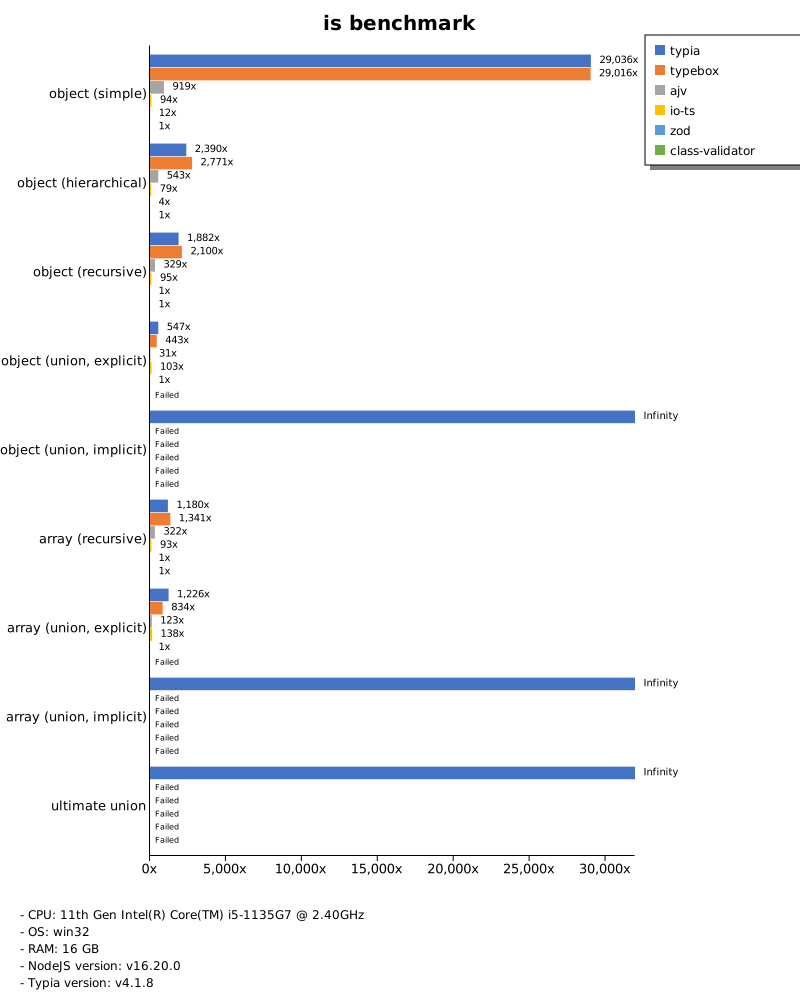
typia采用了 AOT(提前编译)技术,它的性能远超其他同类库。例如,在比较 validate 函数is()与其他同类库时,它的速度typia最多可提升15,000 倍class-validator。
运行时验证器库速度提升了 15,000 倍
// TypeBox was faster than Typia in here `ObjectSimple` case
export type ObjectSimple = ObjectSimple.IBox3D;
export namespace ObjectSimple {
    export interface IBox3D {
        scale: IPoint3D;
        position: IPoint3D;
        rotate: IPoint3D;
        pivot: IPoint3D;
    }
    export interface IPoint3D {
        x: number;
        y: number;
        z: number;
    }
}
你还记得吗?大约一个月前,我写了一篇关于TypeBox的文章,其中提到“我发现了一个比我编写的 vlidator 库更快的版本控制库(在某些情况下)”。在接下来的一个月里,我一直在尝试理解和研究其中的原因。
在学习过程中,我找到了原因。秘诀在于内联。
验证实例类型时,typia会为每种对象类型生成相应的函数。因此,如果一个类型与 8 种对象类型关联,则会生成 8 个内部函数。
但是,typebox允许用户通过标志位来决定是否为特定对象类型生成验证函数$recursiveRef。
基准测试代码
typebox由作者本人编写typebox。
查看以下代码,您或许就能理解内联的含义以及 `inline`typia和 ` typeboxinline` 的区别。`inline`typia会为每个对象类型(`Object`Box3D和 ` Point3dObject`)生成函数,但typebox它不会创建任何内部函数,而是将所有函数内联起来。
// COMPILED VALIDATION CODE OF TYPIA
const is = (input) => {
    const $io0 = (input) =>
        "object" === typeof input.scale && null !== input.scale && $io1(input.scale) &&
        "object" === typeof input.position && null !== input.position && $io1(input.position) &&
        "object" === typeof input.rotate && null !== input.rotate && $io1(input.rotate) &&
        "object" === typeof input.pivot && null !== input.pivot && $io1(input.pivot);
    const $io1 = (input) =>
        "number" === typeof input.x && !isNaN(input.x) && isFinite(input.x) &&
        "number" === typeof input.y && !isNaN(input.y) && isFinite(input.y) &&
        "number" === typeof input.z && !isNaN(input.z) && isFinite(input.z);
    return "object" === typeof input && null !== input && $io0(input);
};

// COMPILED VALIDATION CODE OF TYPEBOX
function Check(value) {
    return (
      (typeof value === 'object' && value !== null && !Array.isArray(value)) &&
      (typeof value.scale === 'object' && value.scale !== null && !Array.isArray(value.scale)) &&
      (typeof value.scale.x === 'number' && !isNaN(value.scale.x)) &&
      (typeof value.scale.y === 'number' && !isNaN(value.scale.y)) &&
      (typeof value.scale.z === 'number' && !isNaN(value.scale.z)) &&
      (typeof value.position === 'object' && value.position !== null && !Array.isArray(value.position)) &&
      (typeof value.position.x === 'number' && !isNaN(value.position.x)) &&
      (typeof value.position.y === 'number' && !isNaN(value.position.y)) &&
      (typeof value.position.z === 'number' && !isNaN(value.position.z)) &&
      (typeof value.rotate === 'object' && value.rotate !== null && !Array.isArray(value.rotate)) &&
      (typeof value.rotate.x === 'number' && !isNaN(value.rotate.x)) &&
      (typeof value.rotate.y === 'number' && !isNaN(value.rotate.y)) &&
      (typeof value.rotate.z === 'number' && !isNaN(value.rotate.z)) &&
      (typeof value.pivot === 'object' && value.pivot !== null && !Array.isArray(value.pivot)) &&
      (typeof value.pivot.x === 'number' && !isNaN(value.pivot.x)) &&
      (typeof value.pivot.y === 'number' && !isNaN(value.pivot.y)) &&
      (typeof value.pivot.z === 'number' && !isNaN(value.pivot.z))
   )
}
如您所知,函数调用本身就存在开销。因此,内联有时可能比函数调用更快。然而,内联并非总是比函数调用更快,在某些情况下,函数调用和内联的性能会相反。
typebox允许用户通过 JSON 模式定义自行确定,但typia无法做到,因为typia只需一行语句即可自动生成运行时验证器函数;typia.assert<T>(input)。
// CODE OF TYPIA
import typia from "typia";
typia.is<ObjectSimple>(input);

// CODE OF TYPEBOX
import { Type } from "@sinclair/typebox";
import { TypeCompiler } from "@sinclair/typebox/compiler";

const Point3D = Type.Object({
    x: Type.Number(),
    y: Type.Number(),
    z: Type.Number(),
});

const Box3D = Type.Object({
    scale: Point3D,
    position: Point3D,
    rotate: Point3D,
    pivot: Point3D,
});

TypeBoxObjectSimple = TypeCompiler.Compile(Box3D);
TypeBoxObjectSimple.Check(input);
因此,我需要比较函数调用和内联的优缺点,并选择合适的算法。我修改了typia代码,在特殊情况下使用内联技术,结果是typia验证器的速度比以前快了 15,000 倍class-validator。
从现在起,typia它是速度最快的运行时验证器库。
新功能
更多类型
// REST ARRAY TYPE IN TUPLE TYPE
type RestArrayInTuple = [boolean, number, ...string[]];

// BUILT-IN CLASS TYPES
type BuildInClassTypes = Date | Uint8Array | {...} | Buffer | DataView;

// TEMPLATE TYPES
interface Templates {
    prefix: `prefix_${string | number | boolean}`;
    postfix: `${string | number | boolean}_postfix`;
    middle: `the_${number | boolean}_value`;
    mixed:
        | `the_${number | "A" | "B"}_value`
        | boolean
        | number;
    ipv4: `${number}.${number}.${number}.${number}`;
    email: `${string}@${string}.${string}`;
}

//----
// JUST CRAZY TYPE
//----
type Join<K, P> = K extends string | number
    ? P extends string | number
        ? `${K}${"" extends P ? "" : "."}${P}`
        : never
    : never;

type Prev = [never, 0, 1, 2, 3, 4, 5, 6, 7, 8, 9];

type StringPathLeavesOf<O, F = "^%#&$!@", D extends number = 4> = [D] extends [
    never,
]
    ? never
    : O extends object
    ? {
          [K in keyof O]-?: O[K] extends F
              ? never
              : Join<K, StringPathLeavesOf<O[K], F, Prev[D]>>;
      }[keyof O]
    : "";

type TypeOfPath<
    Schema extends { [k: string]: any },
    S extends string,
    D extends number = 4,
> = [D] extends [never]
    ? never
    : S extends `${infer T}.${infer U}`
    ? TypeOfPath<Schema[T], U, Prev[D]>
    : Schema[S];

const FILTER_OPERATION_MAPPING_STRING_TO_STRING = {
    like: 2,
    notLike: 3,
    substring: 4,
    startsWith: 5,
    endsWith: 6,
};
const FILTER_CONDITION_MAPPING = {
    or: 2,
    and: 3,
    not: 4,
};

type ValueType =
    | "stringToString"
    | "stringToNumber"
    | "stringOrNumber"
    | "numberArray"
    | "array";
type PathType<
    TableSchema extends { [k: string]: any } | undefined,
    Type extends ValueType,
    Columns extends
        | Array<
              TableSchema extends undefined
                  ? string
                  : StringPathLeavesOf<TableSchema>
          >
        | undefined = undefined,
    ColumnsExclude extends
        | Array<
              TableSchema extends undefined
                  ? string
                  : StringPathLeavesOf<TableSchema>
          >
        | undefined = undefined,
> = Exclude<
    Columns extends any[]
        ? Columns extends Array<infer T>
            ? T
            : never
        : Type extends "stringToString"
        ? StringPathLeavesOf<TableSchema, number | boolean>
        : Type extends "stringToNumber"
        ? StringPathLeavesOf<TableSchema, string | boolean>
        : StringPathLeavesOf<TableSchema>,
    ColumnsExclude extends Array<infer T> ? T : undefined
>;

type FilterBy<
    Operations extends { [k: string]: any },
    Type extends ValueType,
    TableSchema extends { [k: string]: any } | undefined = undefined,
    Columns extends
        | Array<
              TableSchema extends undefined
                  ? string
                  : StringPathLeavesOf<TableSchema>
          >
        | undefined = undefined,
    ColumnsExclude extends
        | Array<
              TableSchema extends undefined
                  ? string
                  : StringPathLeavesOf<TableSchema>
          >
        | undefined = undefined,
    Path extends PathType<
        TableSchema,
        Type,
        Columns,
        ColumnsExclude
    > = PathType<TableSchema, Type, Columns, ColumnsExclude>,
> = TableSchema extends undefined
    ? {
          operation: keyof Operations;
          column: Columns extends any[]
              ? Columns extends Array<infer T>
                  ? T
                  : never
              : string;
          value: Type extends "numberArray"
              ? [string | number, string | number]
              : Type extends "array"
              ? Array<string | number>
              : Type extends "stringToString"
              ? string
              : Type extends "stringToNumber"
              ? string
              : string | number;
      }
    : {
          [key in Path]: {
              operation: keyof Operations;
              column: Columns extends any[]
                  ? Columns extends Array<infer T>
                      ? T
                      : never
                  : key;
              value: Type extends "numberArray"
                  ? [
                        TypeOfPath<Exclude<TableSchema, undefined>, key>,
                        TypeOfPath<Exclude<TableSchema, undefined>, key>,
                    ]
                  : Type extends "stringToString"
                  ? string
                  : Type extends "stringToNumber"
                  ? string
                  : Type extends "array"
                  ? Array<TypeOfPath<Exclude<TableSchema, undefined>, key>>
                  : TypeOfPath<Exclude<TableSchema, undefined>, key>;
          };
      }[Path];

type Filter<
    TableSchema extends { [k: string]: any } | undefined = undefined,
    Columns extends
        | Array<
              TableSchema extends undefined
                  ? string
                  : StringPathLeavesOf<TableSchema>
          >
        | undefined = undefined,
    ColumnsExclude extends
        | Array<
              TableSchema extends undefined
                  ? string
                  : StringPathLeavesOf<TableSchema>
          >
        | undefined = undefined,
    D extends number = 4,
> = [D] extends [never]
    ? never
    :
          | FilterBy<
                typeof FILTER_OPERATION_MAPPING_STRING_TO_STRING,
                "stringToString",
                TableSchema,
                Columns,
                ColumnsExclude
            >
          | {
                [k in keyof typeof FILTER_CONDITION_MAPPING]?: Filter<
                    TableSchema,
                    Columns,
                    ColumnsExclude,
                    Prev[D]
                >;
            };

type Test555 = Filter<{
    aa: number;
    bb: { xx: number; yy: string };
    cc: string;
}>;
引入之后typia(typescript-json当时),很多dev.to用户(或许)开始使用它,并提交了大量问题报告,包括错误报告和新功能建议。经过六个月的问题解决,typiaTypeScript 类型变得更加强大。
经过六个月的改进,typia现在可以支持模板字面量类型和内置类类型了Uint8Array。有时,会报告一些糟糕的类型错误,例如“数组剩余参数化元组类型”或“无尽的递归和条件类型”。
总之,我已经改进并解决了所有这些问题,现在我可以typia自信地说,它“支持所有 TypeScript 类型”。当然,“所有 TypeScript 类型”这个说法随时可能失效,但目前还没有(也许吧)。
评论标签
一些用户要求typia支持更多TypeScript本身不支持的类型。
为了响应他们的启发,我研究了一段时间的解决方案,并在合适的时机找到了一个好方法。那就是typia通过注释标签扩展规范。例如,JavaScript 本身不支持整数类型,但typia可以通过注释标签来验证整数类型@type int。
以下是一个使用此类注释标签的示例。虽然这些注释标签是以注释的形式编写的,但它们在编译时是安全的。如果使用了语法错误的注释标签,typia只会产生编译错误,因此无需担心运行时错误。
export interface TagExample {
    /* -----------------------------------------------------------
        ARRAYS
    ----------------------------------------------------------- */
    /**
     * You can limit array length like below.
     *
     * @minItems 3
     * @maxItems 10
     *
     * Also, you can use `@items` tag instead.
     *
     * @items (5, 10] --> 5 < length <= 10
     * @items [7      --> 7 <= length
     * @items 12)     --> length < 12
     *
     * Furthermore, you can use additional tags for each item.
     *
     * @type uint
     * @format uuid
     */
    array: Array<string|number>;

    /**
     * If two-dimensional array comes, length limit would work for
     * both 1st and 2nd level arrays. Also using additional tags
     * for each item (string) would still work.
     *
     * @items (5, 10)
     * @format url
     */
    matrix: string[][];

    /* -----------------------------------------------------------
        NUMBERS
    ----------------------------------------------------------- */
    /**
     * Type of number.
     *
     * It must be one of integer or unsigned integer.
     *
     * @type int
     * @type uint
     */
    type: number;

    /**
     * You can limit range of numeric value like below.
     *
     * @minimum 5
     * @maximum 10
     *
     * Also, you can use `@range` tag instead.
     *
     * @range (5, 10] --> 5 < x <= 10
     * @range [7      --> 7 <= x
     * @range 12)     --> x < 12
     */
    range: number;

    /**
     * Step tag requires minimum or exclusiveMinimum tag.
     *
     * 3, 13, 23, 33, ...
     *
     * @step 10
     * @exclusiveMinimum 3
     * @range [3
     */
    step: number;

    /**
     * Value must be multiple of the given number.
     *
     * -5, 0, 5, 10, 15, ...
     *
     * @multipleOf 5
     */
    multipleOf: number;

    /* -----------------------------------------------------------
        STRINGS
    ----------------------------------------------------------- */
    /**
     * You can limit string length like below.
     *
     * @minLength 3
     * @maxLength 10
     *
     * Also, you can use `@length` tag instead.
     *
     * @length 10      --> length = 10
     * @length [3, 7]  --> 3 <= length && length <= 7
     * @length (5, 10) --> 5 < length && length < 10
     * @length [4      --> 4 < length
     * @length 7)      --> length < 7
     */
    length: string;

    /**
     * Mobile number composed by only numbers.
     *
     * Note that, `typia` does not support flag of regex,
     * because JSON schema definition does not support it either.
     * Therefore, write regex pattern without `/` characters and flag.
     *
     * @pattern ^0[0-9]{7,16}
     *     -> RegExp(/[0-9]{7,16}/).test("01012345678")
     */
    mobile: string;

    /**
     * E-mail address.
     *
     * @format email
     */
    email: string;

    /**
     * UUID value.
     *
     * @format uuid
     */
    uuid: string;

    /**
     * URL address.
     *
     * @format url
     */
    url: string;

    /**
     * IPv4 address.
     *
     * @format ipv4
     */
    ipv4: string;

    /**
     * IPv6 address.
     *
     * @format ipv6
     */
    ipv6: string;
}
制备实验缓冲液
// Protocol Buffer message structure, content of *.proto file
export function message<T>(): string;

// Binary data to JavaScript instance
export function decode<T>(buffer: Uint8Array): T;
export function isDecode<T>(buffer: Uint8Array): T | null;
export function assertDecode<T>(buffer: Uint8Array): T;
export function validateDecode<T>(buffer: Uint8Array): IValidation<T>;

// JavaScript instance to Binary data of Protobuf
export function encode<T>(input: T): Uint8Array;
export function isEncode<T>(input: T): Uint8Array | null;
export function assertEncode<T>(input: T): Uint8Array;
export function validateEncode<T>(input: T): IValidation<Uint8Array>;
目前,我正在开发 Protocol Buffer 的功能。
这些功能尚未作为稳定版本发布,但您可以通过开发版本体验它们。此外,您还可以在 Protocol Buffer 指南文档中阅读有关这些 Protocol Buffer 功能的详细手册typia。
console.log(typia.message<ObjectSimple>());
syntax = "proto3";
message ObjectSimple {
    message IBox3D {
        ObjectSimple.IPoint3D scale = 1;
        ObjectSimple.IPoint3D position = 2;
        ObjectSimple.IPoint3D rotate = 3;
        ObjectSimple.IPoint3D pivot = 4;
    }
    message IPoint3D {
        double x = 1;
        double y = 2;
        double z = 3;
    }
}
这些功能是我的邻居——一位TypeScript后端开发人员——提出的,他正苦于Protocol Buffer的开发。虽然TypeScript中有一些支持Protocol Buffer的库,但它们用起来并不方便。
因此,他建议他们能够像其他只需一行代码typia就能完成的功能一样,轻松地实现 Protocol Buffer 的特性。考虑到他的意见和实际需求,以及这样做似乎有助于提高知名度,我接受了他的建议。typia
再等一个月,TypeScript 开发者们就能比使用其他任何语言都更轻松地实现 Protocol Buffer 数据了。另外,让我们一起让它typia更加出名吧!
Nestia - 增强型验证装饰器
Nestia是一个辅助库
NestJS,支持以下功能:
@nestia/core使用速度提升 15,000 倍的验证装饰器typia@nestia/sdk:适用于升级版SDK和Swagger生成器@nestia/corenestia:仅 CLI(命令行界面)工具
在与其他竞争验证器库进行性能基准测试typia和测量时,我发现它class-validator是最慢的,其验证速度比我的慢 15,000 倍typia。
然而NestJS,TypeScript 中最著名的后端框架却使用了速度最慢的验证器class-validator。因此,一些 TypeScript 开发者发现他们的后端系统正在使用这种速度最慢的验证器(如我之前的dev.to文章所述),并请求我为 TypeScript 支持新的验证装饰器NestJS。
为了满足他们的需求,我创建了一个新的库@nestia/core。它提供了一个比普通 NestJS 验证器装饰器快 15,000 倍的验证装饰器class-validator。
import { Controller } from "@nestjs/common";
import { TypedBody, TypedRoute } from "@nestia/core";

import { IBbsArticle } from "@bbs-api/structures/IBbsArticle";

@Controller("bbs/articles")
export class BbsArticlesController {
    /**
     * Store a new content.
     *
     * @param inupt Content to store
     * @returns Newly archived article
     */
    @TypedRoute.Post() // 10x faster and safer JSON.stringify()
    public async store(
        @TypedBody() input: IBbsArticle.IStore // supoer-fast validator
    ): Promise<IBbsArticle>;
}
然而,由于NestJS只能在使用最慢的class-validator装饰器时才能生成 Swagger 文档,所以我不得不编写一个新程序@nestia/sdk,该程序可以从@nestia/core装饰器生成 Swagger 文档。
作为参考,@nestia/sdk还可以通过分析编译级别的后端服务器代码,为客户端开发人员生成 SDK(软件开发工具包)库。如果我在这里写下一篇文章dev.to,新文章的主题将围绕这个nestiaSDK 库展开。
事实上,我开发Nestia已经很久了。然而,之前的开发工作
nestia只专注于 SDK 库的生成。在此之前typia,我从未考虑过开发更快速的验证装饰器。因此,
@nestia/core这个新库是根据 TypeScript 后端开发人员的需求而创建的。@nestia/sdk它只是之前版本的一个略微改进的版本nestia,以支持@nestia/core。
由 SDK 库生成的@nestia/sdk
import { Fetcher, IConnection } from "@nestia/fetcher";
import { IBbsArticle } from "../../../structures/IBbsArticle";

/**
 * Store a new content.
 *
 * @param input Content to store
 * @returns Newly archived article
 */
export function store(
    connection: api.IConnection,
    input: IBbsArticle.IStore
): Promise<IBbsArticle> {
    return Fetcher.fetch(
        connection,
        store.ENCRYPTED,
        store.METHOD,
        store.path(),
        input
    );
}
export namespace store {
    export const METHOD = "POST" as const;
    export function path(): string {
        return "/bbs/articles";
    }
}
客户端开发人员可以利用它
import api from "@bbs-api";
import typia from "typia";

export async function test_bbs_article_store(connection: api.IConnection) {
    const article: IBbsArticle = await api.functional.bbs.articles.store(
        connection,
        {
            name: "John Doe",
            title: "some title",
            content: "some content",
        }
    );
    typia.assert(article);
    console.log(article);
}