

我如何在我的网站上使用 Vue Slots
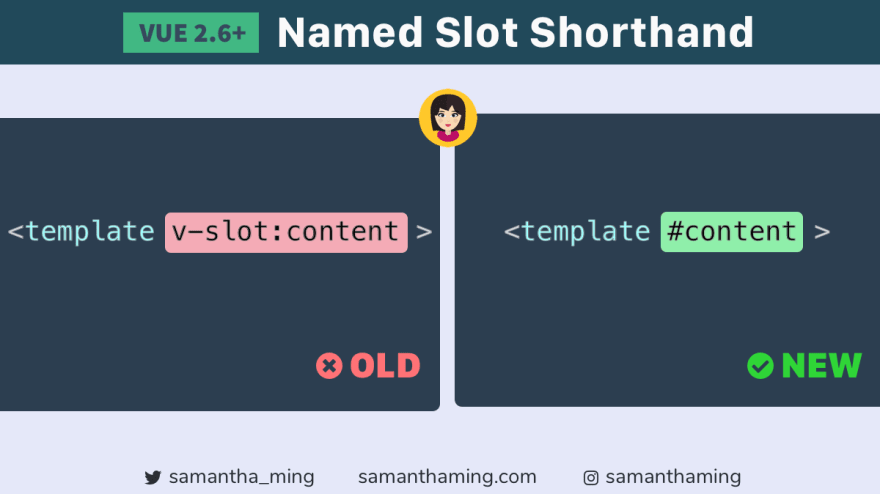
来认识一下我的第一个 Vue 小技巧吧 👋 是时候在我的代码小技巧系列里开始介绍 Vue 了,对吧 😉
使用“#”作为新的命名槽位简写。此功能现已在 Vue 2.6.0 及更高版本中可用👍
<!-- Old -->
<template v-slot:content>

<!-- New -->
<template #content>
Vue 的文档绝对是史上最佳!所以我根本不想跟它比。就像我永远不敢跟塞雷娜·威廉姆斯打网球一样。虽然我的发球也挺厉害的🎾(开玩笑啦,我几乎打不到球😂)。
相反,我打算谈谈我如何在我的网站 samanthaming.com 上使用老虎机 🙋🏻♀️
注意:本文假设读者具备一些 Vue 的基础知识。如果您是 Vue 的完全新手,建议您先阅读 Vue 官方文档:
什么是老虎机?
我喜欢把“插槽”想象成模板。想想你是怎么制作简历的,你通常不会从一张空白文档开始。你会打开谷歌文档,找到一个简历模板,然后以此为基础进行创作。而“插槽”正是如此。它是一个模板,让你能够快速填写空白处,而无需从零开始。超级高效👏
用非开发者的语言解释组件与插槽的区别
我刚开始学习插槽(slots)的时候,非常困惑。我一直以为插槽是独立的东西。但其实并非如此。它是一个 Vue 组件,并额外添加了插槽功能。它是一个功能强大的组件,而且结构清晰。
嗯……我觉得我的解释好像没什么效果,你可能比之前更困惑了😂 让我们用通俗易懂的方式解释一下吧。
把组件想象成你的厨房抽屉。它是一个开放式的储物空间。但开放式空间的问题在于,它很容易变得杂乱无章:

整理工具的一个好方法是使用分隔符,它可以将工具分类整理。而插槽正是如此。它能帮助你将内容清晰地划分成不同的部分👍
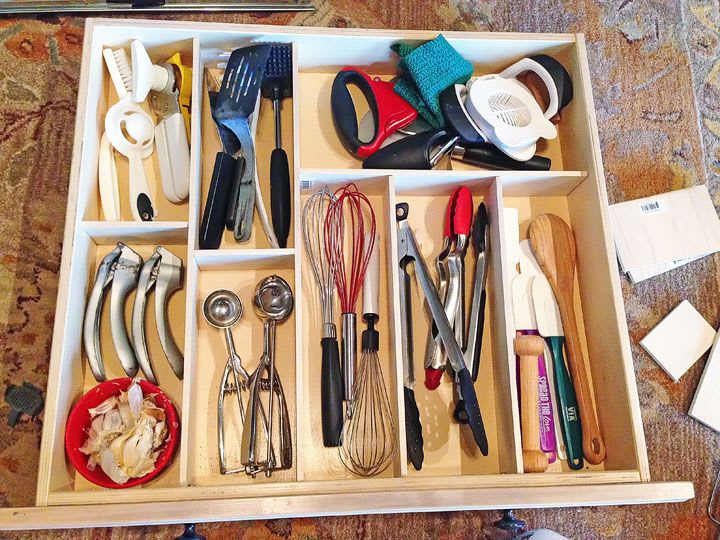
图片来源:https://www.homedit.com/drawer-organizing-tips/
是不是好多了!在我看来,简直就是超级近藤麻理惠✨
我的网站是如何使用老虎机的
我的整个网站都是基于插槽构建的。最典型的例子就是我的文章页面。以下是我所谓的文章页面:
/tidbits/some-code-note-article
# ex. https://www.samanthaming.com/tidbits/82-html-audio-tag/

/blog/some-blog-article
# ex. https://www.samanthaming.com/blog/how-to-ace-the-developer-interview/

/flexbox30/some-flexbox-article
# ex. https://www.samanthaming.com/flexbox30/1-flexbox-intro/
如果你访问这些网站,你会发现它们看起来都很相似。这是因为它们都使用了插槽。那么,接下来我将一步一步地讲解我是如何构建这个网站的。
注:我会尽量简化一下,这样你更容易理解。好了,开始吧!💪
1. 布局
制作老虎机时,最好先规划好布局。这就是我的文章布局。

所以我的布局中有 5 个槽位:
article-headerarticle-contentarticle-footersidebanner
2. 建造插槽
构建插槽与构建组件并无本质区别。本质上,插槽是一种拥有超强功能的组件。以下是该组件的示意图:
<!-- ArticleLayout.vue -->
<template>
  <div>
    <article>
      <slot name="articleHeader" />
      <slot name="articleContent" />
      <slot name="articleFooter" />
    </article>
    <aside>
      <slot name="side" />
    <aside>
    <div>
      <slot name="banner" />
    </div>
  </div>
</template>
3. 占用插槽
好了,我们已经做好了插槽。接下来,让我们往里面放些东西。
<!-- TidbitPage.vue -->
<article-layout>

  <template #articleHeader>
    <h1>I am the header</h1>
  </template>

</article-layout>
好,我们来分析一下这里要做什么。首先,我们调用article-layout组件。然后,我将内容插入到插槽中,方法是用 `<slot>` 标签包裹内容<template>,并用 `<slot name>` 标签引用插槽名称。内容就插入到 `<slot name> #` 标签内部。<template>
4. 最终版
综合起来,大概是这样的:
<!-- TidbitPage.vue -->
<template>
  <article-layout>

    <template #articleHeader>
      <h1>I am the header</h1>
    </template>

    <template #articleContent>
      <p>I am the content</p>
    </template>

    <template #articleFooter>
      <footer>I am the footer</footer>
    </template>

    <template #side>
      <aside>I am the side stuff</aside>
    </template>

    <template #banner>
      <div>I am the banner</div>
    </template>

  </article-layout>
<template>
资源
感谢阅读❤
想了解更多代码技巧,请访问samanthaming.com
| 🌟推特 | 👩🏻💻 SamanthaMing.com |