

诚邀贡献者:开发版夜间模式/主题
 修复了固定导航摘要颜色,使其使用自定义属性。 #2240
由 Mux 主办的 DEV 全球展示挑战赛:展示你的项目!
我们最近为dev.to界面添加了夜间模式选项。您可以在/settings/misc中更改该模式。
进展顺利,但还有一些地方需要更新。如果您发现任何不妥之处,欢迎提交 pull request。
您可以在这里查看标记为“夜间模式”的现有问题。
要进行更改,请在 SCSS 中找到相应的代码行,并在其后添加一行包含 CSS 变量的代码,如下所示:
color: $medium-gray;
color: var(--theme-secondary-color, $medium-gray);
同时采用这两种方法可以确保浏览器兼容性。随着时间的推移,我们或许能够消除重复部分。
以下是我们目前用于夜间模式的 CSS 变量列表:
--theme-background: #161f2b;
--theme-color: #fff;
--theme-secondary-color: #cedae2;
--theme-top-bar-background: #141d26;
--theme-top-bar-color: #fff;
--theme-top-bar-search-background: #424a54;
--theme-top-bar-search-color: #fff;
--theme-top-bar-write-background: #00af81;
--theme-top-bar-write-color: #fff;
--theme-container-background: #27374c;
--theme-container-accent-background: #384b66;
--theme-container-background-hover: #37475c;
--theme-gradient-background: linear-gradient(to right, #293d56 8%, #282833 18%, #293d56 33%);
--theme-container-color: #fff;
--theme-container-box-shadow: none;
--theme-container-border: 1px solid #141d26;
基本上,这些变量可以放置在我们SCSS代码的其余部分中。
目前我们只专注于夜间模式,但我们正在构建这个功能,以便将来能够更动态地定义主题,具体思路如下:
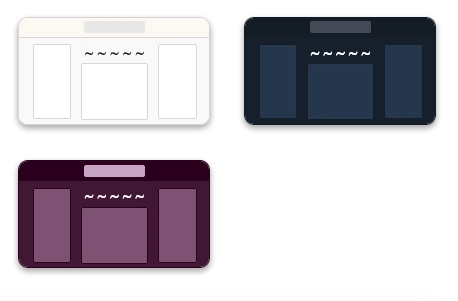
为了在本地进行测试,您需要启动并运行该应用程序,但如果您想在不运行本地应用程序的情况下提交推测性 PR,我们也不会反对。
非常感谢,祝你编程愉快!
文章来源:https://dev.to/devteam/contributors-wanted-night-mode-themes-on-dev-i8n