

Zsh - 安装 Git 插件和主题
检查 Zsh 是否已安装
安装 Oh My Zsh
修改 Oh My Zsh 设置
修改插件
更改主题
应用您的更改
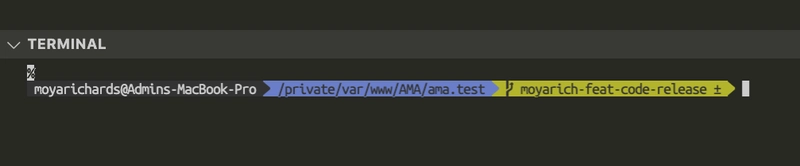
安装字体:
 |
|---|
想让终端显示有关 GIT 的信息吗?如果答案是肯定的 |
检查 Zsh 是否已安装
每台新 Mac 默认都使用 Z shell (Zsh),但如果您的系统没有 Zsh,请使用 Homebrew 安装它。
echo $SHELL
命令的预期结果echo $SHELL:/bin/zsh
使用 Homebrew 安装 zsh(如果尚未安装):
brew install zsh

# Set zsh as your default shell
chsh -s $(which zsh)
安装 Oh My Zsh
打开终端,运行命令
sh -c "$(curl -fsSL https://raw.githubusercontent.com/ohmyzsh/ohmyzsh/master/tools/install.sh)"
修改 Oh My Zsh 设置
zsh 的配置文件名为 .zshrc,位于您的主文件夹中 (~/.zshrc)。
找到该文件并打开它。
open ~/.zshrc
修改插件
要向 shell 添加插件,只需将插件名称添加到配置~/.zshrc文件中的插件数组即可。插件名称之间用空格分隔。
plugins=(git)
更改主题
更改主题就像修改配置文件中的一个字符串一样简单。默认主题是 `<default_theme>` robbyrussell。只需将该值更改为您想要更改的主题,并且不要忘记执行 `.`
ZSH_THEME=pygmalion
应用您的更改
要应用您对主题或插件所做的更改,您需要执行以下操作之一
-
启动一个新的 shell 实例
-
重新加载当前 shell 的配置
#reload configuration
source ~/.zshrc
安装字体:
您必须在终端首选项的“配置文件”下选择字体,zsh 主题才能正确显示。
大多数 Zsh 主题都使用 powerline 字体,所以我们来安装它们。
**安装 Powerline 字体**
# clone
git clone https://github.com/powerline/fonts.git --depth=1
# install
cd fonts
./install.sh
# clean-up a bit
cd ..
rm -rf fonts
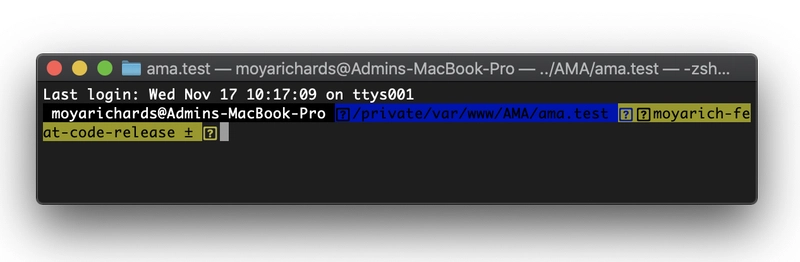
在 Mac OS X 终端中更改字体
 |
|---|
| 无字体的终端图像 |
-
打开终端,然后导航至终端首选项 > 配置文件 > 字体,然后单击
Change按钮。 -
选择
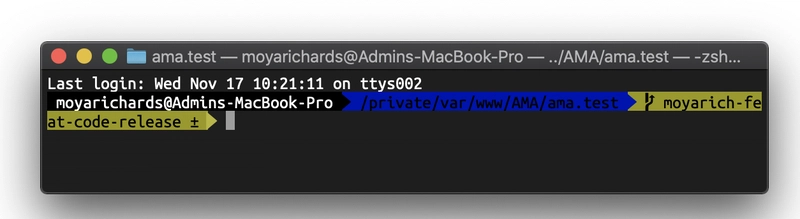
Ubuntu Mono derivative Powerline并设置您喜欢的字体大小。 -
关闭首选项,并退出终端。
 |
|---|
| 预期结果:带有字体的终端图像 |
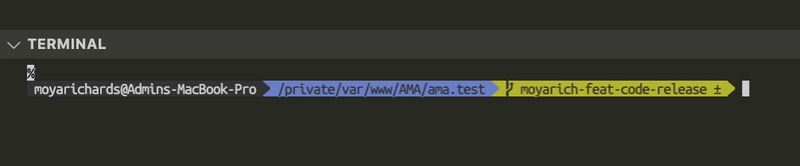
如何在 Visual Studio Code 中更改终端字体?
 |
|---|
| Visual Studio Code 中无字体的终端图像 |
在 VSCode 中打开 settings.json 文件。
在 VSCode 窗口中按下 Ctrl+C command + shift + p,然后搜索settings.json并打开它。
将此行添加到settings.json:
{
  "terminal.integrated.defaultProfile.osx": "zsh",
  "terminal.integrated.fontFamily": "Ubuntu Mono derivative Powerline",
  "terminal.integrated.fontSize": 12
}

 |
|---|
| Visual Studio Code 中带有字体的终端图像 |