TypeScript CLI:自动化构建和部署脚本
由 Mux 主办的 DEV 全球展示挑战赛:展示你的项目!
我想就我之前关于 TypeScript 命令行界面 (CLI) 的帖子做个后续讨论。我的计划是:实现build构建 Vite 应用的命令,以及deploy将应用部署到 Amazon S3 和 AWS CloudFront 的命令。

我们将使用Listr2作为任务运行器来定义构建和部署应用程序所需的步骤。我们将使用execa来运行 Vite 和 AWS 的 CLI 命令。由于我们运行的是 TypeScript 代码,因此可以使用编程 API 而不是 CLI 命令,但为了简单起见,我们还是选择这种方式吧!
#!/usr/bin/env -S pnpm tsx
import chalk from 'chalk';
import { Command } from 'commander';
import { Listr } from 'listr2';
import { $ } from 'execa';

interface Ctx {
  command: 'build' | 'deploy';
}

const tasks = new Listr<Ctx>(
  [
    /**
     * Build tasks
     */
    {
      enabled: (ctx) => ctx.command === 'build' || ctx.command === 'deploy',
      title: 'Build',
      task: (ctx, task): Listr =>
        task.newListr<Ctx>([
          /**
           * Runs `vite build`.
           */
          {
            title: `Run ${chalk.magenta('vite build')}`,
            task: async (ctx, task): Promise<void> => {
              const cmd = $({ all: true })`vite build`;
              cmd.all.pipe(task.stdout());

              await cmd;

              task.output = `Build completed: ${chalk.dim('./dist')}`;
            },
            rendererOptions: { persistentOutput: true },
          },
        ]),
    },
    /**
     * Deploy tasks
     */
    {
      enabled: (ctx) => ctx.command === 'deploy',
      title: 'Deploy',
      task: (ctx, task): Listr =>
        task.newListr<Ctx>([
          /**
           * Runs `aws s3 sync`.
           */
          {
            title: `Run ${chalk.magenta('aws s3 sync')}`,
            task: async (ctx, task): Promise<void> => {
              const build = './dist';
              const bucket = 's3://my-bucket';

              const cmd = $({ all: true })`aws s3 sync ${build} ${bucket} --delete`;
              cmd.all.pipe(task.stdout());

              await cmd;

              task.output = `S3 sync completed: ${chalk.dim(bucket)}`;
            },
            rendererOptions: { persistentOutput: true },
          },
          /**
           * Runs `aws cloudfront create-invalidation`.
           */
          {
            title: `Run ${chalk.magenta('aws cloudfront create-invalidation')}`,
            task: async (ctx, task): Promise<void> => {
              const distributionId = 'E1234567890ABC';

              const cmd = $({ all: true })`aws cloudfront create-invalidation --distribution-id ${distributionId} --paths /* --no-cli-pager`;
              cmd.all.pipe(task.stdout());

              await cmd;

              task.output = `CloudFront invalidation completed: ${chalk.dim(distributionId)}`;
            },
            rendererOptions: { persistentOutput: true },
          },
        ]),
    },
  ],
  {
    rendererOptions: {
      collapseSubtasks: false,
    },
  },
);

const program = new Command()
  .name('monorepo')
  .description('CLI for Monorepo')
  .version('1.0.0');

program
  .command('build')
  .description('Build the monorepo')
  .action(async () => {
    await tasks.run({ command: 'build' });
  });

program
  .command('deploy')
  .description('Deploy the monorepo')
  .action(async () => {
    await tasks.run({ command: 'deploy' });
  });

await program.parseAsync(process.argv);
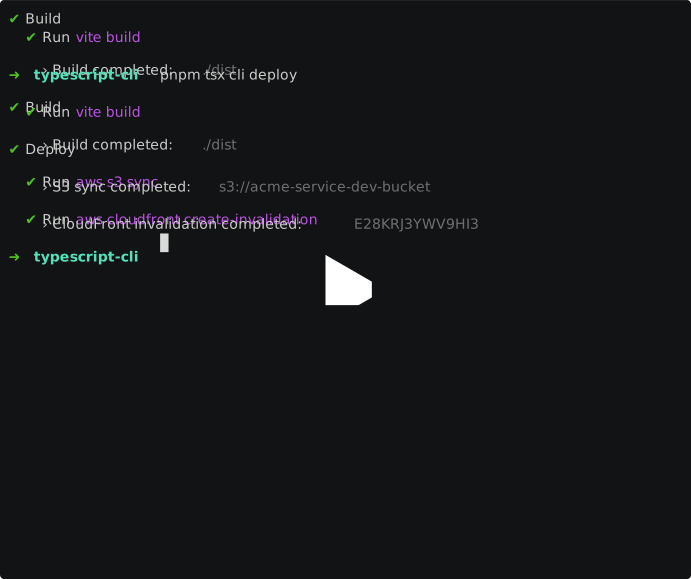
这些tasks任务分为构建任务和部署任务。由于部署需要构建步骤,我们使用enabled属性根据 CLI 命令有条件地启用build或禁用任务deploy。每个任务都会执行相应的 CLI 命令,并将其输出通过管道传输到控制台。
将此脚本保存cli.ts并运行pnpm tsx cli: