

你必须了解的所有 JavaScript/TypeScript 设计模式
结构化模式与最佳实践 API 使用
行为设计模式与最佳实践 API 工作流
全栈 TypeScript 整洁架构计划
由 Mux 主办的 DEV 全球展示挑战赛:展示你的项目!
结构化模式与最佳实践 API 使用
1. 复合模式 + API 获取
最佳实践用例:想象一个由组件
(例如小部件、仪表板) 组成的系统,其中每个小部件都获取自己的 API 数据。
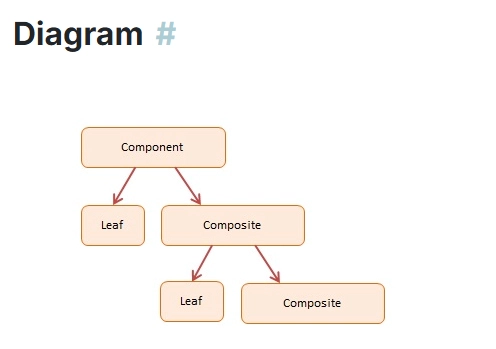
例子:
interface Component {
  render(): Promise<void>;
}

class APITile implements Component {
  constructor(private url: string) {}

  async render() {
    const res = await fetch(this.url);
    const data = await res.json();
    console.log("Tile data:", data);
  }
}

class Dashboard implements Component {
  private children: Component[] = [];

  add(component: Component) {
    this.children.push(component);
  }

  async render() {
    console.log("Rendering Dashboard...");
    await Promise.all(this.children.map(child => child.render()));
  }
}

// Usage
const dashboard = new Dashboard();
dashboard.add(new APITile("https://jsonplaceholder.typicode.com/users/1"));
dashboard.add(new APITile("https://jsonplaceholder.typicode.com/posts/1"));

dashboard.render();
最佳实践:
- 请正确使用async/await——如果需要,请始终将 API 调用包装在 try-catch 中。
- 让每个组件负责自己的数据获取。
2. 装饰器模式 + Axios 日志装饰器
最佳实践用例:在不触及核心逻辑的情况下,使用日志记录、缓存或重试装饰器
包装 API 调用。
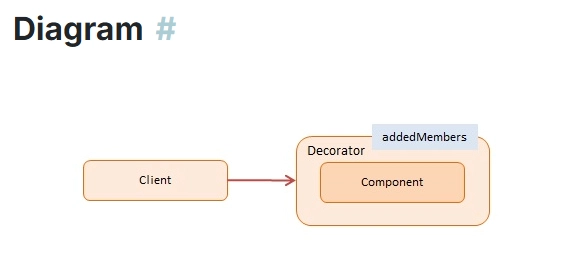
例子:
import axios from 'axios';

interface APIService {
  get(url: string): Promise<any>;
}

class RealAPIService implements APIService {
  async get(url: string) {
    const response = await axios.get(url);
    return response.data;
  }
}

class LoggingDecorator implements APIService {
  constructor(private service: APIService) {}

  async get(url: string) {
    console.log(`[LOG] Fetching: ${url}`);
    const result = await this.service.get(url);
    console.log(`[LOG] Fetched:`, result);
    return result;
  }
}

// Usage
const api = new LoggingDecorator(new RealAPIService());
api.get('https://jsonplaceholder.typicode.com/users/1');
最佳实践:
- 使用装饰器可以透明地增强行为。
- 保持API 服务和横切关注点解耦。
3. 适配器模式 + API 集成
最佳实践用例:
将旧版或第三方 API 响应适配到应用程序的预期格式时。

例子:
interface User {
  id: number;
  fullName: string;
}

class UserAPI {
  async fetchUser(): Promise<any> {
    const response = await fetch('https://jsonplaceholder.typicode.com/users/1');
    return response.json();
  }
}

class UserAdapter {
  constructor(private api: UserAPI) {}

  async getUser(): Promise<User> {
    const data = await this.api.fetchUser();
    return {
      id: data.id,
      fullName: `${data.name}`
    };
  }
}

// Usage
const userAdapter = new UserAdapter(new UserAPI());
userAdapter.getUser().then(user => console.log(user));
最佳实践:
- 使用适配器将你的领域模型与外部 API 解耦。
- 即使外部 API 不一致,也要确保内部接口的一致性。
4. 桥接模式 + 用于多个后端的 API
最佳实践用例:
支持在通用抽象层背后实现多个后端(例如 REST 和 GraphQL)。
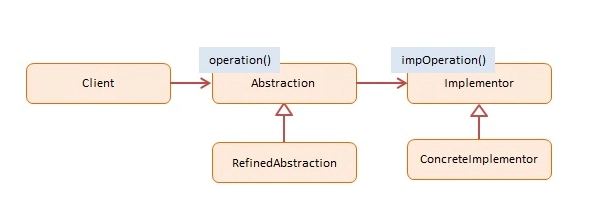
例子:
interface UserService {
  getUser(id: number): Promise<any>;
}

class RestUserService implements UserService {
  async getUser(id: number) {
    const res = await fetch(`https://jsonplaceholder.typicode.com/users/${id}`);
    return res.json();
  }
}

class GraphQLUserService implements UserService {
  async getUser(id: number) {
    const query = `{ user(id: ${id}) { id, name } }`;
    const res = await fetch('/graphql', {
      method: 'POST',
      body: JSON.stringify({ query }),
      headers: { 'Content-Type': 'application/json' }
    });
    const data = await res.json();
    return data.data.user;
  }
}

// Usage
function displayUser(service: UserService, id: number) {
  service.getUser(id).then(console.log);
}

displayUser(new RestUserService(), 1);
// displayUser(new GraphQLUserService(), 1);
最佳实践:
- 使用通用的服务接口。
- 为了便于将来灵活使用,请保持代码与后端无关。
5. 外观模式 + 统一 API 服务
最佳实践用例:
将复杂的多端点操作简化为一个简洁的界面。
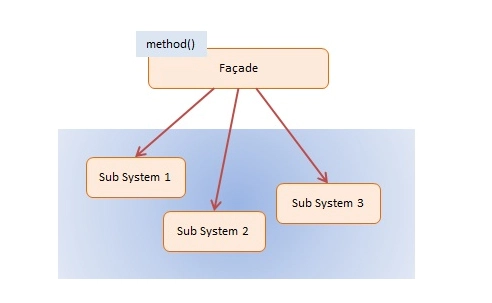
例子:
class UserAPI {
  getUser(id: number) {
    return fetch(`https://jsonplaceholder.typicode.com/users/${id}`).then(res => res.json());
  }
}

class PostAPI {
  getPost(id: number) {
    return fetch(`https://jsonplaceholder.typicode.com/posts/${id}`).then(res => res.json());
  }
}

class APIServiceFacade {
  private userAPI = new UserAPI();
  private postAPI = new PostAPI();

  async getUserWithPost(userId: number, postId: number) {
    const [user, post] = await Promise.all([
      this.userAPI.getUser(userId),
      this.postAPI.getPost(postId)
    ]);
    return { user, post };
  }
}

// Usage
const apiFacade = new APIServiceFacade();
apiFacade.getUserWithPost(1, 1).then(console.log);
最佳实践:
- 向应用层公开简单、高级的 API 。
- 隐藏底层多API编排的复杂性。
6. 代理模式 + 延迟加载 API
最佳实践用例:
仅在需要时延迟加载 API 数据,或缓存结果。
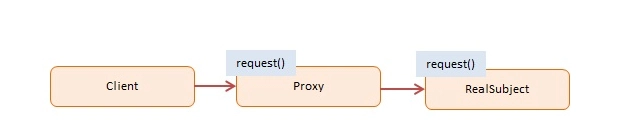
例子:
interface DataService {
  getData(): Promise<any>;
}

class RealDataService implements DataService {
  async getData() {
    const res = await fetch("https://jsonplaceholder.typicode.com/posts/1");
    return res.json();
  }
}

class ProxyDataService implements DataService {
  private realService: RealDataService | null = null;

  async getData() {
    if (!this.realService) {
      console.log("Initializing RealDataService...");
      this.realService = new RealDataService();
    }
    return this.realService.getData();
  }
}

// Usage
const service = new ProxyDataService();
service.getData().then(console.log);
最佳实践:
- 使用代理进行缓存、延迟加载或API 调用访问控制。
- 推迟资源密集型操作,直到必要时才进行。
摘要:简洁的 API 驱动型结构模式
| 图案 | 最佳 API 使用场景 |
|---|---|
| 合成的 | 独立的嵌套组件各自获取各自的 API |
| 装饰师 | 透明日志记录、缓存、API 调用重试机制 |
| 适配器 | 将外部 API 响应适配到您自己的模型中 |
| 桥 | 在 REST、GraphQL 或其他后端之间切换 |
| 正面 | 简化单一服务背后的多端点编排 |
| 代理人 | 在代理服务后延迟加载或缓存 API 数据 |
最终最佳实践(中高级)
- 始终将 API 端点抽象在接口之后(清晰的依赖倒置)
- 使用装饰器/代理进行日志记录、缓存、重试和授权。
- 外观模式和适配器非常适合安全地升级第三方或传统 API。
- 巧妙地使用async/await 和 Promise.all,针对并行请求进行优化
- 将SOLID 原则与这些模式结合使用,可以实现简洁、可扩展的设计。
行为设计模式与最佳实践 API 工作流
行为模式管理对象如何交互、协调以及共同执行操作。在 API 驱动的应用程序中,这通常意味着:
- 处理异步调用
- 连锁动作
- 管理重试、命令、事件系统
- 集中协调
我将展示一些你可以立即应用到项目中的简洁示例。
1. 责任链 + API 重试链
何时使用:
当多个处理程序/处理器有机会处理 API 请求时,例如使用备用 URL 重试。
例子:
interface APIHandler {
  setNext(handler: APIHandler): APIHandler;
  handle(url: string): Promise<any>;
}

class PrimaryAPIHandler implements APIHandler {
  private nextHandler: APIHandler | null = null;

  setNext(handler: APIHandler): APIHandler {
    this.nextHandler = handler;
    return handler;
  }

  async handle(url: string): Promise<any> {
    try {
      const res = await fetch(url);
      if (!res.ok) throw new Error("Primary failed");
      return res.json();
    } catch {
      if (this.nextHandler) return this.nextHandler.handle(url);
      throw new Error("All attempts failed");
    }
  }
}

class FallbackAPIHandler implements APIHandler {
  async handle(url: string): Promise<any> {
    console.log("Trying fallback...");
    const fallbackUrl = url.replace("primary", "fallback");
    const res = await fetch(fallbackUrl);
    if (!res.ok) throw new Error("Fallback failed");
    return res.json();
  }
}

// Usage
const primary = new PrimaryAPIHandler();
primary.setNext(new FallbackAPIHandler());

primary.handle("https://primary.api/users/1")
  .then(data => console.log(data))
  .catch(err => console.error(err));
最佳实践:
- 清晰地链式处理程序——不要在单个方法中硬编码重试逻辑。
- 优雅地处理失败,并提供备用方案。
2. 命令模式 + 排队的 API 调用
何时使用:
将 API 操作封装为命令对象,从而实现排队、撤销或批量处理。
例子:
interface Command {
  execute(): Promise<void>;
}

class FetchUserCommand implements Command {
  constructor(private userId: number) {}

  async execute() {
    const res = await fetch(`https://jsonplaceholder.typicode.com/users/${this.userId}`);
    const data = await res.json();
    console.log("User:", data);
  }
}

class APICommandQueue {
  private queue: Command[] = [];

  addCommand(command: Command) {
    this.queue.push(command);
  }

  async run() {
    for (const command of this.queue) {
      await command.execute();
    }
  }
}

// Usage
const queue = new APICommandQueue();
queue.addCommand(new FetchUserCommand(1));
queue.addCommand(new FetchUserCommand(2));
queue.run();
最佳实践:
- 使用命令队列进行离线队列、重试系统或批量作业处理。
- 保持命令简洁明了,并且内容独立完整。
3. 观察者模式 + API 轮询/WebSocket 事件
何时使用:
当应用程序的多个部分需要对 API 事件或服务器更新做出反应时。
例子:
type Listener = (data: any) => void;

class APIObserver {
  private listeners: Listener[] = [];

  subscribe(listener: Listener) {
    this.listeners.push(listener);
  }

  unsubscribe(listener: Listener) {
    this.listeners = this.listeners.filter(l => l !== listener);
  }

  notify(data: any) {
    this.listeners.forEach(listener => listener(data));
  }

  async pollAPI() {
    setInterval(async () => {
      const res = await fetch("https://jsonplaceholder.typicode.com/posts/1");
      const data = await res.json();
      this.notify(data);
    }, 5000);
  }
}

// Usage
const observer = new APIObserver();
observer.subscribe(data => console.log("Subscriber 1", data));
observer.subscribe(data => console.log("Subscriber 2", data));
observer.pollAPI();
最佳实践:
- 使用观察者进行基于推送的 API 更新(WebSocket、轮询)。
- 将事件源与事件处理程序解耦。
4. 策略模式 + 动态 API 请求策略
何时使用:
在运行时选择不同的 API 请求策略(例如,缓存、无缓存、重试)。
例子:
interface FetchStrategy {
  fetch(url: string): Promise<any>;
}

class NormalFetch implements FetchStrategy {
  async fetch(url: string) {
    const res = await fetch(url);
    return res.json();
  }
}

class CachedFetch implements FetchStrategy {
  private cache: Map<string, any> = new Map();

  async fetch(url: string) {
    if (this.cache.has(url)) {
      console.log("Returning from cache");
      return this.cache.get(url);
    }
    const res = await fetch(url);
    const data = await res.json();
    this.cache.set(url, data);
    return data;
  }
}

class APIContext {
  constructor(private strategy: FetchStrategy) {}

  fetch(url: string) {
    return this.strategy.fetch(url);
  }

  setStrategy(strategy: FetchStrategy) {
    this.strategy = strategy;
  }
}

// Usage
const api = new APIContext(new NormalFetch());
api.fetch("https://jsonplaceholder.typicode.com/users/1").then(console.log);

api.setStrategy(new CachedFetch());
api.fetch("https://jsonplaceholder.typicode.com/users/1").then(console.log);
最佳实践:
- 使用策略实现可切换的 API 请求行为,而无需更改客户端逻辑。
5. 中介者模式 + 集中式 API 协调器
何时使用:
用于集中管理不同服务或组件之间通过 API 调用进行的通信。
例子:
class APIMediator {
  private services: Record<string, any> = {};

  register(name: string, service: any) {
    this.services[name] = service;
  }

  async notify(sender: string, action: string, ...args: any[]) {
    switch (action) {
      case "userFetched":
        this.services["PostService"].fetchPosts(args[0]);
        break;
    }
  }
}

class UserService {
  constructor(private mediator: APIMediator) {}

  async fetchUser(id: number) {
    const res = await fetch(`https://jsonplaceholder.typicode.com/users/${id}`);
    const user = await res.json();
    console.log("User fetched:", user);
    this.mediator.notify("UserService", "userFetched", user.id);
  }
}

class PostService {
  async fetchPosts(userId: number) {
    const res = await fetch(`https://jsonplaceholder.typicode.com/posts?userId=${userId}`);
    const posts = await res.json();
    console.log("Posts fetched:", posts);
  }
}

// Usage
const mediator = new APIMediator();
const userService = new UserService(mediator);
const postService = new PostService();

mediator.register("PostService", postService);

userService.fetchUser(1);
最佳实践:
- 调解员可以防止服务之间的紧密联系——一项服务不需要知道接下来该联系谁。
摘要——何时选择哪种 API 模式
| 图案 | API 工作流程示例 |
|---|---|
| 责任链 | 重试链、回退 API、拦截器 |
| 命令 | API 命令队列,可撤销操作 |
| 观察者 | WebSocket 通知、API 轮询监听器 |
| 战略 | 动态 API 请求行为(缓存、非缓存) |
| 调解员 | 各部门之间的集中协调 |
最终版 API 最佳实践
- 始终使用简洁的接口或类将 API 调用封装在服务中。
- 始终使用async/await,对于并行请求使用Promise.all 。
- 利用重试机制、回退处理程序和观察器构建弹性系统。
- 应用SOLID 原则和模式,使 API 密集型应用程序保持模块化和可测试性。
- 使用中介器和命令队列来处理工作流和后台作业。
全栈 TypeScript 整洁架构计划
技术栈:
- 后端: NestJS(TypeScript,模块化,支持依赖注入)
- 前端: Next.js(React + TypeScript)
- API协议: REST(可选扩展为GraphQL)
- 模式:工厂模式、单例模式、适配器模式、装饰器模式、代理模式、策略模式、责任链模式、命令模式、观察者模式、中介者模式
- 工具: Axios、Prisma 或 TypeORM、Zod/DTO 验证、Swagger、JWT
1. 模块化 API 层(后端 — NestJS)
后端应用模块
src/
  modules/
    user/
      user.module.ts
      user.controller.ts
      user.service.ts
      user.repository.ts
      dto/
      strategy/
      observer/
    post/
    auth/
  common/
    middleware/
    guards/
    interceptors/
    exceptions/
    config/
  main.ts
最佳实践:
- 保持模块独立性
- 实现中间件链
- 集中式错误处理
- 使用DTO + 验证
- 隔离存储库
- 在服务中应用设计模式
2. 示例:API 重试链(责任链)
/common/api/api-retry.handler.ts
export interface APIHandler {
  setNext(handler: APIHandler): APIHandler;
  handle(url: string): Promise<any>;
}

export class PrimaryHandler implements APIHandler {
  private nextHandler: APIHandler | null = null;

  setNext(handler: APIHandler): APIHandler {
    this.nextHandler = handler;
    return handler;
  }

  async handle(url: string) {
    try {
      return await fetch(url).then(res => res.json());
    } catch {
      if (this.nextHandler) return this.nextHandler.handle(url);
      throw new Error('API failed');
    }
  }
}
在你的 NestJS服务中使用它。
3. API 命令队列(命令模式)
/common/commands/api-command.ts
export interface Command {
  execute(): Promise<void>;
}

export class GetUserCommand implements Command {
  constructor(private userService: UserService, private id: number) {}

  async execute() {
    const user = await this.userService.getUserById(this.id);
    console.log('User fetched:', user);
  }
}
使用队列来处理这些任务,以便进行后台作业或顺序工作流程。
4. API观察者服务
/modules/post/post.observer.ts
type Listener = (data: any) => void;

export class PostObserver {
  private listeners: Listener[] = [];

  subscribe(listener: Listener) {
    this.listeners.push(listener);
  }

  notify(data: any) {
    this.listeners.forEach(listener => listener(data));
  }
}
创建新帖子时通知其他模块。
5. 授权策略模式
/modules/auth/strategy/jwt.strategy.ts
@Injectable()
export class JWTStrategy extends PassportStrategy(Strategy) {
  constructor(private configService: ConfigService) {
    super({
      jwtFromRequest: ExtractJwt.fromAuthHeaderAsBearerToken(),
      secretOrKey: configService.get('JWT_SECRET'),
    });
  }

  async validate(payload: any) {
    return { userId: payload.sub, email: payload.email };
  }
}
最佳实践:
- 解耦认证策略(JWT、会话、OAuth)
- 保持身份验证策略可插拔
6. 错误处理(代理 + 装饰器)
全局异常筛选器
@Catch()
export class AllExceptionsFilter implements ExceptionFilter {
  catch(exception: any, host: ArgumentsHost) {
    const ctx = host.switchToHttp();
    const response = ctx.getResponse<Response>();

    response.status(exception.status || 500).json({
      statusCode: exception.status || 500,
      message: exception.message || 'Unexpected error occurred',
    });
  }
}
最佳实践:
- 集中化错误格式化
- 使用拦截器或装饰器进行日志记录和验证
7. 中间件、守卫、拦截器
/common/middleware/logging.middleware.ts
@Injectable()
export class LoggingMiddleware implements NestMiddleware {
  use(req: Request, res: Response, next: NextFunction) {
    console.log(`[${req.method}] ${req.originalUrl}`);
    next();
  }
}
/common/guards/auth.guard.ts
@Injectable()
export class AuthGuard implements CanActivate {
  canActivate(context: ExecutionContext) {
    const request = context.switchToHttp().getRequest();
    return !!request.user;
  }
}
最佳实践:
- 派卫兵保护路线
- 使用拦截器进行请求/响应转换
- 在生命周期的早期应用中间件链
8. Next.js 前端架构
/services/userService.ts
import axios from 'axios';

export const userService = {
  async getUser(id: number) {
    const res = await axios.get(`/api/users/${id}`);
    return res.data;
  }
}
/hooks/useUser.ts
import { useEffect, useState } from 'react';
import { userService } from '../services/userService';

export function useUser(id: number) {
  const [user, setUser] = useState(null);

  useEffect(() => {
    userService.getUser(id).then(setUser);
  }, [id]);

  return user;
}
最佳实践:
- 保持服务隔离
- 使用React Hooks处理有状态 API 数据
- 使用装饰器进行日志记录,或在服务上使用重试包装器。
9. 全栈集成模式
| 问题 | 模式解决方案 |
|---|---|
| API重试/回退 | 责任链 |
| 中央事件管理 | 调解员 + 观察员 |
| 授权策略 | 策略模式 |
| API 排队和批处理 | 命令模式 |
| 模块化服务协调 | 中介模式 |
| 惰性或缓存 API 调用 | 代理 + 装饰器 |
| 错误处理 + 日志记录 | 拦截器 + 全局过滤器 |
| 可定制请求 | 装饰器 + 适配器 |
| 前端服务隔离 | 立面 + 单行 |
文章来源:https://dev.to/tak089/typescript-design-patterns-5hei