

用 JavaScript 构建一个聊天应用程序
由 Mux 主办的 DEV 全球展示挑战赛:展示你的项目!
为什么要开发聊天应用
学习新事物的一个简单方法是尝试解决问题。就我而言,我想构建一个 [Node JS] 应用程序 ( https://nodejs.org/en/ ) 并将其部署到云端(例如Heroku,但我后来放弃了它)。

问题是这样的 >> 我的大多数朋友都在不同的公司工作,为了在电脑上沟通,我们尝试过像 Hangouts 这样的应用……但大多数公司都屏蔽了这些应用。当时(2014 年 8 月)WhatsApp Web 还没有上线,所以我决定通过学习 Node.js 和 socket.io 来解决这个问题。
入门

- 安装 NodeJS 并使用以下 package.json 文件创建一个新的 Node 项目。
{
  "name": "Chat-App",
  "version": "1.0.0",
  "description": "",
  "main": "index.js",
  "scripts": {
    "test": "echo \"Error: no test specified\" && exit 1"
  },
  "author": "",
  "license": "ISC",
  "dependencies": {
    "express": "^4.13.3",
    "moment": "^2.12.0",
    "socket.io": "^1.3.7"
  }
}
设置Node.js文件以设置应用程序
var PORT = process.env.PORT || 3000;
var express = require("express");
var app = express(); // express app which is used boilerplate for HTTP
var http = require("http").Server(app);
// expose the folder via express thought
app.use(express.static(__dirname + '/public'));
http.listen(PORT, function() {
  console.log("server started");
});
为用户界面设置客户端公共文件夹。
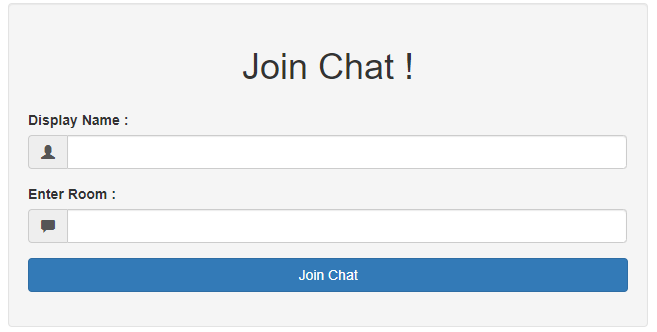
- 添加index.html 文件以启动着陆页
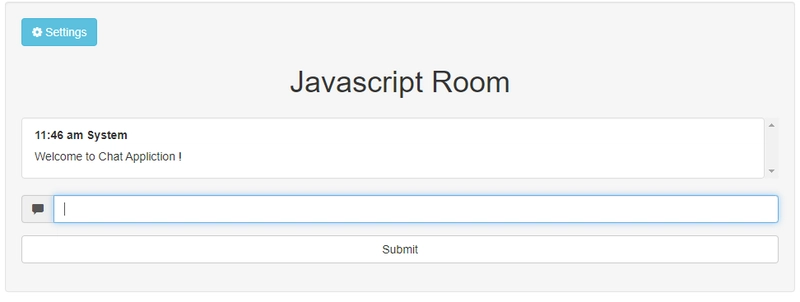
- 添加chat.html 文件,以便在登录聊天窗口后打开聊天界面。
- 添加app.js以显示从 Node 服务器接收的消息(使用 Socket.io)。
套接字通信
- 显示欢迎信息
当用户加入聊天室时,系统会向他显示登录信息。
  socket.emit("message", {
    text: "Welcome to Chat Appliction !",
    timestamp: moment().valueOf(),
    name: "System"
  });
server.js
此外,如果其他人加入了房间,客户端也必须发出一个事件。
 socket.on("connect", function() {
   console.log("Connected to Socket I/O Server!");
   console.log(name + " wants to join  " + room);
   // to join a specific room
   socket.emit('joinRoom', {
     name: name,
     room: room
   });
 });
app.js
服务器现在已将此消息广播给该房间内的所有用户。
  socket.on('joinRoom', function(req) {
    clientInfo[socket.id] = req;
    socket.join(req.room);
    //broadcast new user joined room
    socket.broadcast.to(req.room).emit("message", {
      name: "System",
      text: req.name + ' has joined',
      timestamp: moment().valueOf()
    });

  });
server.js
- 当用户正在输入时显示通知
当用户在消息字段中输入内容时,客户端会发出该事件:
 $('#messagebox').keyup(function() {
   console.log('happening');
   typing = true;
   $("#icon-type").removeClass();
   //console.log("typing typing ....");
   //socket.emit('typing', 'typing...');
   socket.emit('typing', {
     text: name + " is typing ..."
   });
   clearTimeout(timeout);
   timeout = setTimeout(timeoutFunction, 1000);
 });
app.js
服务器随后广播此通知:
  socket.on('typing', function(message) { // broadcast this message to all users in that room
    socket.broadcast.to(clientInfo[socket.id].room).emit("typing", message);
  });
server.js
- 当用户发送消息时,当用户提交消息表单后,经过输入内容清理后,消息将被发送到服务器。
var $form = $("#messageForm");
var $message1 = $form.find('input[name=message]');
$form.on("submit", function(event) {
event.preventDefault();
var msg = $message1.val();
//prevent js injection attack
msg = msg.replace(/</g, "<").replace(/>/g, ">").trim();
if (msg === "") return -1; //empty messages cannot be sent
socket.emit("message", {
text: msg,
name: name
});
// show user messageForm
var $messages = $(".messages");
var $message = $('<li class = "list-group-item"></li>');
var momentTimestamp = moment().format("h:mm a");
// $(".messages").append($('<p>').text(message.text));
$message.append("<strong>" + momentTimestamp + " " + name + "</strong>");
//$message.append("<p>" + $message1.val()+ "</p>");
$message.append($("<p>", {
class: "mymessages",
text: $message1.val()
}));
$messages.append($message);
$message1.val('');
// manage autoscroll
var obj = $("ul.messages.list-group");
var offset = obj.offset();
var scrollLength = obj[0].scrollHeight;
// offset.top += 20;
$("ul.messages.list-group").animate({
scrollTop: scrollLength - offset.top
});
});
app.js
服务器监听上述客户端事件,然后在检查输入消息是否为预定义命令(例如,@currentUsers 列出当前聊天室中的用户)后,广播接收到的消息。
  socket.on("message", function(message) {
    console.log("Message Received : " + message.text);
    // to show all current users
    if (message.text === "@currentUsers") {
      sendCurrentUsers(socket);
    } else {
      //broadcast to all users except for sender
      message.timestamp = moment().valueOf();
      //socket.broadcast.emit("message",message);
      // now message should be only sent to users who are in same room
      socket.broadcast.to(clientInfo[socket.id].room).emit("message", message);
      //socket.emit.to(clientInfo[socket.id].room).emit("message", message);
    }
server.js
- 检查消息是否由用户发送
在客户端,当收到消息时,会检查用户是否打开了聊天窗口。如果聊天窗口已打开,则表示消息已被查看,此时会发出一个事件。
// notify, only when the user has not open chat view
   if (document[hidden]) {
     notifyMe(message);
     // also notify server that user has not seen messgae
     var umsg = {
       text: name + " has not seen message",
       read: false
     };
     socket.emit("userSeen", umsg);
   } else {
     // notify  server that user has seen message
     var umsg = {
       text: name + " has seen message",
       read: true,
       user: name
     };
     socket.emit("userSeen", umsg);
   }
 });
app.js
当聊天窗口最小化时,用户会收到通知。 如果用户点击通知窗口,则会发出“用户已读”消息,蓝色勾号(用户未读消息)会变为绿色(用户已读消息)。
function notifyMe(msg) {
   // Let's check if the browser supports notifications
   if (!("Notification" in window)) {
     alert("This browser does not support desktop notification,try Chromium!");
   }

   // Let's check whether notification permissions have already been granted
   else if (Notification.permission === "granted") {
     // If it's okay let's create a notification
     //  var notification = new Notification(msg);
     var notification = new Notification('Chat App', {
       body: msg.name + ": " + msg.text,
       icon: '/images/apple-icon.png' // optional
     });
     notification.onclick = function(event) {
       event.preventDefault();
       this.close();
       // assume user would see message so broadcast userSeen event
       var umsg = {
         text: name + " has seen message",
         read: true,
         user: name
       };
       socket.emit("userSeen", umsg);
       //window.open('http://www.mozilla.org', '_blank');
     };
   }
   // Otherwise, we need to ask the user for permission
   else if (Notification.permission !== 'denied') {
     Notification.requestPermission(function(permission) {
       // If the user accepts, let's create a notification
       if (permission === "granted") {
         var notification = new Notification('Chat App', {
           body: msg.name + ": " + msg.text,
           icon: '/images/apple-icon.png' // optional
         });
         notification.onclick = function(event) {
           event.preventDefault();
           this.close();
           var umsg = {
             text: name + " has seen message",
             read: true,
             user: name
           };
           socket.emit("userSeen", umsg);
           // assume user would see message so broadcast userSeen event

         };
       }
     });
   }

   // At last, if the user has denied notifications, and you
   // want to be respectful there is no need to bother them any more.
 }
app.js
当用户看到该消息时,服务器端需要收到通知。
 // to check if user seen Message
  socket.on("userSeen", function(msg) {
    socket.broadcast.to(clientInfo[socket.id].room).emit("userSeen", msg);
    //socket.emit("message", msg);

  });
server.js
- 部署到云端
现在需要将代码部署到云端,这可以通过Heroku轻松实现。Heroku 一次可以免费部署五个应用程序。
结论
当我把这个分享给朋友们时,我真的非常兴奋,我们可以通过一个不受任何组织政策限制的网页应用聊天。
这是一个已经做了四年的项目,当我了解到dev.to之后,我决定把我的学习成果分享在这里。
为了改进这款聊天应用,可以添加以下功能:
- 使用 OAuth2 实现身份验证
- 增加更改用户名和添加个人资料图片的功能。
- 添加数据库以保存聊天记录。
- 其他任何功能……
源代码:https://github.com/bhupendra1011/Chat-App
演示:https://bhupendra1011.herokuapp.com/
文章来源:https://dev.to/bhupendra1011/build-a-chat-application-in-javascript-194p