

如何在 Heroku 上部署 Flask 应用。
大家好,在本文中,我将向大家展示如何在 Heroku 上部署 Flask 应用。请按照以下步骤将您的 Python Flask 应用部署到 Heroku。
先决条件:
- 你的系统中必须安装了Git 。
- 你的系统中必须安装了Python 。
步骤一:安装 Heroku CLI
% brew tap heroku/brew && brew install heroku
以上命令适用于 Mac 系统,其他系统用户请点击此处。
步骤二:创建 Python 虚拟环境
% python3 -m venv foldername
% source foldername/bin/activate
% cd foldername
步骤 3:安装 Flask 和 Gunicorn
% pip3 install flask gunicorn
步骤四:创建应用文件夹和一个简单的 Python 应用
% mkdir app
% cd app
% vi main.py
main.py
from flask import Flask
app= Flask(__name__)
@app.route('/')
def index():
  return "<h1>Welcome to CodingX</h1>"
步骤五:创建应用程序入口点 wsgi.py
% cd ../
% vi wsgi.py
wsgi.py
from app.main import app
if __name__ == "__main__":
  app.run()
步骤 6:在本地系统上运行应用程序
% python wsgi.py
步骤 7:创建 requirements.txt 和 Procfile 文件
% pip3 freeze
% pip3 freeze > requirements.txt
% vi Procfile
配置文件
web: gunicorn wsgi:app
步骤 8:在 Heroku 上创建应用
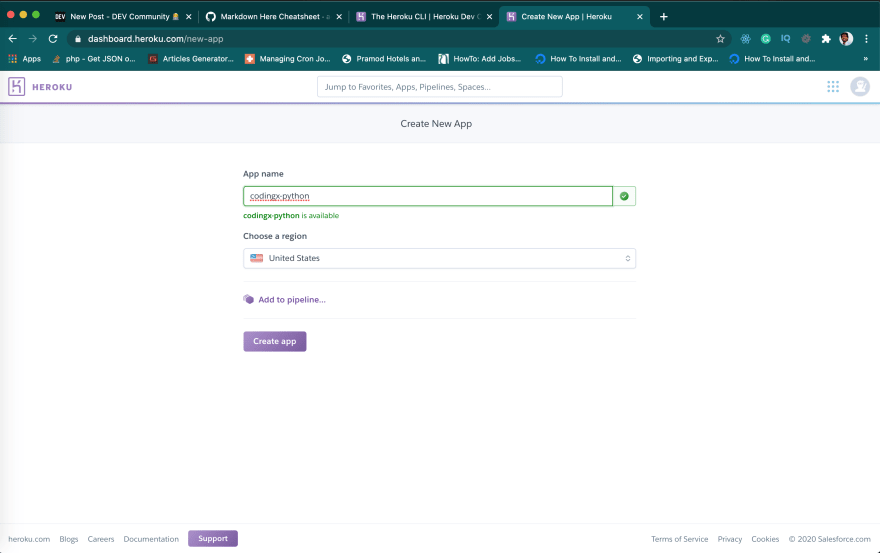
步骤 9:将应用部署到 Heroku
% heroku login
% git init
% heroku git:remote -a codingx-python
% git add.
% git commit -am "First python app"
% git push heroku master
步骤 10:在浏览器中打开您的应用程序
https://app-name.herokuapp.com
完成了!
请订阅我的 YouTube 频道:https://youtube.com/c/codingx
文章来源:https://dev.to/techparida/how-to-deploy-a-flask-app-on-heroku-heb