

使用 Netlify Serverless Functions 和 GitHub 为 Gatsby 添加注释
我希望在 Gatsby 网站上接收用户评论,并将它们存储在 GitHub 上。也就是说,我希望评论直接写入comments.json我仓库中一个名为 `comments` 的文件中。因此,我可以使用像 `
import comments from "../comments.json"
我的网站代码中没有使用任何数据库,也没有第三方插件发出数十个网络请求。
Netlify 无服务器函数让我能够使用 GitHub 的 API,根据用户提交的评论数据来更新这个仓库。它还隐藏了我的 API 凭据。
我构建了一个原型——healeycodes/gatsby-serverless-comments——它使用了以下流程:
- 👩 用户输入评论并点击提交。
- ⚙️ 无服务器函数接收数据并调用 GitHub 的 API。
- 🔧 它读取现有内容
comments.json,追加新评论,然后保存。 - 🚧 新的提交会触发 Netlify 构建。
- ✅ 新版网站已上线!
新评论会在用户首次点击后约 30 秒 ⏰ 可见。
无服务器函数
让我们仔细分析一下接收用户评论的无服务器函数。它将使用一些常量,这些常量可以通过 Netlify 网站的“设置” → “部署”进行设置。
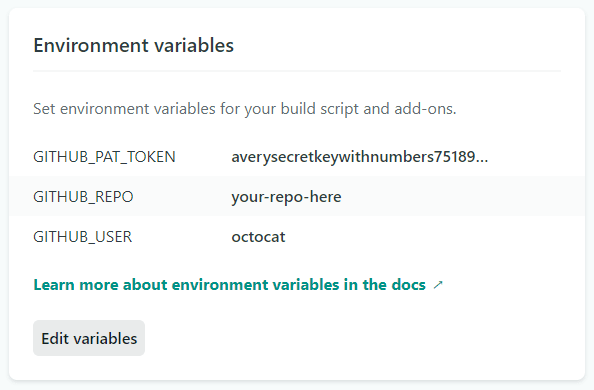
该函数是用Node.js编写的,并导出一个函数,这在Netlify的文档handler中有详细说明。
// comment.js

const fetch = require("node-fetch")

const auth = process.env.GITHUB_PAT_TOKEN
const repo = process.env.GITHUB_REPO
const user = process.env.GITHUB_USER
const api =
  "https://api.github.com/repos/" +
  user +
  "/" +
  repo +
  "/contents/src/comments.json"

exports.handler = async function(event, context, callback) {
  // Use the Contents API from GitHub
  // https://developer.github.com/v3/repos/contents/#get-contents
  const existingFile = JSON.parse(
    await fetch(api, {
      headers: {
        // Pass some kind of authorization
        // I'm using a personal access token
        Authorization:
          "Basic " + Buffer.from(user + ":" + auth)
            .toString("base64"),
      },
    }).then(res => res.text())
  )

  // The file's content is stored in base64 encoding
  // Decode that into utf-8 and then parse into an object
  let comments = JSON.parse(
    Buffer.from(existingFile.content, "base64").toString("utf-8")
  )

  // This is the user submitted comment
  // Perhaps we would do some validation here
  const newComment = JSON.parse(event.body)

  // Update the comments
  comments.push({
    author: newComment.author,
    email: newComment.email,
    message: newComment.message,
    date: Date.now(),
  })

  // Use the Contents API to save the changes
  const res = await fetch(api, {
    method: "PUT",
    headers: {
      Authorization:
        "Basic " + Buffer.from(user + ":" + auth).toString("base64"),
    },
    body: JSON.stringify({
      message: "New comment on " + new Date().toDateString(),

      // Turn that object back into a string and encoded it
      content: Buffer(JSON.stringify(comments)).toString("base64"),

      // Required: the blob SHA of the existing file
      sha: existingFile.sha,
    }),
  }).then(res => res.text())

  callback(null, {
    statusCode: 204,
  })
}
潜在缺点
如果有人在你的网站上发布垃圾评论怎么办?那你很快就会达到构建时间限制。
此外,在 API 调用之间还有一个很小的窗口期(10-100 毫秒),在此期间,两个人可以同时发表评论,较早的评论将被覆盖。
解决这两个问题的方法是修改我们的无服务器函数,使其在提交更改后自动创建一个拉取请求。虽然现在评论会延迟显示,但我们避免了恶意行为,并且可以筛选评论的适宜性。我们不会丢失任何数据,但可能偶尔需要处理合并冲突。
我的 Netlify 评测
Netlify 非常看好Jamstack应用。如果是我,我也会这么做。
他们的开发者体验 (DX) 目前绝对是顶尖水平。我很少看到哪个产品能像 Netlify 那样“开箱即用”,而且实际体验也确实如此!最近,Netlify 的快速部署功能让我能够在几分钟内迅速发布更改,修复线上问题。
这对他们未来的成功意味着什么?Tiny.cloud指出:
数字化转型(DX)非常重要。开发人员在产品的推广中可以发挥巨大作用,尤其考虑到他们很可能会就组织应该投资哪些工具提供指导,尽管最终决定通常是在高管层面做出的。
Netlify 的开发者工具让我可以轻松创建像你现在看到的这种原型,而无需进行任何配置。我的 Gatsby 网站托管在他们慷慨的免费套餐中,迁移和托管过程都非常顺利。
我推荐他们。
已有 300 多人订阅了我的编程和个人成长简讯!
我在推特上发布关于科技的内容,账号是@healeycodes。
文章来源:https://dev.to/healeycodes/adding-comments-to-gatsby-with-netlify-serverless-functions-github-58ch