

Vue Router - 完整指南
由 Mux 主办的 DEV 全球展示挑战赛:展示你的项目!
最初发布于nordschool。
如果你正在使用 Vue,那么你很可能需要用到 Vue Router。让我们一起来看看你会用到的所有常见用例吧!👌
在本教程中,我们将介绍最基本的路由概念以及更高级的模式,例如受保护的路由和动画路由。
准备好了吗?开始吧!💪
概述
我们先从大局来看,然后再深入探讨。
项目结构
我创建了一个小型 Vue 项目来演示 Vue Router 的不同功能。该项目使用 vue-cli 进行了标准配置。
├── README.md
├── babel.config.js
├── package.json
├── postcss.config.js
├── public
│   ├── favicon.ico
│   └── index.html
├── src
│   ├── App.vue
│   ├── assets
│   │   └── logo.png
│   ├── components
│   │   └── HelloWorld.vue
│   ├── main.js
│   ├── router.js
│   └── views
│       ├── Animated.vue
│       ├── Dynamic.vue
│       ├── Guarded.vue
│       ├── Home.vue
│       ├── LazyLoaded.vue
│       ├── Login.vue
│       ├── Nested.vue
│       └── WithProps.vue
└── yarn.lock
我们将主要处理router.js,但也会涉及不同的视图。
以下是主要路由器配置:
import Vue from 'vue';
import Router from 'vue-router';

// All the views
import Home from './views/Home.vue';
import Nested from './views/Nested.vue';
import Animated from './views/Animated.vue';
import Dynamic from './views/Dynamic.vue';
import Guarded from './views/Guarded.vue';
import Login from './views/Login.vue';
import WithProps from './views/WithProps.vue';

Vue.use(Router);

export default new Router({
  mode: 'history',
  routes: [
    {
      path: '/',
      name: 'home',
      component: Home,
      children: [
        {
          name: 'nested-home',
          path: 'nested',
          component: Nested
        }
      ]
    },
    {
      path: '/animated',
      component: Animated
    },
    {
      path: '/dynamic/:id',
      component: Dynamic
    },
    {
      path: '/login',
      component: Login
    },
    {
      path: '/very-secure',
      component: Guarded,
      beforeEnter: (to, from, next) => {
        let isAuthenticated;
        try {
          isAuthenticated = sessionStorage.getItem('authenticated');
        } catch (error) {
          return next({ path: '/login' });
        }

        return isAuthenticated ? next() : next({ path: '/login' });
      }
    },
    {
      path: '/with-props',
      component: WithProps,
      props: { newsletterPopup: true }
    },
    {
      path: '/lazy-loaded',
      name: 'lazyLoaded',
      // route level code-splitting
      // this generates a separate chunk (lazyLoaded.[hash].js) for this route
      // which is lazy-loaded when the route is visited.
      component: () =>
        import(/* webpackChunkName: "lazyLoaded" */ './views/LazyLoaded.vue')
    }
  ]
});
以下是我们在启动 Vue 应用时添加路由器的方法:
// src/main.js
import Vue from 'vue';
import App from './App.vue';
import router from './router';

new Vue({
  router,
  render: h => h(App)
}).$mount('#app');
现在让我们深入研究一下,看看这些路由器配置的每个部分究竟有什么作用。🧐
基本要素
使用道具
路由配置示例:
// src/router.js
{
  path: "/with-props",
  component: WithProps,
  props: { newsletterPopup: true }
}
一个简单的视图,从路由器获取 props:
// src/views/WithProps.vue
<template>
  <div class="home">
    <h1>This is a view with props coming from the router!</h1>
    <h2>Look at that - {{ $props.newsletterPopup }}</h2>
  </div>
</template>

<script>
export default {
  props: {
    newsletterPopup: Boolean
  }
};
</script>
您可能已经注意到,其中一些路由定义了名称。您可能会想知道,这些名称是如何工作的?
命名路线
路线名称提供了一种无需依赖路径即可导航到路线的替代方法。
路由配置示例:
// src/router.js
{
  path: "/",
  component: Home,
  children: [
    {
      name: "nested-home",
      path: "nested",
      component: Nested
    }
  ]
}
以下是如何在路由器链路中使用它的方法
<router-link :to="{ name: 'nested-home' }">Nested</router-link> |
你可能会想……“嗯,路由器链接?😕”
路由器链路
路由器链接可以帮助你进行导航,它就像锚点链接一样,但功能更强大。
其底层实现是渲染一个带有正确 href 属性的锚标签。此外,当目标路由处于活动状态时,router-link组件会自动获取 CSS 类。
最佳实践是坚持使用路由器链接而不是普通的锚链接。
想了解更多?您可以点击这里深入了解。
你注意到这个路由器视图功能了吗?
路由器视图
简单来说,这是一个占位符,它会被动态地替换为与你的路由匹配的组件。
<router-view></router-view>
以下是来自 Vue 官方文档的描述:
router -view组件是一个功能性组件,用于渲染给定路径的匹配组件。
在路由视图中渲染的组件也可以包含自己的路由视图,该路由视图将为嵌套路径渲染组件。
任何非名称属性都会传递给渲染的组件,但大多数情况下,每个路由的数据都包含在路由的参数中。
接下来,我们来谈谈嵌套路由……
嵌套路由
需要嵌套路由?很简单!
你可以为路由定义子路由。
路由配置示例:
// src/router.js
{
  path: "/",
  component: Home,
  children: [
    {
      name: "nested-home",
      path: "nested",
      component: Nested
    }
  ]
}
这里有一个包含另一条嵌套路由的视图,因此称为路由视图。
// src/views/Home.vue
<template>
  <div class="home">
    <img alt="Vue logo" src="../assets/logo.png" />
    <HelloWorld msg="Welcome to Your Vue.js App" />
    <router-view />
  </div>
</template>

<script>
// @ is an alias to /src
import HelloWorld from "@/components/HelloWorld.vue";

export default {
  name: "home",
  components: {
    HelloWorld
  }
};
</script>
以及嵌套视图本身:
// src/views/Nested.vue
<template>
  <div class="about">
    <h1>This is a nested view, Helloww!</h1>
  </div>
</template>
如果URL中包含动态片段呢?例如,如果我有用户ID或其他类型的动态字段呢?
动态路由和路由器参数
带有动态段:id的路由配置示例
// src/router.js
{
  path: "/dynamic/:id",
  component: Dynamic
}
您可以通过以下方式在组件中访问动态参数:
// src/views/Dynamic.vue
<template>
  <div>
    <h1>This is a very dynamic page, here is the id:</h1>
    <h2 class="highlight">{{ $route.params.id }}</h2>
    <span>Its almost like magic right?</span>
  </div>
</template>

<style lang="scss" scoped>
.highlight {
  font-weight: bold;
}
</style>
这里是休息的好地方!要不要站起来伸展一下?试试吧!我等你回来哦。👍
先进的
好了,既然你已经了解了所有基础知识,让我们来看看更高级的内容吧。
路线守卫
以下是如何创建只有经过身份验证的用户才能访问的受保护路由:
// src/router.js
{
  path: "/login",
  component: Login
},
{
  path: "/very-secure",
  component: Guarded,
  beforeEnter: (to, from, next) => {
    let isAuthenticated;
    try {
      isAuthenticated = sessionStorage.getItem("authenticated");
    } catch (error) {
      return next({ path: "/login" });
    }

    return isAuthenticated ? next() : next({ path: "/login" });
  }
}
// src/views/Guarded.vue
<template>
  <div class="about">
    <h1>This is a nested view, Helloww!</h1>
  </div>
</template>
// src/App.vue
methods: {
  authenticate() {
    sessionStorage.setItem("authenticated", true);
  },
  logout() {
    sessionStorage.removeItem("authenticated");
  }
}
请记住,这只是一个简单的示例,在实际应用中您可能需要添加更多层检查。😁
外卡路线
以下是如何添加通配符路由以捕获未知路由的方法。
{
  // will match everything
  path: '*';
  component: NotFound;
}
你可以使用这种方法显示“未找到 404”页面。💯
观察路线
如果你想对路由变化做出反应呢?你可以给$route对象添加一个特定的监听器。
<script>
export default {
  watch: {
    $route(to, from) {
      console.log("to", to);
      console.log("from", from);
      // react to route changes...
    }
  }
};
</script>
既然说到这儿了,我们就来谈谈路由对象吧。
路由对象
以下是路由对象的样子:
interface RouteConfig = {
  path: string,
  component?: Component,
  name?: string, // for named routes
  components?: { [name: string]: Component }, // for named views
  redirect?: string | Location | Function,
  props?: boolean | Object | Function,
  alias?: string | Array<string>,
  children?: Array<RouteConfig>, // for nested routes
  beforeEnter?: (to: Route, from: Route, next: Function) => void,
  meta?: any,

  // 2.6.0+
  caseSensitive?: boolean, // use case sensitive match? (default: false)
  pathToRegexpOptions?: Object // path-to-regexp options for compiling regex
}
想了解更多?请查看文档。
您是否有更特殊的使用场景?让我们来看看如何使用路由器选项。
路由器选项
您可以根据自己的喜好定制路由器。
以下是初始化路由器时的一些配置选项。
// src/router.js

new Router({
  mode: 'history', //  the router mode
  routes: [
      // Routes go here
  ],
  base: '/', // The base URL of the app
  linkActiveClass: 'router-link-active', // <router-link> default active class
  linkExactActiveClass: 'router-link-exact-active', // <router-link> default active class for exact matches
  scrollBehavior (to, from, savedPosition) {
    // native-like behavior when navigating with back/forward buttons
    if (savedPosition) {
      return savedPosition
    } else {
      return { x: 0, y: 0 }
    }
  }‚
  parseQuery: q => q, // custom query string parse
  fallback: true, // whether the router should fallback to hash mode
  });
您可以通过阅读文档了解更多信息:
我知道这篇教程很长,请耐心看完,我们马上就结束了!😌
路由器转换
想为路由组件添加过渡效果吗?
在 Vue 中添加简单的过渡效果很容易,只需将你的组件包裹在过渡组件中即可。
// src/views/Animated.vue
<template>
  <transition name="fade">
    <div>
      <h1>This is a animated page, it fades away slowly...</h1>
    </div>
  </transition>
</template>


<style lang="scss" scoped>
.fade-enter-active,
.fade-leave-active {
  transition: opacity 2s;
}

.fade-enter,
.fade-leave-to {
  /* .fade-leave-active below version 2.1.8 */
  opacity: 0;
}
</style>
您可以点击此处阅读更多关于Vue过渡和动画的内容。
懒加载路线
延迟加载是提高应用程序性能的一种有效技术。以下是一个示例:
// src/router.js
{
  path: "/lazy-loaded",
  name: "lazyLoaded",
  // route level code-splitting
  // this generates a separate chunk (lazyLoaded.[hash].js) for this route
  // which is lazy-loaded when the route is visited.
  component: () =>
    import(/* webpackChunkName: "lazyLoaded" */ "./views/LazyLoaded.vue")
}
// src/views/LazyLoaded.vue
<template>
  <h1>This is a lazy-loaded view. Performance baby!</h1>
</template>
这样,你就可以仅在需要时才延迟加载路由。只需使用动态导入语法(如你在src/router.js代码片段中看到的),即可轻松实现。
导航解析流程
路由器有不同的钩子,这些钩子会按照特定的顺序执行。
了解这些钩子的顺序很有帮助。这样可以确保你的逻辑在正确的时间出现在正确的位置。
下图是一张绘制粗糙的图表,解释了路由器钩子的执行顺序:
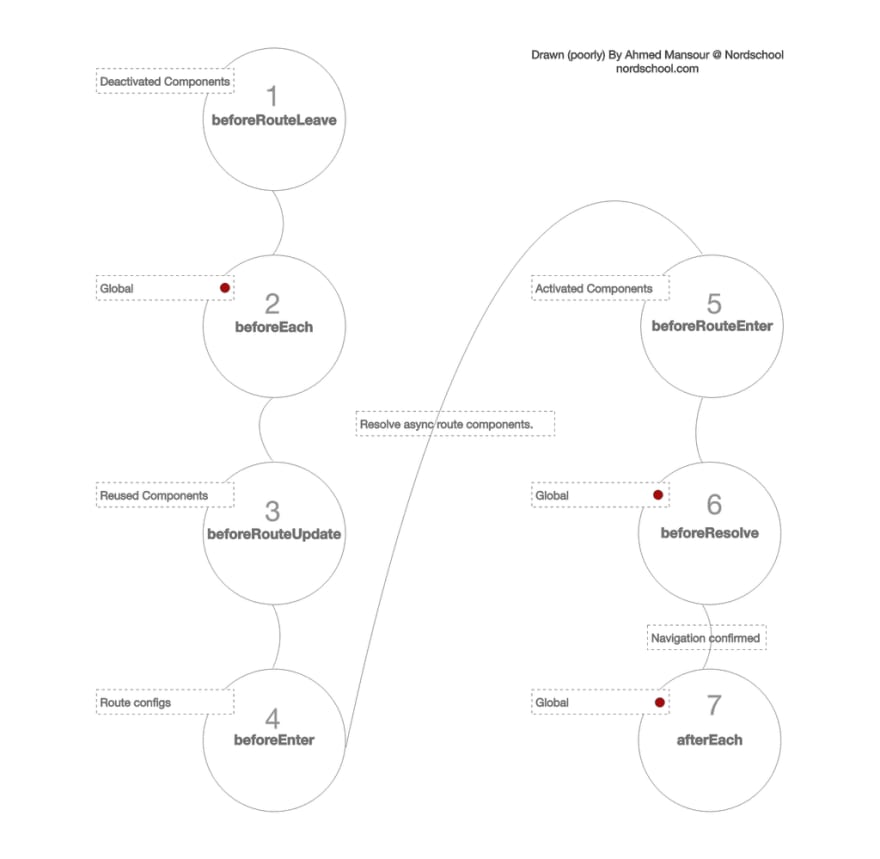
路由器挂钩的几个使用案例:
- 想要拥有全局保护的路由?全局运行的beforeEach钩子 2可能是你的最佳选择。
- 想要添加组件特定的路由逻辑?请查看钩子编号 5 beforeRouteEnter。
好了,现在你就是 Vue 路由专家了!✋
支持
喜欢这篇文章吗?在推特上分享这篇摘要吧。

 诺德学派@nordschool
 Vue Router - 完整指南(
主题帖)…
- 使用 props 的路由
- 嵌套路由
- 动态路由
- 路由守卫
- 通配符路由
- 路由过渡
- 路由懒加载
- 导航解析流程
#vue #vue Router #tutorial #javascript #js2019年9月27日 下午1:50
2 2

Better Code Monday 时事通讯
您或许也会喜欢我的电子报。我的想法是每周一分享 3 个网页开发技巧。
我的目标是提升写作技巧,并尽可能多地分享知识。目前已有数百位开发者订阅,他们似乎很喜欢。
文章来源:https://dev.to/nordschool/vue-router-the-complete-guide-3ko1