[Agentica] 你会编写函数吗?那么你就是 AI 开发者——TypeScript AI 函数调用框架比任何其他框架都更容易。
概括
Agentica是一个专门用于函数调用的 TypeScript AI 框架。
- GitHub 仓库:https://github.com/wrtnlabs/agentica
- 指南文档:https://wrtnlabs.io/agentica
通过简单地列出功能,您可以比使用任何其他 AI 框架更容易地创建 AI 代理,同时保持稳定和灵活的结构。
当您将 TypeScript 类集成到Agentica中时,其函数会通过 AI 函数调用进行正确调用。如果您引入 React Native 的移动 API 函数,则可以创建一个比 Apple Siri 更高质量的移动助手。
此外,如果您导入 Swagger/OpenAPI 文档,Agentica将正确调用您的后端 API,即使与 MCP 集成,其稳定性也远胜于其他 AI 框架。
你不再需要惧怕人工智能。任何懂得如何编写函数的人都可以成为人工智能开发者。使用Agentica挑战自我,构建人工智能代理吧!

1. 前言
你知道如何创建 TypeScript 函数吗?你现在就可以成为一名 AI 开发人员。
您是后端服务器开发人员吗?如果是,那么您比大多数人更有潜力成为人工智能开发人员。
只需导入并列出以下三个协议中的函数即可。这就是开发 AI 代理所需的全部步骤。Agentica是一个 AI 函数调用框架,它比您之前见过的任何 AI 代理框架都更简单、更强大。
- TypeScript 类
- Swagger/OpenAPI 文档
- MCP(模型上下文协议)服务器
import { Agentica, assertHttpLlmApplication } from "@agentica/core";
import OpenAI from "openai";
import typia from "typia";

import { MobileFileSystem } from "./services/MobileFileSystem";

const agent = new Agentica({
  vendor: {
    api: new OpenAI({ apiKey: "********" }),
    model: "gpt-4o-mini",
  },
  controllers: [
    // functions from TypeScript class
    {
      protocol: "class",
      name: "filesystem",
      application: typia.llm.application<MobileFileSystem, "chatgpt">(),
      execute: new MobileFileSystem(),
    },
    // functions from Swagger/OpenAPI
    {
      protocol: "http",
      name: "shopping",
      application: assertHttpLlmApplication({
        model: "chatgpt",
        document: await fetch(
          "https://shopping-be.wrtn.ai/editor/swagger.json",
        ).then(r => r.json()),
      }),
      connection: {
        host: "https://shopping-be.wrtn.ai",
        headers: { Authorization: "Bearer ********" },
      },
    },
  ],
});
await agent.conversate("I wanna buy MacBook Pro");
2. AI 函数调用
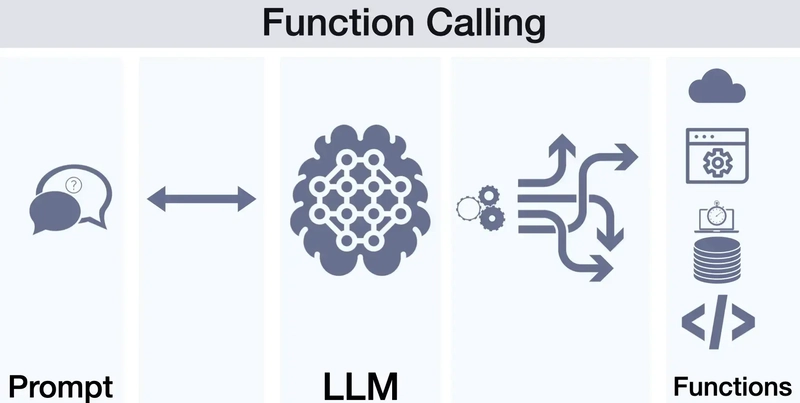
https://platform.openai.com/docs/guides/function-calling
当开发者提供函数时,AI 会选择合适的函数并填充执行所需的参数值。这就是 AI 函数调用的核心概念。
AI 函数调用是 OpenAI 于 2023 年 6 月发布的一项技术,当它发布时,许多 AI 开发人员与Agentica有着完全相同的未来愿景。
当时我住的地方步行三分钟的范围内,就有三家公司正在尝试使用 AI 函数调用来创建超级 AI 聊天机器人。
未来,开发者只需创建功能,人工智能代理将处理其他一切。
您不再需要直接构建复杂的用户界面应用程序,因此开发人员只需专注于函数即可。函数才是核心所在。
你能实现这个功能吗?如果能,你就是人工智能开发者。
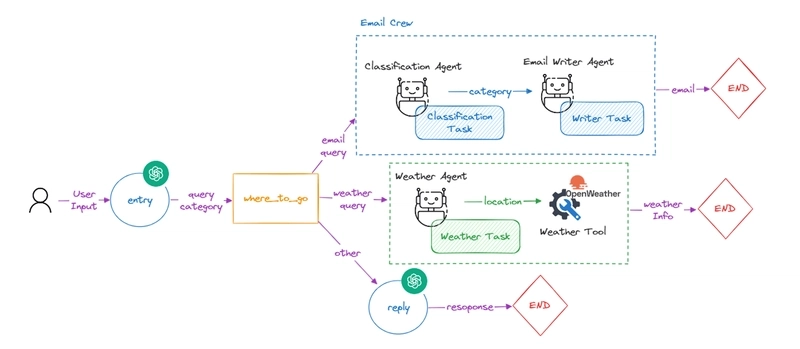
然而,由于 AI 函数调用规范的复杂性以及参数值组合的成功率较低,AI 函数调用未能成为 AI 代理开发生态系统的主流。
趋势不再是通用的、易于开发的 AI 函数调用,而是转向专用的代理工作流,虽然这些工作流需要大量的设计和开发时间,但专注于特定的应用。
近年来,MCP(模型上下文协议)服务器变得流行起来,但由于其稳定性问题,受到了批评,导致人工智能研究人员回归到代理工作流开发方法。
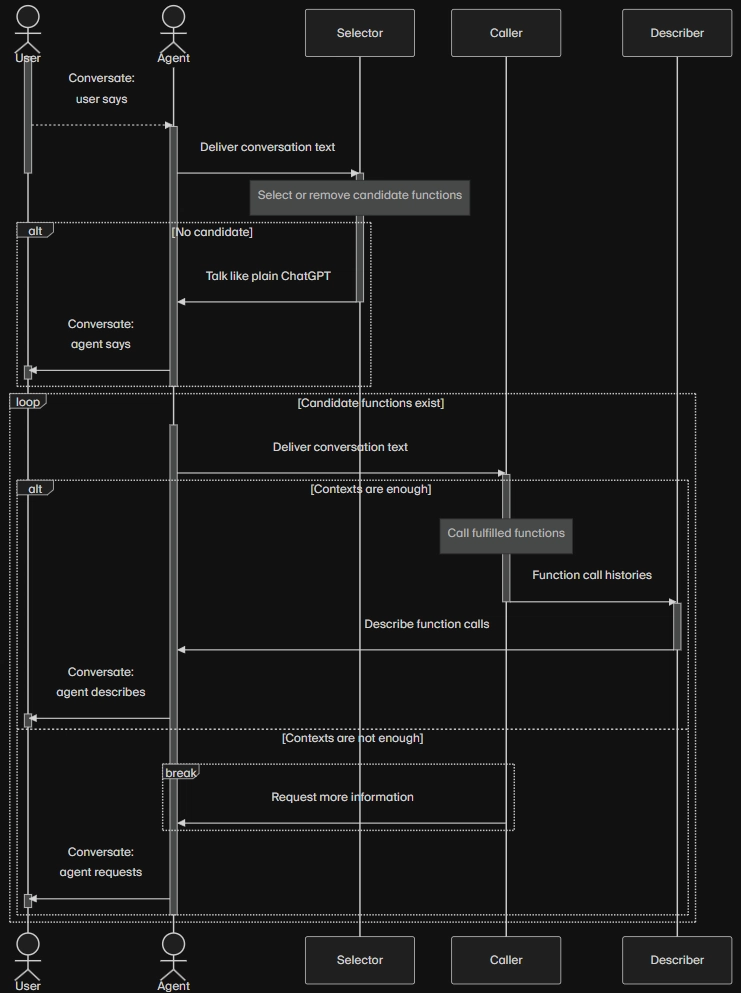
如今,Agentica 的目标是从 2023 年 6 月起重振这一未来愿景。
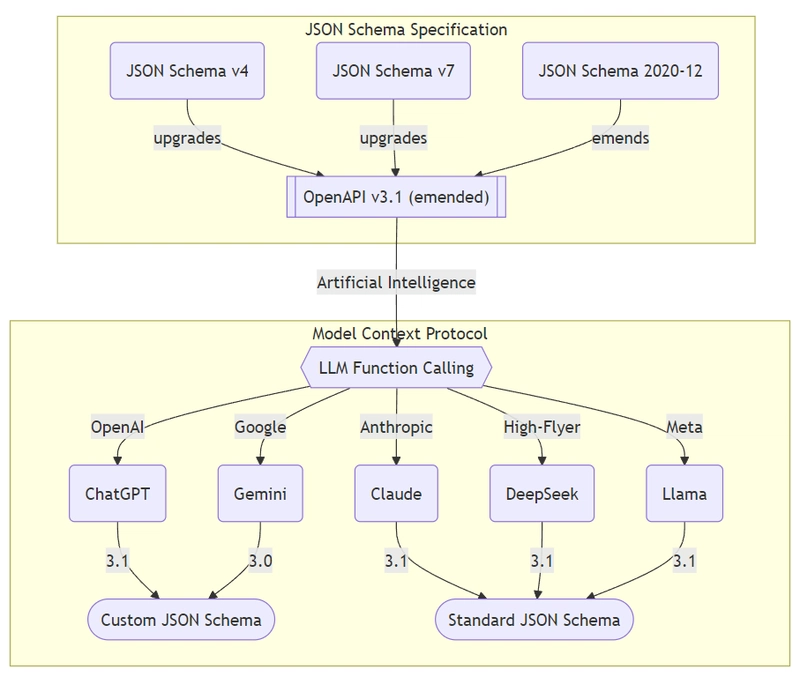
Agentica使用四种策略来解决 AI 函数调用规范的复杂性,并大幅提高成功率,从而开启了 AI 函数调用的新时代,它具有通用性、可扩展性,并且任何人都可以轻松创建——而不是不灵活、难以开发、特定用途的代理工作流。
你能实现这个功能吗?如果能,你就是人工智能开发者。
- 编译器驱动开发:利用编译器自动构建函数调用模式,无需手动编写。
- JSON Schema 转换:自动处理 LLM 供应商之间的规范差异,确保无论您选择哪种 AI 模型,都能实现无缝集成。
- 验证反馈:检测并纠正人工智能在论证构建中的错误,显著减少错误并提高可靠性。
- 选择器代理:筛选候选函数,以最大限度地减少上下文使用、优化性能并减少令牌消耗。
3. TypeScript 类
import { Agentica } from "@agentica/core";
import OpenAI from "openai";
import typia from "typia";

import { BbsArticleService } from "./services/BbsArticleService";

const agent = new Agentica({
  vendor: {
    model: "gpt-4o-mini",
    api: new OpenAI({ apiKey: "********" }),
  },
  controllers: [
    {
      protocol: "class",
      name: "bbs",
      application: typia.llm.application<BbsArticleService, "chatgpt">(),
      execute: new BbsArticleService(),
    },
  ],
});
await agent.conversate("I want to write an article.");
如果您想使用Agenticatypia.llm.application<BbsArticleService, Model>()创建一个 AI 代理,请将代理应执行的任务定义为类函数。然后,按照上述源代码所示配置控制器。
您可以通过“对话”在论坛上执行一系列操作,例如撰写、编辑和查看帖子。您可以BbsArticleService通过“对话”调用各种函数。这正是人工智能函数调用,也是Agentica最擅长的功能。
import fs from "fs";

export class FileSystem {
  public __dirname(): string {
    return __dirname;
  }

  public readdir(input: {
    path: string;
    options?:
      | {
          encoding: "utf-8";
          withFileTypes?: false | undefined;
          recursive?: boolean | undefined;
        }
      | "utf-8"
      | null;
  }): Promise<string[]> {
    return fs.promises.readdir(input.path, input.options);
  }

  public readFile(input: { path: string }): Promise<string> {
    return fs.promises.readFile(input.path, "utf8");
  }

  public writeFileSync(input: {
    file: string;
    data: string;
  }): Promise<void> {
    return fs.promises.writeFile(input.file, input.data);
  }
}
如果您向AgenticaFileSystem提供像上面这样的类,您可以通过 AI 对话执行一系列任务,例如整理、删除和分类计算机上的旧文件。
你可以创建一个人工智能代理,仅通过聊天就能控制你电脑上的所有文件。而且,构建这个代理只需要5分钟。
import { Agentica } from "@agentica/core";
import OpenAI from "openai";
import typia from "typia";

import { GmailService } from "@wrtnlabs/connector-gmail";
import { GoogleScholarService } from "@wrtnlabs/connector-google-scholar";
import { NaverNewsService } from "@wrtnlabs/connector-naver-news";
import { NotionService } from "@wrtnlabs/connector-notion";

const agent = new Agentica({
  vendor: {
    model: "gpt-4o-mini",
    api: new OpenAI({ apiKey: "********" }),
  },
  controllers: [
    {
      protocol: "class",
      name: "gmail",
      application: typia.llm.application<GmailService, "chatgpt">(),
      execute: new GmailService({
        clientId: "********",
        clientSecretKey: "********",
        refreshToken: "********",
      }),
    },
    {
      protocol: "class",
      name: "scholar",
      application: typia.llm.application<GoogleScholarService, "chatgpt">(),
      execute: new GoogleScholarService({
        serpApiKey: "serpApiKey",
      }),
    },
    {
      protocol: "class",
      name: "news",
      application: typia.llm.application<NaverNewsService, "chatgpt">(),
      execute: new NaverNewsService(),
    },
    {
      protocol: "class",
      name: "notion",
      application: typia.llm.application<NotionService, "chatgpt">(),
      execute: new NotionService({
        secretKey: "********",
      }),
    },
  ],
});
await agent.conversate("I want to write an article.");
此外,如果您同时提供多个 TypeScript 类(例如`class` GoogleScholarService、 `class` NaverNewsService、NotionService`class` 和 `class` GmailService),就可以向您的 AI 代理发出更复杂的指令。如果您想创建一个功能全面且通用的 AI 代理,只需添加更多类似的功能即可。
您提供的功能决定了您的人工智能代理的策略。
分析近期美国经济趋势,并对学术论文进行总结和评论。
然后将此内容写入 Notion 文档,并将链接通过电子邮件发送给这 3 个人:
4. 移动应用程序
import { Agentica, assertHttpLlmApplication } from "@agentica/core";
import OpenAI from "openai";
import typia from "typia";

import { MobileFileSystem } from "./services/MobileFileSystem";

const agent = new Agentica({
  vendor: {
    api: new OpenAI({ apiKey: "********" }),
    model: "gpt-4o-mini",
  },
  controllers: [
    {
      type: "class",
      name: "battery",
      application: typia.llm.application<ReactNativeBattery, "chatgpt">(),
      execute: new ReactNativeBattery(),
    },
    {
      type: "class",
      name: "sms",
      application: typia.llm.application<ReactNativeSMS, "chatgpt">(),
      execute: new ReactNativeSMS(),
    },
    {
      type: "class",
      name: "gallery",
      application: typia.llm.application<ReactNativeGallery, "chatgpt">(),
      execute: new ReactNativeGallery(),
    }
  ]
});
await agent.conversate("How much my battery left?");
如果你想开发类似苹果 Siri 的产品,可以使用 React Native 封装移动 API 函数。这样你就能创建一个比苹果 Siri 更稳定、更强大、功能更全面的 AI 代理。
上面的应用程序和视频是由我一位20岁的开发人员同事制作的。他刚高中毕业,被要求创建一个类似苹果Siri的移动应用程序时,只用了20分钟就完成了。
AI代理的开发非常简单。只需引入相应的功能即可。就这么简单。
- 由20 岁的开发者Jaxtyn制作
- React Native 函数调用教程:https://wrtnlabs.io/agentica/tutorial/react-native/sms/
5. Swagger/OpenAPI 文档
如果你是一名后端开发人员,那么你已经具备了人工智能开发的技能。
您分析需求以设计 API 规范,创建 API 文档并与前端/客户端开发人员共享,并提供各种解释和示例以帮助他们更好地理解您的 API。现在,请对您的 AI 代理执行相同的操作。
你创建的AI代理将比其他任何事物都更稳定、更优秀、更有用。
以下是一个将商城后端服务器转换为人工智能代理的案例。我们只需将商城后端文件提供给Agenticaswagger.json即可。该商城包含 289 个 API 函数,令人惊叹的是,人工智能代理能够理解所有这些函数,并根据与用户的对话上下文调用最合适的函数,同时还会解释整个过程。
实际上,我虽然是全栈开发人员,但并非专业的后端开发人员。如果基于我的后端服务器开发的AI代理都能达到这样的效果,那么由像您这样的专业人士开发的AI代理肯定会更好。
后端开发人员们,接受人工智能代理的挑战吧!你们已经是最棒的了。
- 购物中心后端项目:https://github.com/samchon/shopping-backend
- 购物商城
swagger.json文件:https://shopping-be.wrtn.ai/editor/swagger.json - 购物中心AI代理演示:https://wrtnlabs.io/agentica/playground/shopping
- Swagger Playground:https://wrtnlabs.io/agentica/playground/uploader
import { Agentica } from "@agentica/core";
import { HttpLlm, OpenApi } from "@samchon/openapi";
import typia from "typia";

const agent = new Agentica({
  model: "chatgpt",
  vendor: {
    api: new OpenAI({ apiKey: "*****" }),
    model: "gpt-4o-mini",
  },
  controllers: [
    {
      protocol: "http",
      name: "shopping",
      application: HttpLlm.application({
        model: "chatgpt",
        document: await fetch(
          "https://shopping-be.wrtn.ai/editor/swagger.json",
        ).then((r) => r.json()),
      }),
      connection: {
        host: "https://shopping-be.wrtn.ai",
        headers: {
          Authorization: "Bearer *****",
        },
      },
    },
  ],
});
await agent.conversate("I want to buy a MacBook Pro");
6. MCP 服务器
Claude Desktop 上的 Github MCP 崩溃太多
MCP(模型上下文协议)目前很流行。然而,它也因其不稳定性而饱受诟病。但我认为:问题不在于MCP本身,而在于使用它的AI代理应用程序。
同一个 GitHub MCP 服务器,通过 Claude Desktop 调用时,十次中有八次会崩溃,而且原因不明。然而,当 GitHub MCP 与 Agentica 集成时,则每次都能成功运行。GitHub MCP 只有大约 30 个函数,但即使函数数量增加到 300 或 400 个,Agentica 也能正常工作。
import { Agentica, assertMcpController } from "@agentica/core";
import { Client } from "@modelcontextprotocol/sdk/client/index.js";
import { StdioClientTransport } from "@modelcontextprotocol/sdk/client/stdio.js";

const client = new Client({
  name: "shopping",
  version: "1.0.0",
});
await client.connect(new StdioClientTransport({
  command: "npx",
  args: ["-y", "@wrtnlabs/shopping-mcp"],
}));

const agent = new Agentica({
  model: "chatgpt",
  vendor: {
    api: new OpenAI({ apiKey: "********" }),
    model: "gpt-4o-mini",
  },
  controllers: [
    await assertMcpController({
      name: "shopping",
      model: "chatgpt",
      client,
    }),
  ],
});
await agent.conversate("I wanna buy a Macbook");
这得益于Agentica在第 2 章中提到的独特的 AI 函数调用策略,该策略使Agentica能够实现 100% 成功的 AI 函数调用。
MCP 服务器开发人员,你们也应该使用Agentica对你们的 MCP 服务器进行验证和试验。
- 编译器驱动开发:利用编译器自动构建函数调用模式,无需手动编写。
- JSON Schema 转换:自动处理 LLM 供应商之间的规范差异,确保无论您选择哪种 AI 模型,都能实现无缝集成。
- 验证反馈:检测并纠正人工智能在论证构建中的错误,显著减少错误并提高可靠性。
- 选择器代理:筛选候选函数,以最大限度地减少上下文使用、优化性能并减少令牌消耗。