

VSCode 插件 comment-hide:敢于写评论!
在编程中,注释的重要性仅次于“Hello, world!”,通常是你在向世界问好之后最先学习的内容。注释通常有两种形式:单行注释和多行注释,例如 `<script>` 和 `<script>` //。/* */它们的目的是解释当前代码的逻辑并提供注释。
什么是评论?
在深入探讨“为什么现在没人愿意写代码注释了?”这个问题之前,我们先来看看人们实际上是如何编写注释的。
例如,某些项目或编码标准要求在文件开头声明版权信息。这可能包括 ASCII 艺术作品或许可详情:
/*
 * Copyright 2024-2025 the original author or authors.
 *
 * Licensed under the Apache License, Version 2.0 (the "License");
 * you may not use this file except in compliance with the License.
 * You may obtain a copy of the License at
 *
 *      https://www.apache.org/licenses/LICENSE-2.0
 *
 * Unless required by applicable law or agreed to in writing, software
 * distributed under the License is distributed on an "AS IS" BASIS,
 * WITHOUT WARRANTIES OR CONDITIONS OF ANY KIND, either express or implied.
 * See the License for the specific language governing permissions and
 * limitations under the License.
 */
有些甚至还加入了ASCII艺术:
/*
 *                        _oo0oo_
 *                       o8888888o
 *                       88" . "88
 *                       (| -_- |)
 *                       0\  =  /0
 *                     ___/`---'\___
 *                   .' \\|     |// '.
 *                  / \\|||  :  |||// \
 *                 / _||||| -:- |||||- \
 *                |   | \\\  - /// |   |
 *                | \_|  ''\---/''  |_/ |
 *                \  .-\__  '-'  ___/-. /
 *              ___'. .'  /--.--\  `. .'___
 *           ."" '<  `.___\_<|>_/___.' >' "".
 *          | | :  `- \`.;`\ _ /`;.`/ - ` : | |
 *          \  \ `_.   \_ __\ /__ _/   .-` /  /
 *      =====`-.____`.___ \_____/___.-`___.-'=====
 *                        `=---='
 *
 *      ~~~~~~~~~~~~~~~~~~~~~~~~~~~~~~~~~~~~~~~~~~~
 *
 *            Buddha bless, never crashes, never bugs
 */
在公司工作时,通常会声明函数的作者。如果函数出现问题,就更容易找到责任人(承担责任):
/**
 * Title base agent.<br>
 * Description base agent.<br>
 *
 * @author yuanci.ytb
 * @since 1.0.0-M2
 */
有些 IDE 甚至可以自动生成注释格式,例如 Laravel(或 Java 的 Spring 框架):
/**
 * Create a new repository builder instance.
 *
 * @param \Dotenv\Repository\Adapter\ReaderInterface[] $readers
 * @param \Dotenv\Repository\Adapter\WriterInterface[] $writers
 * @param bool                                         $immutable
 * @param string[]|null                                $allowList
 *
 * @return void
 */
private function __construct(array $readers = [], array $writers = [], bool $immutable = false, ?array $allowList = null)
{
    $this->readers = $readers;
    $this->writers = $writers;
    $this->immutable = $immutable;
    $this->allowList = $allowList;
}
有时,注释会被用来禁用旧功能:
{
  // image
}
{
  /* {isValidImageIcon
      ? <img src={imageUrl} className="w-full h-full rounded-full" alt="answer icon" />
      : (icon && icon !== '') ? <em-emoji id={icon} /> : <em-emoji id='🤖' />
    } */
}
为什么现在没人愿意写代码注释了?
注释通常分为两类:一类解释信息,另一类说明功能。例如,以下代码没有注释——理解它的功能需要花费一些时间:
function lengthOfLongestSubstring(s) {
  let charIndexMap = new Map(),
    longest = 0,
    left = 0;

  for (let right = 0; right < s.length; right++) {
    if (charIndexMap.has(s[right]) && charIndexMap.get(s[right]) >= left) {
      left = charIndexMap.get(s[right]) + 1;
    }
    charIndexMap.set(s[right], right);
    longest = Math.max(longest, right - left + 1);
  }
  return longest;
}
添加注释可以使其更容易理解:
// Computes the length of the longest substring without repeating characters
function lengthOfLongestSubstring(s) {
  let charIndexMap = new Map(),
    longest = 0,
    left = 0;

  for (let right = 0; right < s.length; right++) {
    // If the character exists in the map and its index is >= left pointer, move left pointer
    if (charIndexMap.has(s[right]) && charIndexMap.get(s[right]) >= left) {
      left = charIndexMap.get(s[right]) + 1;
    }
    // Update the character's latest index in the map
    charIndexMap.set(s[right], right);
    // Update the longest substring length
    longest = Math.max(longest, right - left + 1);
  }
  return longest;
}
人们宁愿事后花五分钟理清逻辑,也不愿在灵感迸发时花时间写下评论。
我认为这主要是因为人们害怕以下几种情况:
恐怕有人会说:
“这不就是计算不重复字符的最长子字符串长度的逻辑问题吗?我小学都会了。你居然还为此写评论?你真是太弱了。”
“这个人写了这么多评论,肯定是新手。”
“还在代码里写注释?明天人工智能就会取代你!”
那么,为什么我们不写评论呢?我认为一半的原因是纯粹的懒惰,另一半则是害怕出现类似的情况。然而,当我们查看别人的项目时,我们希望他们的评论和文档尽可能详细——因为越详细越好。
随着 CSS 的发展,我们很多人都接触过 SASS 和 Less。这些扩展程序不可避免地需要用到数学运算(加、减、乘、除)来实现复杂的效果。例如:
$padding: 12px;

.post {
  // Since these max() calls are valid calculation expressions, they're
  // parsed as calculations.
  padding-left: max($padding, env(safe-area-inset-left));
  padding-right: max($padding, env(safe-area-inset-right));
}

.sidebar {
  // Since these use the SassScript-only modulo operator, they're parsed as
  // SassScript function calls.
  padding-left: max($padding % 10, 20px);
  padding-right: max($padding % 10, 20px);
}
偶尔使用这样的代码片段是可以的,但如果代码很长,你可能要花大量时间去理解它,甚至调试它。请看下面这段很长的代码:
body::before {
    --size: 45px;
    --line: color-mix(in hsl, canvasText, transparent 70%);
    content: '';
    height: 100vh;
    width: 100vw;
    position: fixed;
    background: linear-gradient(
          90deg,
          var(--line) 1px,
          transparent 1px var(--size)
        )
        50% 50% / var(--size) var(--size),
      linear-gradient(var(--line) 1px, transparent 1px var(--size)) 50% 50% /
        var(--size) var(--size);
    mask: linear-gradient(-20deg, transparent 50%, white);
    top: 0;
    transform-style: flat;
    pointer-events: none;
    z-index: -1;
  }
很多人可能会去 MDN 查看定义,例如 mask 的作用以及它在这里是如何使用的。
如果我们添加评论,则可能面临同样的嘲笑:
“这不就是个面具吗?我小学就学过了。你居然还为此评论?你真是太没品了。”
“这个人连CSS代码都要评论,肯定是新手。”
“还在写评论?明天人工智能就会取代你!”
我们需要代码注释!
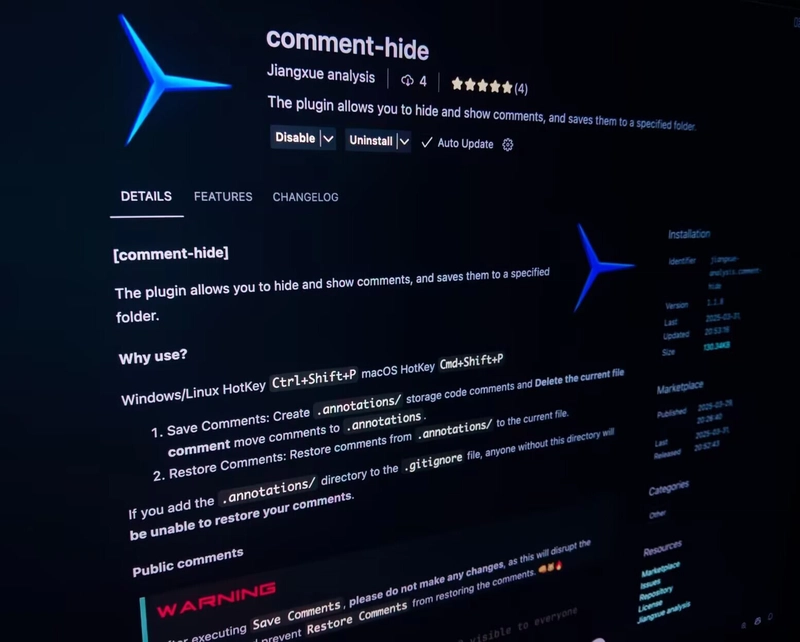
我们需要代码注释,但同时也需要控制哪些注释对其他人可见。许多插件可以隐藏注释,但如果您既需要可见性又需要隐私保护,可以使用 comment-hide VSCode 插件。
它提供了两个命令:Save Comments和Restore Comments。前者提取并删除注释,并将它们存储在.annotations/目录中,而后者恢复它们——前提是该文件在此期间没有更改。
Windows/Linux快捷键:
Ctrl+Shift+P
macOS快捷键:Cmd+Shift+P
例如:
0 /* >>>
1   This will not be hidden and will be 2 visible to everyone
2 */
3
4 const x = 42; // This is a comment
5 /* This is a multi-line
6    comment */
7 // Another comment
运行后Save Comments,它变成:
1 /* >>>
2   This will not be hidden and will be 3 visible to everyone
3 */
4
5 const x = 42;
代码/* */块仍然存在,因为评论隐藏功能允许保留评论>>>。只有块级/* */评论支持此功能。
这些注释存储在.annotations/根目录下的文件夹中。您可以通过当前文件名找到 JSON 文件。
{
  "originalContent": "/* >>>\n  This will not be hidden and will be visible to everyone\n*/\n\nconst x = 42; // This is a comment\n/* This is a multi-line\n   comment */\n// Another comment",
  "comments": [
    {
      "text": "// This is a comment",
      "line": 4,
      "start": 83,
      "end": 103
    },
    {
      "text": "/* This is a multi-line\n   comment */",
      "line": 5,
      "start": 104,
      "end": 141
    },
    {
      "text": "// Another comment",
      "line": 7,
      "start": 142,
      "end": 160
    }
  ],
  "filePath": "test/hhha.js"
}
要恢复注释,请运行Restore Comments,插件将根据行号和位置重新插入注释:
0 /* >>>
1   This will not be hidden and will be 2 visible to everyone
2 */
3
4 const x = 42; // This is a comment
5 /* This is a multi-line
6    comment */
7 // Another comment
如果你添加.annotations/内容.gitignore,其他人将看不到。只有>>>评论会保持可见。
这个插件有什么缺点吗?
是的——这个插件依赖于绝对定位。如果您修改了行号或缩进,恢复注释的功能可能会失效。因此,最好在Save Comments所有内容都最终确定后再使用。
支持的评论样式
该插件支持四种主要评论样式,涵盖多种语言:
// Hello

# Hello

/*
  Hello
*/

<!-- Hello -->
为什么不支持 Python 的 `
'''and` 函数"""?开发者太懒了。
这四种风格涵盖了大多数现代语言,包括:
JavaScript - HTML - Markdown - CSS - C++ - C# - Java - Python - Golang - Rust - Ruby - JSX/TSX...
安全隐患
由于此插件需要读写权限,部分用户可能会担心代码隐私问题。幸运的是,它是开源的。您可以在这里查看源代码。该插件通过 GitHub Actions 发布,确保不会发生恶意代码注入或数据泄露。
README 文件中包含一个红色警告标签🟥,提示其当前存在局限性。未来的更新旨在实现整个项目的一键隐藏/恢复功能,并提高定位的可靠性。
编程领域的网络欺凌
归根结底,问题在于网络欺凌。如果你从未经历过,不妨想想《黑暗之魂3》玩家的遭遇。
有些玩家对游戏不熟悉,在与无名王者这样的 Boss 战斗中苦战数小时后便放弃,转而寻求攻略。而另一些玩家则享受挑战,并沉浸于最终胜利带来的多巴胺快感之中。
但有些开发者却以同样的方式阻止用户发表评论,甚至羞辱那些使用评论功能的人。阿尔伯特·爱因斯坦曾说过:
“每个人都是天才。但如果你以爬树的能力来评判一条鱼,它终其一生都会觉得自己很笨。”
(或许他没说过这话——但嘿,你又不会去核实,对吧?)
文章来源:https://dev.to/brights/why-doesnt-anyone-want-to-write-code-comments-anymore-40jf