

10 个超棒的 Rust 箱子和学习资源
如果你刚开始学习 Rust,你可能会想知道应该探索哪些软件包,以及如何加入 Rust 社区。根据你的初始使用场景,以下是我发现的一些对学习 Rust 非常有帮助的资源。祝你学习愉快!
权威之作
《Rust编程语言》(又名“本书”)将从基本原理出发,为你全面介绍这门语言。你将在学习过程中完成几个项目,最终对这门语言有扎实的掌握。
https://doc.rust-lang.org/book/
所有Rustaceas(Rust的母语使用者)在去其他地方之前都应该仔细阅读这篇文章。这是学习Rustaceas语言的最佳指南,几乎是所有人的起点。
1. 箱子:nom

nom 是一个用 Rust 编写的解析器组合器库。它的目标是提供构建安全解析器的工具,同时确保速度和内存占用不受影响。为此,它充分利用了 Rust 的强类型和内存安全特性来生成快速且正确的解析器,并提供了函数、宏和 trait 来抽象大部分容易出错的底层逻辑。
我曾经尝试实现一个简单的 NetFlow 解析器,然后发现了它nom。它实现协议的方式非常直观,并且包含许多有用的示例。这里有一个颜色解析器的例子!
extern crate nom;
use nom::{
  IResult,
  bytes::complete::{tag, take_while_m_n},
  combinator::map_res,
  sequence::tuple
};

#[derive(Debug,PartialEq)]
pub struct Color {
  pub red:   u8,
  pub green: u8,
  pub blue:  u8,
}

fn from_hex(input: &str) -> Result<u8, std::num::ParseIntError> {
  u8::from_str_radix(input, 16)
}

fn is_hex_digit(c: char) -> bool {
  c.is_digit(16)
}

fn hex_primary(input: &str) -> IResult<&str, u8> {
  map_res(
    take_while_m_n(2, 2, is_hex_digit),
    from_hex
  )(input)
}

fn hex_color(input: &str) -> IResult<&str, Color> {
  let (input, _) = tag("#")(input)?;
  let (input, (red, green, blue)) = tuple((hex_primary, hex_primary, hex_primary))(input)?;

  Ok((input, Color { red, green, blue }))
}

fn main() {}

#[test]
fn parse_color() {
  assert_eq!(hex_color("#2F14DF"), Ok(("", Color {
    red: 47,
    green: 20,
    blue: 223,
  })));
}
在这个代码库中,你可以找到几乎所有内容的解析器,包括编程语言、网络协议、各种格式(例如 Game Boy ROM)以及文本格式。绝对值得一看,或者收藏起来。
2. Crate:Bevy 游戏引擎
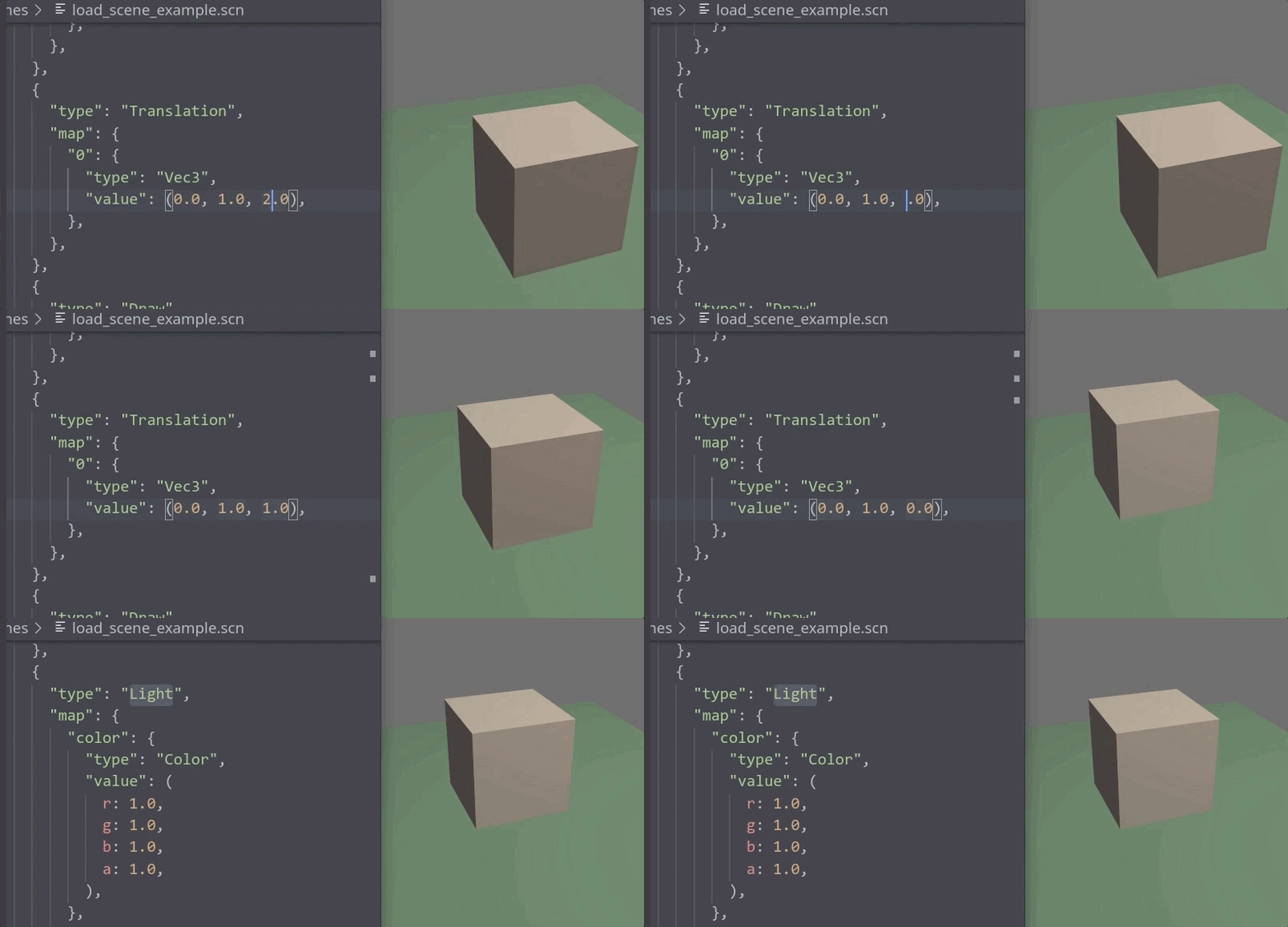
Bevy 是一款非常棒的游戏引擎库!它提供了许多出色的开箱即用工具和功能,例如:
- 跨平台:Windows、MacOS 和 Linux(计划支持移动端和网页端)
- 3D:灯光、网格、纹理、MSAA 和 GLTF 加载
- 精灵:将单个图像渲染为精灵、从精灵图集渲染以及动态生成新的精灵图集
- 资源:一个可扩展的、事件驱动的资源系统,它在后台线程中异步加载资源。
- 场景:将 ECS Worlds 保存为易于阅读的场景文件,并将场景文件加载到 ECS Worlds 中。
- 插件:所有引擎和应用程序功能均以模块化插件的形式实现。
- 声音:将音频文件加载为资源并在系统内部播放它们
- 支持多种渲染后端:Vulkan、DirectX 12 和 Metal(得益于 wgpu,未来还将支持更多后端)
- 数据驱动着色器:轻松地将 ECS 组件直接绑定到着色器 uniform 变量
- 热资源重载:在运行时自动重新加载资源更改,无需重新编译或重启。
- 事件:高效地从 ECS 系统内部消费和生成事件
- 属性:使用组件名称的字符串版本动态获取和设置组件字段。
- 层级转换:在实体之间创建父子关系,并将转换向下传递到层级结构中。
设计目标是既要让新手操作简单,又要为经验丰富的开发者提供足够的灵活性。其人机工程学设计和编译性能着实令人惊叹!
3. Crate:rocket.rs Web框架
如果你需要编写一个既保证类型安全、又兼顾灵活性和易用性的网站,那么不妨了解一下 rocket.rs。我尝试过很多不同的 Web 框架,包括actix-web、tide和warp。关于 Web 生态系统的讨论很多,但我最终还是会把rocket.rs列入其中。
#![feature(proc_macro_hygiene, decl_macro)]

#[macro_use] extern crate rocket;

#[get("/hello/<name>/<age>")]
fn hello(name: String, age: u8) -> String {
    format!("Hello, {} year old named {}!", age, name)
}

fn main() {
    rocket::ignite().mount("/", routes![hello]).launch();
}
如果您想更好地了解和比较不同的 Web 框架和人体工程学,请查看Luca Palmieri的这篇文章《选择Rust Web 框架 2020 版》。
4. Crate/生态系统:Tokio.rs
Tokio 是 Rust 编程语言的异步运行时库。关于它与 async-std 的长期差异存在一些争议,但无论如何,Tokio 功能强大,许多 Rust crate 都依赖于它。
以下是 Redis 迷你教程的入门指南:
use mini_redis::{client, Result};

#[tokio::main]
pub async fn main() -> Result<()> {
    // Open a connection to the mini-redis address.
    let mut client = client::connect("127.0.0.1:6379").await?;

    // Set the key "hello" with value "world"
    client.set("hello", "world".into()).await?;

    // Get key "hello"
    let result = client.get("hello").await?;

    println!("got value from the server; result={:?}", result);

    Ok(())
}
一探究竟!
5. Crate serde 序列化
Serde 是一个用于将 Rust 数据结构序列化和反序列化为多种格式的框架(并可与serde-json等工具配合使用)。
use serde::{Deserialize, Serialize};
use serde_json::Result;

#[derive(Serialize, Deserialize)]
struct Person {
    name: String,
    age: u8,
    phones: Vec<String>,
}

fn typed_example() -> Result<()> {
    // Some JSON input data as a &str. Maybe this comes from the user.
    let data = r#"
        {
            "name": "John Doe",
            "age": 43,
            "phones": [
                "+44 1234567",
                "+44 2345678"
            ]
        }"#;

    // Parse the string of data into a Person object. This is exactly the
    // same function as the one that produced serde_json::Value above, but
    // now we are asking it for a Person as output.
    let p: Person = serde_json::from_str(data)?;

    // Do things just like with any other Rust data structure.
    println!("Please call {} at the number {}", p.name, p.phones[0]);

    Ok(())
}
他们的文档网站上有很多很好的例子!
6. Crate:超HTTP
hyper 是 Rust 的一个快速 HTTP 实现。
- 用于与网络服务通信的客户端
- 用于构建这些 Web 服务的服务器
- 速度飞快,这要归功于 Rust
- 高并发性与非阻塞套接字
- 支持 HTTP/1 和 HTTP/2
use std::{convert::Infallible, net::SocketAddr};
use hyper::{Body, Request, Response, Server};
use hyper::service::{make_service_fn, service_fn};

async fn handle(_: Request<Body>) -> Result<Response<Body>, Infallible> {
    Ok(Response::new("Hello, World!".into()))
}

#[tokio::main]
async fn main() {
    let addr = SocketAddr::from(([127, 0, 0, 1], 3000));

    let make_svc = make_service_fn(|_conn| async {
        Ok::<_, Infallible>(service_fn(handle))
    });

    let server = Server::bind(&addr).serve(make_svc);

    if let Err(e) = server.await {
        eprintln!("server error: {}", e);
    }
}
如果你想比像warp这样基于 hyper 构建的“Web 框架”更底层一些,这会很有帮助。
7. Crate:文本换行
如果您需要一个能够为命令行实用程序自动换行的小型快速库,请看看这个库。
[dependencies]
textwrap = "0.12"
fn main() {
    let text = "textwrap: a small library for wrapping text.";
    println!("{}", textwrap::fill(text, 18));
}
textwrap: a small
library for
wrapping text.
8. Crate:reqwest HTTP 客户端
如果您需要一款更“开箱即用”的 HTTP 请求客户端,不妨了解一下 reqwest。它包含以下部分功能:
- 纯文本、JSON、URL编码、多部分
- 可自定义重定向策略
- HTTP代理
- 通过系统原生 TLS(或可选的 rustls)实现 HTTPS
- 饼干商店
- WASM
下面这个示例使用tokio.rs和异步运行时来执行一个简单的GET请求。
use std::collections::HashMap;

#[tokio::main]
async fn main() -> Result<(), Box<dyn std::error::Error>> {
    let resp = reqwest::get("https://httpbin.org/ip")
        .await?
        .json::<HashMap<String, String>>()
        .await?;
    println!("{:#?}", resp);
    Ok(())
}
9. 货箱:货物编辑:货物实用性
你可以向内置命令添加许多实用工具cargo。我比较喜欢的一个工具是,cargo-edit它可以让你执行诸如以下操作:
货物添加
$ # Add a specific version
$ cargo add regex@0.1.41 --dev
$ # Query the latest version from crates.io and adds it as build dependency
$ cargo add gcc --build
$ # Add a non-crates.io crate
$ cargo add local_experiment --path=lib/trial-and-error/
$ # Add a non-crates.io crate; the crate name will be found automatically
$ cargo add lib/trial-and-error/
$ # Add a crates.io crate with a local development path
$ cargo add my_helper --vers=1.3.1 --path=lib/my-helper/
$ # Add a renamed dependency
$ cargo add thiserror --rename error
货舱
$ # Remove a dependency
$ cargo rm regex
$ # Remove a development dependency
$ cargo rm regex --dev
$ # Remove a build dependency
$ cargo rm regex --build
货物升级
# Upgrade all dependencies for the current crate
$ cargo upgrade
# Upgrade docopt (to ~0.9) and serde (to >=0.9,<2.0)
$ cargo upgrade docopt@~0.9 serde@>=0.9,<2.0
# Upgrade regex (to the latest version) across all crates in the workspace
$ cargo upgrade regex --workspace
当你不想编辑的时候,这非常有用。Cargo.toml
10. 货箱:货物审核:货物效用
Cargo-audit 会审核Cargo.lock文件,查找已报告给RustSec安全漏洞的 crate 。非常有用!

结论
这些只是庞大的 Rust 社区的一小部分。如果您想了解更多,请查看这些非常有用的Rust代码库!
- https://github.com/rust-unofficial/awesome-rust
- https://github.com/rust-embedded/awesome-embedded-rust
干杯!🍻
--
如果你喜欢这篇文章,请关注并点赞。也欢迎关注我的推特,获取更多更新!
再次感谢!
文章来源:https://dev.to/nyxtom/10-awesome-rust-crates-and-resources-to-learn-ef4