

Angular 与 Svelte - 卡片组件
如果你看过我之前的一些帖子,就会知道我最近一直在用 Svelte 和 Sapper 做一些实验。
由于我使用 Angular 已经很多年了,现在我正在通过实践学习 Svelte,所以我认为将我的一些组件从 Angular 迁移到 Svelte 可能会很有用。
在本文中,我将分享以下分别使用 Angular 和 Svelte 构建的卡片组件,以便您了解它们之间的区别:
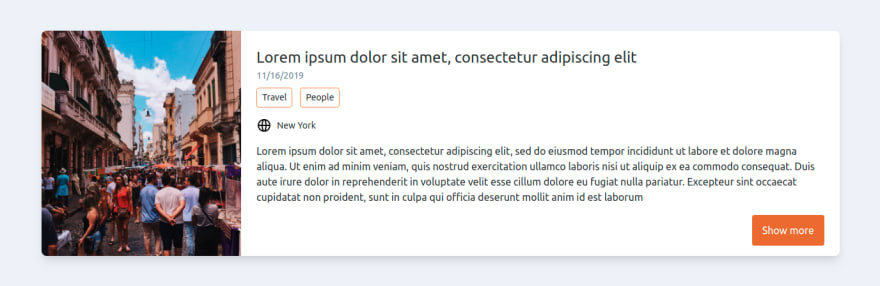
我使用 Tailwind CSS 作为我的实用型 CSS 框架。如果您不熟悉 Tailwind CSS,请访问其官方网站。此外,如果您想将 Tailwind CSS 与 Angular 或 Svelte 结合使用,我撰写了以下文章:
角
对于此卡片组件的 Angular 版本,我们需要创建一个如下所示的 post-card 组件:
// post-card.component.ts

import { Component, Input } from '@angular/core'

@Component({
    selector: 'post-card',
    templateUrl: './post-card.component.html',
    styleUrls: ['./post-card.component.css']
})

export class PostCardComponent {

    @Input() title;
    @Input() description;
    @Input() location;
    @Input() picUrl = 'https://i1.wp.com/www.foot.com/wp-content/uploads/2017/03/placeholder.gif?ssl=1'
    @Input() createdAt;
    @Input() labels = [];

    constructor() { }

    showMore() {
        alert("showing more...")
    }
}
- `@Input()` 装饰器允许我们在组件之间共享数据。`@Input()` 属性是可写的,而 `@Output()` 属性是可观察的。
<!-- post-card.component.html -->

<div class="flex flex-wrap shadow-lg rounded-lg overflow-hidden mb-6">
    <!-- Image -->
    <div class="w-full h-48 md:h-auto md:w-1/4 bg-cover bg-center" [style.backgroundImage]="'url('+ picUrl +')'"></div>
    <!-- Details -->
    <div class="w-full md:w-3/4 px-6 py-4 bg-white">
        <div class="py-2">
            <p class="text-2xl">{{title}}</p>
            <p class="text-sm text-gray-600 mb-2">{{createdAt | date:'MM/dd/yyyy'}}</p>
            <!-- Labels -->
            <div class="flex flex-wrap">
                <p *ngFor="let label of labels"
                    class="border border-solid border-orange-500 rounded w-auto inline-block px-2 py-1 mr-3 text-sm mb-2">
                    {{label}}
                </p>
            </div>
        </div>
        <p class="flex items-center text-sm mb-4">
            <svg xmlns="http://www.w3.org/2000/svg" viewBox="0 0 24 24" width="24" height="24">
                <path class="heroicon-ui"
                    d="M4.06 13a8 8 0 0 0 5.18 6.51A18.5 18.5 0 0 1 8.02 13H4.06zm0-2h3.96a18.5 18.5 0 0 1 1.22-6.51A8 8 0 0 0 4.06 11zm15.88 0a8 8 0 0 0-5.18-6.51A18.5 18.5 0 0 1 15.98 11h3.96zm0 2h-3.96a18.5 18.5 0 0 1-1.22 6.51A8 8 0 0 0 19.94 13zm-9.92 0c.16 3.95 1.23 7 1.98 7s1.82-3.05 1.98-7h-3.96zm0-2h3.96c-.16-3.95-1.23-7-1.98-7s-1.82 3.05-1.98 7zM12 22a10 10 0 1 1 0-20 10 10 0 0 1 0 20z" />
                </svg>
            <span class="ml-2">{{location}}</span>
        </p>
        <p class="mb-4">{{description}}</p>
        <div class="flex flex-wrap md:flex-row-reverse">
            <button (click)="showMore()"
                class="w-full md:ml-2 px-4 py-3 rounded bg-orange-600 hover:bg-orange-500 mb-2 md:w-auto md:mb-0 text-white">
                Show more
            </button>
        </div>
    </div>
</div>
- 我使用管道来更改日期格式。管道接收数据作为输入,并将其转换为所需的输出。在本例中,我将 JavaScript 日期转换为“MM/dd/yyyy”格式。
- 数据绑定是通过使用双花括号实现的,如下所示:
{{yourProperty}} - 为了将图像设置为卡片中的背景图像,我使用了属性绑定,如下所示:
[style.backgroundImage]="'url('+ picUrl +')'" - NgFor 是一个结构化指令,它会为集合中的每个元素渲染一个模板。在这个例子中,我用它来遍历每个标签,如下所示:
<p *ngFor="let label of labels" class="border border-solid border-orange-500 rounded w-auto inline-block px-2 py-1 mr-3 text-sm mb-2">
  {{label}}
</p>
用法
为了显示我们的明信片组件,我在AppComponent中添加了一个card属性,如下所示:
// app.component.ts

import { Component } from '@angular/core'

@Component({
    selector: 'app-root',
    templateUrl: './app.component.html',
    styleUrls: ['./app.component.css']
})

export class AppComponent {
  // This data will be sent to our post-card component
  card = {
    title: "Lorem ipsum dolor sit amet, consectetur adipiscing elit",
    description: "Lorem ipsum dolor sit amet, consectetur adipiscing elit, sed do eiusmod tempor incididunt ut labore et dolore magna aliqua. Ut enim ad minim veniam, quis nostrud exercitation ullamco laboris nisi ut aliquip ex ea commodo consequat. Duis aute irure dolor in reprehenderit in voluptate velit esse cillum dolore eu fugiat nulla pariatur. Excepteur sint occaecat cupidatat non proident, sunt in culpa qui officia deserunt mollit anim id est laborum",
    location: "New York",
    picUrl: "https://images.pexels.com/photos/1060803/pexels-photo-1060803.jpeg?auto=compress&cs=tinysrgb&dpr=2&h=750&w=1260",
    createdAt: new Date(),
    labels: ["Travel", "People"]
  }

  constructor() { }
  }
}
<!-- app.component.html -->
<post-card  [title]="card.title"
            [description]="card.description"
            [location]="card.location"
            [picUrl]="card.picUrl"
            [createdAt]="card.createdAt"
            [labels]="card.labels">
</post-card>
- 这次,我使用属性绑定将数据从AppComponent发送到PostCardComponent。
苗条
现在,让我们使用 Svelte 构建完全相同的组件。
<!-- PostCard.svelte -->

<script>
  export let title
  export let description
  export let location
  export let picUrl = 'https://i1.wp.com/www.foot.com/wp-content/uploads/2017/03/placeholder.gif?ssl=1'
  export let createdAt
  export let labels = []

  function showMore() {
    alert("Showing more...")
  }
</script>

<div class="flex flex-wrap shadow-lg rounded-lg overflow-hidden mb-6">
  <!-- Image -->
  <div class="w-full h-48 md:h-auto md:w-1/4 bg-cover bg-center" style="background-image: url('{picUrl}')"></div>
  <!-- Details -->
  <div class="w-full md:w-3/4 px-6 py-4 bg-white">
    <div class="py-2">
      <p class="text-2xl">{title}</p>
      <p class="text-sm text-gray-600 mb-2">{createdAt.toLocaleDateString()}</p>
      <!-- Labels -->
      <div class="flex flex-wrap">
        {#each labels as label}
          <p
            class="border border-solid border-orange-500 rounded w-auto inline-block px-2 py-1 mr-3 text-sm mb-2">
            {label}
          </p>
        {/each}
      </div>
    </div>
    <p class="flex items-center text-sm mb-4">
        <svg xmlns="http://www.w3.org/2000/svg" viewBox="0 0 24 24" width="24" height="24"><path class="heroicon-ui" d="M4.06 13a8 8 0 0 0 5.18 6.51A18.5 18.5 0 0 1 8.02 13H4.06zm0-2h3.96a18.5 18.5 0 0 1 1.22-6.51A8 8 0 0 0 4.06 11zm15.88 0a8 8 0 0 0-5.18-6.51A18.5 18.5 0 0 1 15.98 11h3.96zm0 2h-3.96a18.5 18.5 0 0 1-1.22 6.51A8 8 0 0 0 19.94 13zm-9.92 0c.16 3.95 1.23 7 1.98 7s1.82-3.05 1.98-7h-3.96zm0-2h3.96c-.16-3.95-1.23-7-1.98-7s-1.82 3.05-1.98 7zM12 22a10 10 0 1 1 0-20 10 10 0 0 1 0 20z"/></svg>
        <span class="ml-2">{location}</span>
    </p>
    <p class="mb-4">{description}</p>
    <div class="flex flex-wrap md:flex-row-reverse">
      <button
        on:click={showMore}
        class="w-full md:ml-2 px-4 py-3 rounded bg-orange-600 hover:bg-orange-500 mb-2 md:w-auto md:mb-0 text-white">
        Show more
      </button>
    </div>
  </div>
</div>
- 我没有使用管道,而是使用 . 来格式化 JavaScript Date 对象
{createdAt.toLocaleDateString()}。 - 数据绑定是通过使用单个花括号实现的,如下所示:
{yourProperty} - 为了将图像设置为卡片中的背景图像,我使用了如下所示的数据绑定:
style="background-image: url('{picUrl}')" - Svelte 没有使用结构化指令来遍历项目,而是使用each 代码块:
{#each labels as label}
  <p class="border border-solid border-orange-500 rounded w-auto inline-block px-2 py-1 mr-3 text-sm mb-2">
    {label}
  </p>
{/each}
用法
<!-- OtherSvelteComponent.Svelte -->
<script>
    import PostCard from "../components/PostCard.svelte";
    // This data will be sent to our post-card component
    const card = {
        title: "Lorem ipsum dolor sit amet, consectetur adipiscing elit",
        description: "Lorem ipsum dolor sit amet, consectetur adipiscing elit, sed do eiusmod tempor incididunt ut labore et dolore magna aliqua. Ut enim ad minim veniam, quis nostrud exercitation ullamco laboris nisi ut aliquip ex ea commodo consequat. Duis aute irure dolor in reprehenderit in voluptate velit esse cillum dolore eu fugiat nulla pariatur. Excepteur sint occaecat cupidatat non proident, sunt in culpa qui officia deserunt mollit anim id est laborum",
        location: "New York",
        picUrl: "https://images.pexels.com/photos/1060803/pexels-photo-1060803.jpeg?auto=compress&cs=tinysrgb&dpr=2&h=750&w=1260",
        createdAt: new Date(),
        labels: ["Travel", "People"]
    }

</script>

<PostCard {...card} />
最后想说的
正如你可能已经注意到的,Svelte 的实现更小巧。更准确地说,它小了 20%:Svelte 为 2348 个字符,而 Angular 为 2817 个字符。
你可能觉得 20% 的差别不大,但组件越小,两种实现之间的差异就越大。
为了证明这一点,我们来看一个非常简单的例子:
// Angular - HelloWorld component
import { Component } from '@angular/core';

@Component({
  selector: 'hello-world',
  template: '<p>{{message}}</p>',
  styleUrls: ['./hello-world.component.css']
})
export class HelloWorldComponent {

  message = "Hello world"

  constructor() { }
}
<!-- Svelte - HelloWorld component -->

<script>
  let message = "Hello world"
</script>

<p>{message}</p>
在这种情况下,Svelte 组件比 Angular 组件小 4 倍:224 个字符对比 59 个字符。这就是它的优势所在!通过尽可能地保持组件的简洁性和原子性,你就能编写更少的代码。
你觉得Svelte怎么样?你试过吗?
请在下方评论区留言!
文章来源:https://dev.to/mauro_codes/angular-vs-svelte-card-component-14nk