

微前端:使用 Webpack 5 实现模块联合
12 0.726
12 0.726 > container@0.1.0 build /app
12 0.726 > react-scripts 构建
12 0.726
12 2.108 创建优化的生产版本...
12 8.336 编译失败。
12 8.336
12 8.337 找不到模块:错误:无法解析“/app/src/modules/traking”中的“app2/App”
12 8.337
12 8.337
12 8.503 npm ERR! 代码 ELIFECYCLE
12 8.503 npm ERR! 错误号 1
12 8.506 npm ERR! container@0.1.0构建:react-scripts build
12 8.506 npm ERR! 退出状态 1
12 8.506 npm ERR!
12 8.507 npm ERR! container@0.1.0构建脚本执行失败。
12 8.507 npm ERR! 这可能不是 npm 的问题。上方可能还有其他日志输出。
12 8.514
12 8.514 npm ERR! 本次运行的完整日志可在以下位置找到:
12 8.514 npm 错误! /root/.npm/_logs/2021-12-21T16_42_43_474Z-debug.log
什么是模块联合?
它本质上是一种 JavaScript 架构。它允许 JavaScript 应用程序动态加载来自另一个应用程序(不同的 Webpack 构建版本)的代码。
这就是你通常使用 Webpack 的方式。
您可以使用 Webpack 生成用于生产或开发的打包文件。假设 Webpack 帮助您生成一个名为 `<script>` 的文件夹dist,并在该文件夹内生成一个 `<script>` 文件main.js。这就是您通常放在名为 `<script>` 的文件夹中的所有 JavaScript 代码的最终结果。src
文件夹中的代码越多, Webpack 生成的文件src就越大main.js。请记住,这是您部署到生产环境并由客户端浏览器下载的文件。如果此文件过大,则意味着用户加载页面所需的时间会更长。
这意味着我们既关注软件包的大小,也希望不断为项目添加新功能。
这个问题有解决办法吗?
确实有办法将main.js文件拆分成更小的文件块,从而避免在首次渲染时加载所有代码。这称为代码分割(https://webpack.js.org/guides/code-splitting/)。
实现此目的有多种方法,其中一种方法是在 Webpack 配置中定义多个入口点,但这存在一些缺陷,有时代码块之间会有重复的模块,并且两个代码块都会包含这些模块,因此会增加代码块的大小。
还有另一种更流行、更被广泛接受的方法,那就是使用import()符合 ES 提案的语法,以便在 JS 中实现动态导入(https://github.com/tc39/proposal-dynamic-import)。
使用这种方法,流程大致如下:
function test() {
  import('./some-file-inside-my-project.js')
    .then(module => module.loadItemsInPage())
    .catch(error => alert('There was an error'))
}
我们可以使用语法对页面元素进行延迟加载import(),这还会创建一个新的代码块,该代码块会在需要时加载。
但如果我告诉你,还有另一种方法可以将这个 main.js 文件不仅分成不同的块,还可以分成不同的项目呢?
这就是模块联邦发挥作用的地方。
借助模块联合,您可以将远程 Webpack 构建导入到您的应用程序中。目前,您可以导入这些代码块,但它们必须来自同一个项目。现在,您可以从不同的来源(即不同的项目)导入这些代码块(Webpack 构建)!
模块联合行动中
为了解释这一切的意义,我们将看到一些使用 Webpack 配置的代码示例ModuleFederationPlugin以及一些 React.js 代码。
为此,我们将使用目前处于 beta 版本的 Webpack 5。package.json文件内容如下:
// package.json (fragment)

...

  "scripts": {
   "start": "webpack-dev-server --open",
   "build": "webpack --mode production"
  },
  "author": "",
  "license": "ISC",
  "devDependencies": {
    "@babel/core": "7.10.3",
    "@babel/preset-react": "7.10.1",
    "babel-loader": "8.1.0",
    "html-webpack-plugin": "^4.3.0",
    "webpack": "5.0.0-beta.24",
    "webpack-cli": "3.3.11",
    "webpack-dev-server": "^3.11.0"
  },
  "dependencies": {
    "react": "^16.13.1",
    "react-dom": "^16.13.1"
  }

...
我们已包含所有 Webpack 模块,为 React 应用程序创建基本设置。
目前情况如下webpack.config.js:
// webpack.config.js

const HtmlWebpackPlugin = require('html-webpack-plugin');
const path = require('path');

module.exports = {
  entry: './src/index',
  mode: 'development',
  devServer: {
    contentBase: path.join(__dirname, 'dist'),
    port: 3000,
  },
    output: {
    publicPath: "http://localhost:3000/",
  },
  module: {
    rules: [
      {
        test: /\.jsx?$/,
        loader: 'babel-loader',
        exclude: /node_modules/,
        options: {
          presets: ['@babel/preset-react'],
        },
      },
    ],
  },
  plugins: [
    new HtmlWebpackPlugin({
      template: './public/index.html',
    }),
  ],
};
这是 Webpack 的正常配置。
让我们向项目中添加一个 React 组件:
// src/index.js

import React from 'react';
import ReactDOM from 'react-dom';

function App() {
  return (
    <h1>Hello from React component</h1>
  )
}

ReactDOM.render(<App />, document.getElementById('root'));
此时,如果您运行此项目,将会看到一个页面,上面显示“来自 React 组件的问候”的消息。到目前为止,这里还没有什么新内容。
该项目到目前为止的代码在这里:https://github.com/brandonvilla21/module-federation/tree/initial-project
创建第二个项目
现在,我们将创建第二个项目,使用相同的package.json文件,但在 Webpack 配置方面有一些不同:
const HtmlWebpackPlugin = require('html-webpack-plugin');
const path = require('path');

// Import Plugin
const { ModuleFederationPlugin } = require('webpack').container;

module.exports = {
  entry: './src/index',
  mode: 'development',
  devServer: {
    contentBase: path.join(__dirname, 'dist'),
    // Change port to 3001
    port: 3001,
  },
    output: {
    publicPath: "http://localhost:3001/",
  },
  module: {
    rules: [
      {
        test: /\.jsx?$/,
        loader: 'babel-loader',
        exclude: /node_modules/,
        options: {
          presets: ['@babel/preset-react'],
        },
      },
    ],
  },
  plugins: [
    // Use Plugin
    new ModuleFederationPlugin({
      name: 'app2',
      library: { type: 'var', name: 'app2' },
      filename: 'remoteEntry.js',
      exposes: {
        // expose each component you want
        './Counter': './src/components/Counter',
      },
      shared: ['react', 'react-dom'],
    }),
    new HtmlWebpackPlugin({
      template: './public/index.html',
    }),
  ],
};
我们在配置之上导入了 ModuleFederationPlugin。
const { ModuleFederationPlugin } = require('webpack').container;
由于我们将同时运行这两个应用程序,因此还需要更改端口。
port: 3001,
插件配置如下所示:
new ModuleFederationPlugin({
  name: 'app2', // We need to give it a name as an identifier
  library: { type: 'var', name: 'app2' },
  filename: 'remoteEntry.js', // Name of the remote file
  exposes: {
    './Counter': './src/components/Counter', // expose each component you want
  },
  shared: ['react', 'react-dom'], // If the consumer application already has these libraries loaded, it won't load them twice
}),
这是使第二个项目与第一个项目共享依赖项的主要配置部分。
在从第一个应用程序中使用第二个应用程序之前,让我们先创建 Counter 组件:
// src/components/Counter.js

import React from 'react'

function Counter(props) {
  return (
     <>
       <p>Count: {props.count}</p>
       <button onClick={props.onIncrement}>Increment</button>
       <button onClick={props.onDecrement}>Decrement</button>
     </>
  )
}

export default Counter
这是一个非常常见的例子,但重点在于展示如何使用这个组件并从第一个应用程序传递一些属性。
如果您此时尝试运行第二个应用程序,并index.js像我们在第一个应用程序中添加基本功能一样进行操作,您可能会收到以下消息:
Uncaught Error: Shared module is not available for eager consumption
正如错误提示所示,您正在使用异步方式执行应用程序。为了提供一种异步加载应用程序的方式,我们可以这样做:
创建一个bootstrap.js文件,并将你之前的所有代码移动index.js到这个文件中。
// src/bootstrap.js

import React from 'react';
import ReactDOM from 'react-dom';

function App() {
  return <h1>Hello from second app</h1>;
}

ReactDOM.render(<App />, document.getElementById('root'));
然后像这样导入index.js:(注意这里我们使用了import()语法)
// src/index.js

import('./bootstrap')
现在,如果您运行第二个项目,您将能够看到来自第二个应用程序的“Hello”消息。
将计数器组件导入到第一个项目中
我们首先需要更新webpack.config.js文件,以便能够使用第二个应用程序中的 Counter 组件。
// webpack.config.js (fragment)

...
plugins: [
    new ModuleFederationPlugin({
      name: 'app1',
      library: { type: 'var', name: 'app1' },
      remotes: {
        app2: 'app2', // Add remote (Second project)
      },
      shared: ['react', 'react-dom'],
    }),
    new HtmlWebpackPlugin({
      template: './public/index.html',
    }),
  ],
...
此 Webpack 配置与其他配置的区别在于 `<webpack-config-name>` 和 `<webpack-config-name> expose` remote。在第一个应用中,我们暴露了想要从第一个应用中获取的组件,因此在这个应用中,我们指定了远程应用的名称。
我们还需要指定remoteEntry.js远程主机上的文件:
<!-- public/index.html (fragment)-->

...
<body>
  <div id="root"></div>
  <script src="http://localhost:3001/remoteEntry.js"></script>
</body>
...
从远程项目导入 React 组件
现在是时候将第二个项目中的 Counter 组件应用到第一个项目中了:
// src/bootstrap.js

import React, { useState } from 'react';
import ReactDOM from 'react-dom';

const Counter = React.lazy(() => import('app2/Counter'));

function App() {
  const [count, setCount] = useState(0);
  return (
    <>
      <h1>Hello from React component</h1>
      <React.Suspense fallback='Loading Counter...'>
        <Counter
          count={count}
          onIncrement={() => setCount(count + 1)}
          onDecrement={() => setCount(count - 1)}
        />
      </React.Suspense>
    </>
  );
}

ReactDOM.render(<App />, document.getElementById('root'));
我们需要对 Counter 组件进行懒加载,然后可以使用 React Suspense 来加载该组件,并设置回退机制。
搞定了!你应该能够从第一个项目中加载计数器组件了。
结论
将远程 Webpack 构建加载到应用程序中的功能,为创建新的前端架构开辟了新的可能性。这将使创建以下内容成为可能:
微前端
由于我们可以将 JavaScript 代码打包到不同的项目中,因此我们可以为每个应用程序制定单独的构建流程。
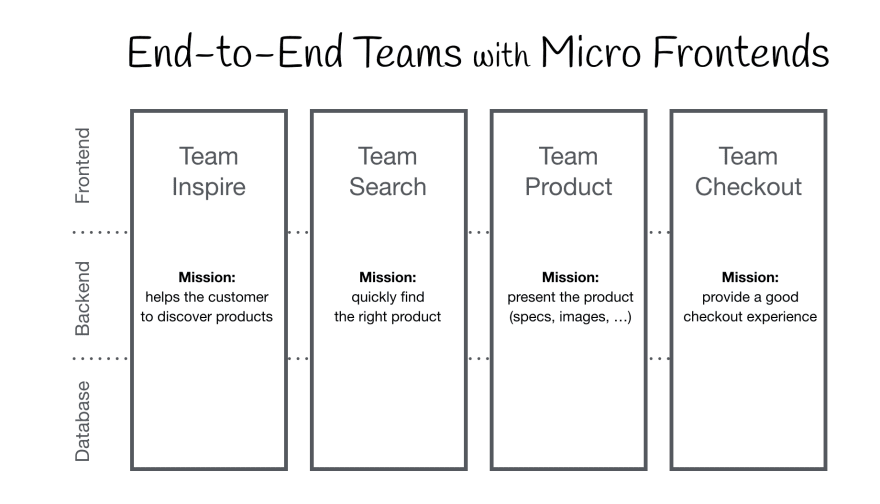
您将能够拥有完全独立的应用程序,同时又能保持统一的网站体验。这使得大型团队可以拆分成更小、更高效的团队,并能从前端到后端实现垂直扩展。
这样一来,我们就能拥有自主团队,它们无需依赖其他团队即可交付新功能。
它可以这样表示:
运行时设计系统集成
目前,在构建时实现设计系统的方法有很多种(例如 npm/yarn 包、GitHub 包、Bit.dev),但这对于某些项目来说可能存在问题。每当需要更新设计系统中的某些组件时,都必须重新构建应用程序并再次部署,才能确保生产环境中使用的是最新版本的设计系统。
借助运行时设计系统,您无需重新构建和部署整个应用程序,即可将最新版本的设计系统导入到您的应用程序中,因为您将从不同的来源并在运行时获取组件。
以上只是联邦模块的几种可能性。
完整示例的存储库
github.com/brandonvilla21/module-federation
文章来源:https://dev.to/brandonvilla21/micro-frontends-module-federation-with-webpack-5-426