Svelte 4 的新特性:性能提升和开发流程简化
6月22日,Svelte宣布了其新的重大版本发布。
即使它被描述为“主要是为了给未来的改进奠定基础”,它也带来了一些改进,包括对其一些展示网站的重新设计。
如果您更喜欢听而不是读,本次发布内容也已在Svelte Radio Live上录制。
目录
性能提升
📉 Svelte 套餐大幅降价
为了这次发布,Svelte 确实瘦了不少!
Svelte 的整体大小从 10.6 MB 减少到 2.8 MB,大小减少了近 75%。
由于 Svelte 的依赖项从 61 个减少到 16 个,运行 Svelte 所需的其他软件包也减少了,这也减少了 SvelteKit 的依赖项数量。
这种减少带来了一些不错的副作用,例如更快的 REPL 体验、更快的交互式网站体验以及更快的执行速度npm install(无论你正在使用什么包管理器)。
从本次发布起,Svelte 的确如此!
🚿 改善补水效果
除了降低软件包大小之外,Svelte 还减少了为水合而生成的代码。
例如,为SvelteKit 网站生成的代码已从 126.3 kB 减少到 110.2 kB,减少了近 13%。
提升开发者体验
🎭 过渡范围
现在过渡效果默认是本地的。
这样可以防止它们默认是全局的,从而避免与其他效果相互干扰,导致页面加载期间的过渡效果发生冲突。
🧱 Web组件创作
在 Svelte 中创建 Web 组件非常简单:
<svelte:options tag="my-component" />
然而,对于更高级的情况,例如控制是否将更新的 prop 值反映回 DOM、禁用 shadow DOM 等,它也存在局限性。
customElementSvelte 4 通过将 Web 组件的配置转移到一个专用属性中,使 Web 组件的创作体验更加流畅svelte:options。
此属性接受多个选项,可帮助您配置 Web 组件:
<svelte:options
  customElement={{
    tag: 'custom-element',
    shadow: 'none',
    props: {
      name: {
        <!-- 👇 Reflects the updated value back to the DOM -->
        reflect: true,
        <!-- 👇 Reflects the value as a number -->
        type: 'Number',
        <!-- 👇 Name of the attribute -->
        attribute: 'element-index'
      }
    }
  }}
/>

<script>
  export let elementIndex;
</script>

...
🛡️更严格的类型
现在对createEventDispatcher、Action和ActionReturn强制onMount执行更严格的类型:
createEventDispatcher现在检查所提供的参数的类型和数量是否正确,并抛出相关的错误:
import { createEventDispatcher } from 'svelte';

const dispatch = createEventDispatcher<{
  optional: number | null;
  required: string;
  noArgument: never;
}>();

// Svelte version 3:
dispatch('optional');
dispatch('required'); // Detail argument still omitted
dispatch('noArgument', 'surprise'); // Detail argument still provided

// Svelte version 4 using TypeScript strict mode:
dispatch('optional');
dispatch('required'); // Error, missing argument
dispatch('noArgument', 'surprise'); // Error, cannot pass an argument
Action现在,如果没有提供泛型类型,则ActionReturn默认参数类型为:neverAction
const untyped: Action = (node, params) => {
  // Now an error as `params` is expected not to exist
}

const typed: Action<HTMLElement, string> = (node, params) => {
  // `params` is of type string
}
onMount现在要求它返回一个同步函数,因为异步函数可能会导致错误,尤其是在预期在销毁时调用回调函数的情况下,因为这种情况仅适用于同步函数:
// ❌ `cleanup()` is not called due to the function being async
onMount(async () => {
  const bar = await foo();
  return cleanup();
});

// ✅ `cleanup()` will be called
onMount(() => {
  foo().then(bar => /* ... */ );
  return cleanup();
});
网站已更新
📝教程网站
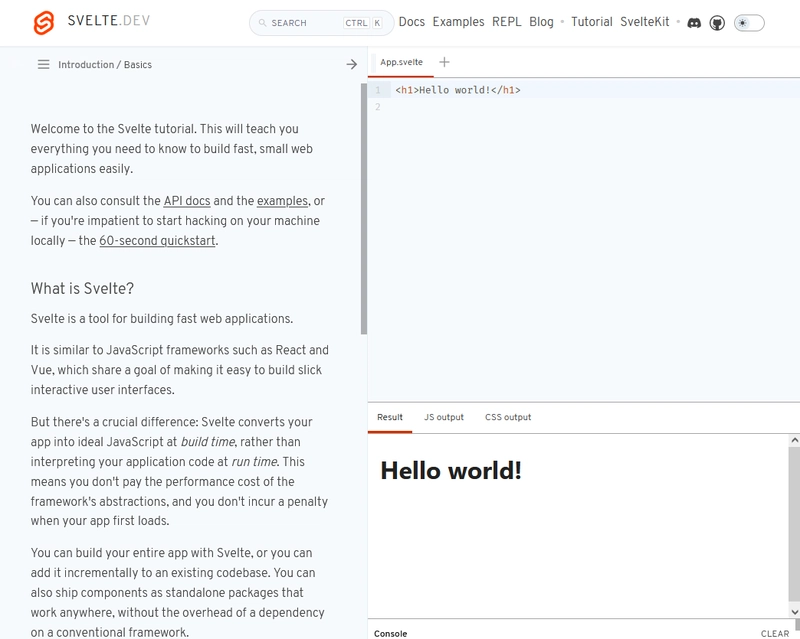
为了提供更好的用户体验,教程已重新设计:
| 以前的 | 较新的 |
|---|---|
 |
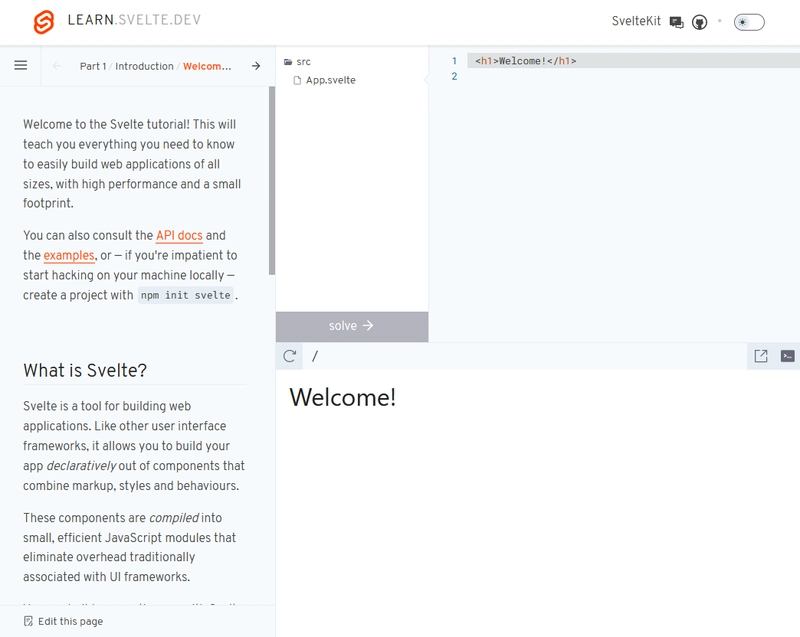 |
设计仍然相同:侧边栏包含文字和说明,右侧是代码编辑器,用于完成练习。
不过,一些很棒的改进之处也得以实现,例如在侧边栏显示文件结构、减少导航栏元素数量以及优化各部分之间的导航。它还新增了深色模式!
该教程现在位于https://learn.svelte.dev,而之前的版本可以通过https://svelte.dev/tutorial/basics访问。
📚 Svelte 网站
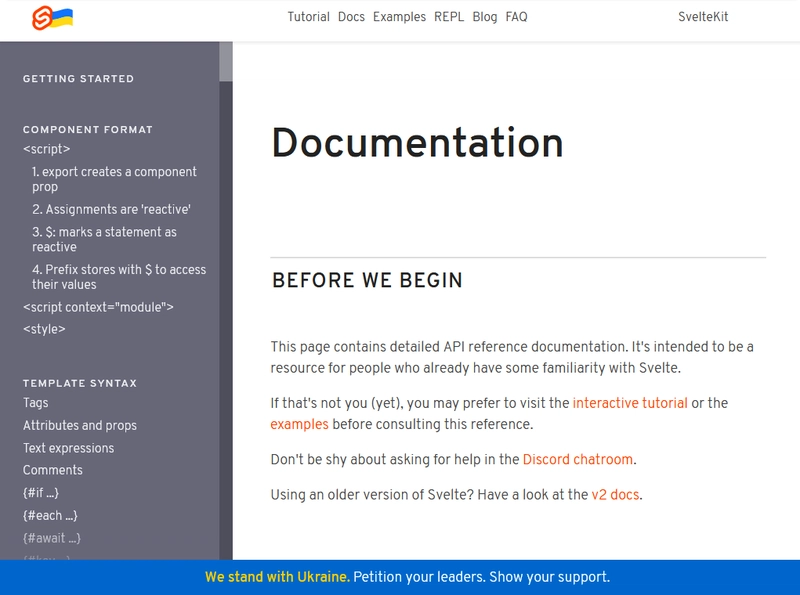
Svelte网站也进行了改版:
| 以前的 | 较新的 |
|---|---|
 |
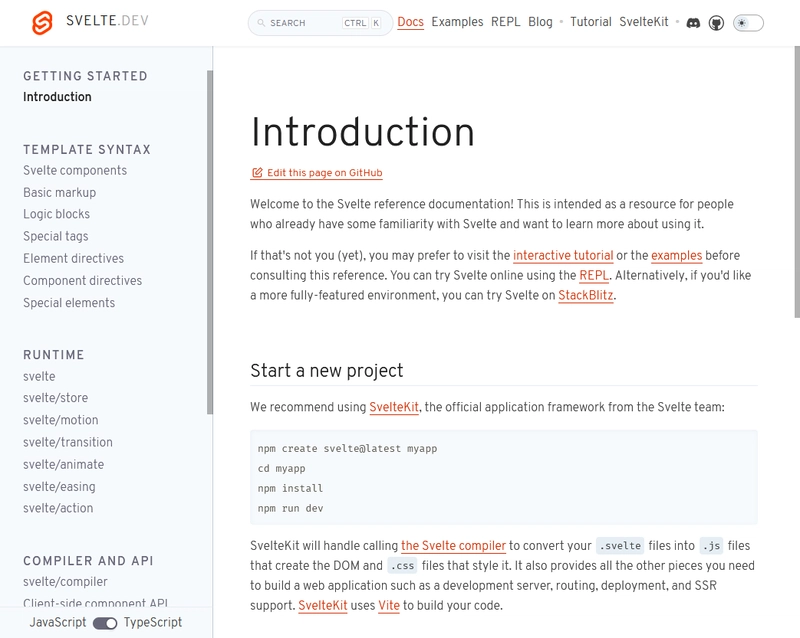 |
页面已拆分,移动导航已改进,TypeScript 文档已增强,并且还发布了深色模式。
截至目前,SvelteKit网站尚未更新,但正在进行改版以提供类似的用户体验。
迁移指南
此次发布被视为迈向 Svelte 5 的一步,但影响并不大。
为了将 Svelte 从 3 升级到 Svelte 4,团队已经更新了迁移工具,只需运行以下命令即可:
npx svelte-migrate@latest svelte-4
请注意,最低版本要求已更新,您需要:
- NodeJS 16 或更高版本
- SvelteKit 1.20.4 或更高版本
- TypeScript 5 或更高版本
迁移指南中列出了更多详细信息。
Svelte 5 有哪些值得期待的地方
目前为止,关于 Svelte 5 的未来发展方向几乎没有任何信息公布。
然而,由于 Svelte 与 ESLint 的依赖性很强,其软件包体积也相对较大。随着ESLint 的重写,到 Svelte 5 发布时,其体积可能会再减少 50% 以上。
由于 Svelte 专注于开发者体验和效率,因此我们可能会看到这些领域出现一些改进,正如他们在博客文章中所述:
Svelte 5 将为 Svelte 带来重大的新功能和性能改进。
希望你在那里学到一些有用的东西!
文章来源:https://dev.to/this-is-learning/whats-new-in-svelte-4-performance-boosts-and-streamlined-development-42dc